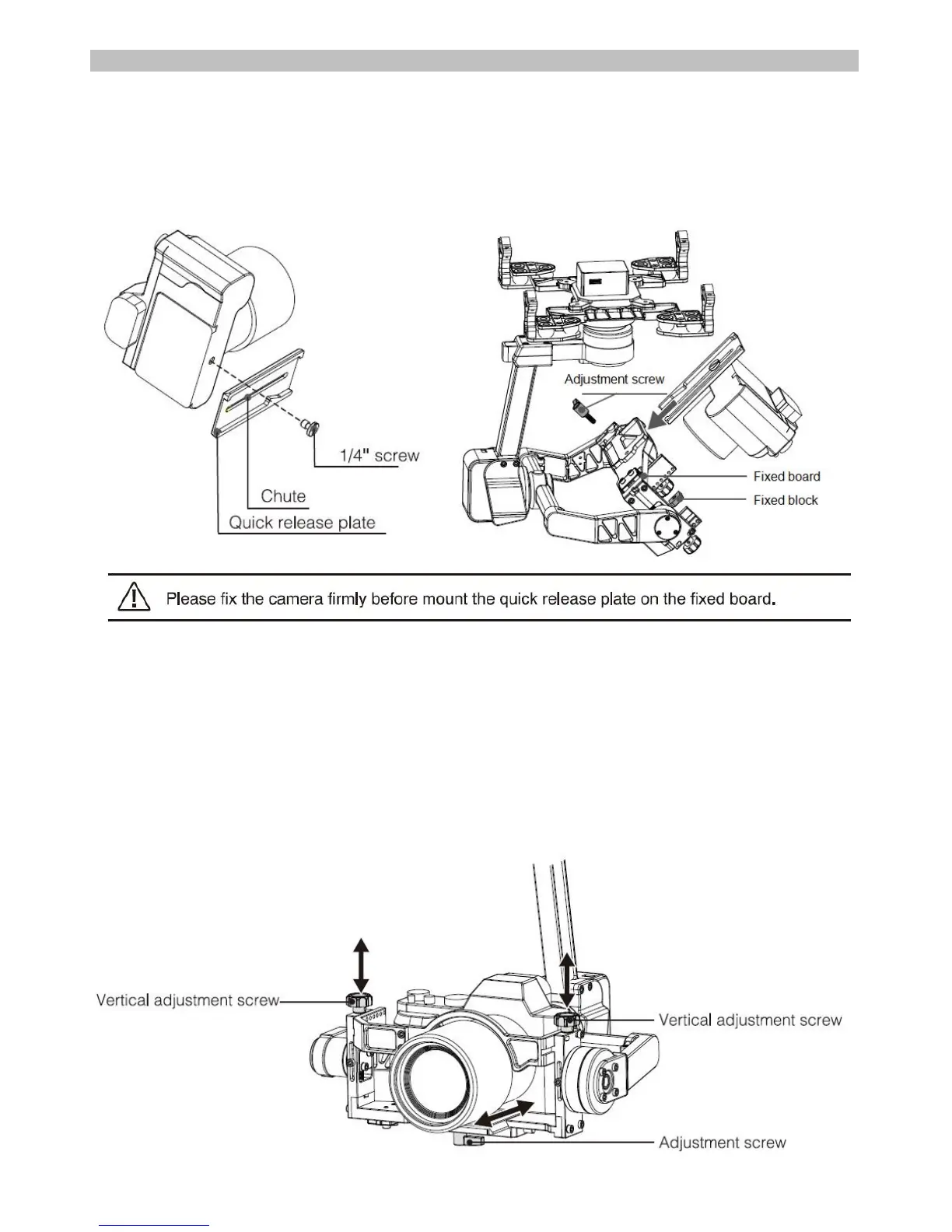
Camera installation and gimbal balance
1. Camera installation
a. Mount the camera on the quick release plate with1/4" camera screw. Adjust the camera forwards or backwards
with quick release plate as per the gravity;
b. lnsert the fixed block to fixed board and lock with adjustment screw;
c. Mount the quick release plate with camera to the chute of fixed board and balance the camera;
d. Screw up the block with adjustment screw to fix the quick release plate and camera.
2. Gimbal balance
After finished installation, if the gimbal do not balance well, please adjust the 3 axes as followings.
1) Pitch balance
Rotate the camera to one position(within the lens range), adjust the camera vertical gravity with vertical
adjustment screw: Adjust the camera gravity forwards or backwards with quick release plate by loosen the
adjustment screw. Adjust slightly to make the lens stand in the position while removed the hands. Then screw up
the vertical fixed screw.Turn over to check whether the pitch motor can work properly or not after adjustment.



 To Next Page