5:51
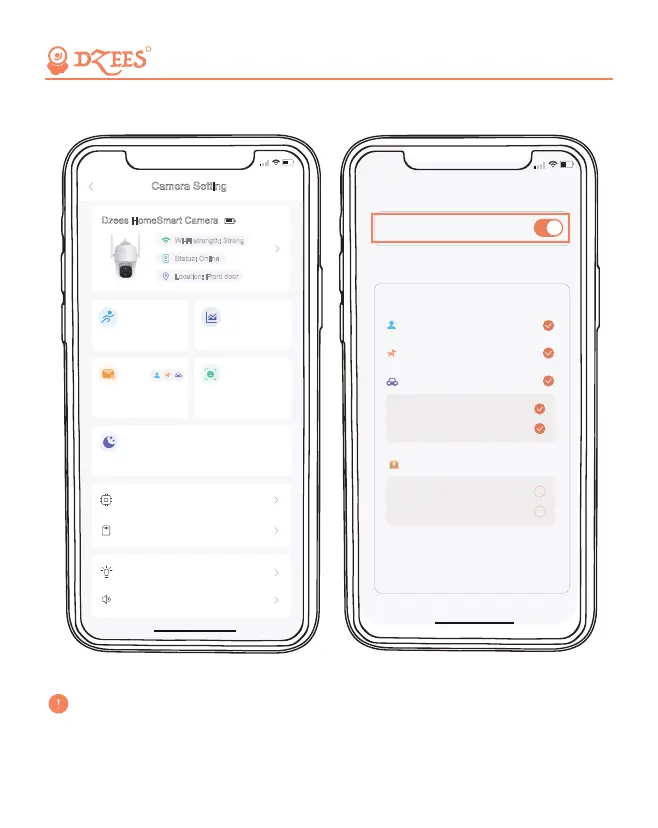
Notification
Notification Setting
<
Classification
After Classfication is turned on, the video will
analyze the content of the video. At present,
the main recognition categories include person,
pet, and package.
After Notification is turned on, the camera will
push the trigger recording of abnormal activities.
Person
Pet
Vehicle
Vehicle approaching
Vehicle leaving
Package (Beta) User guides
Package delivered
Package picked up
14
Before turn on 'Notification', please first turn on 'Motion Detection'
to receive alarm messages.
R
Camera Setting
5:50
Dzees Home Smart Camera
Wi-Fi strength: Strong
Status: Online
Location: Front door
Dzees HomeSmart Camera
High sensitivity
Motion Detection
Notification
Setting
Sleep Settings
Firmware info
SD card
management
Off
AI Analysis
Activity Zone
0 Activity Zone
Lighting Setting
Audio settings
Safe, Convenient, and Scientific


 To Next Page