Micro SD Card
19. Files Storage
1. Press buttons on both sides, and pull out the back cover.
2. Insert the Micro SD card and wait a few seconds until you hear
'SD card detected', or you can check if the Micro SD card is inserted
successfully in 'Advanced Setting' (If not, try it again after turning off
the camera).
Cloud Recording
1. Cloud Recording can be subscribed on 'Dzees Home Awareness'.
2. Subscribe different service.
No plan
Cloud
3 days 15 days 30 days 60days
Recording
Intelligent
Notification
Activity
Zone
(≤1GB)
X
X
(≤3GB) (≤5GB) (≤10GB)
Basic Plus Pro
18. Camera Reset
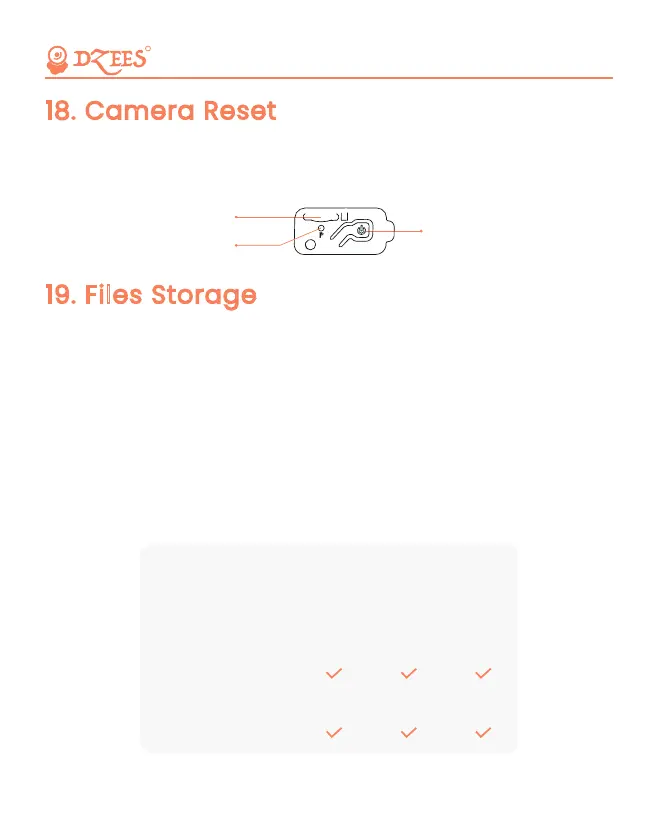
1. Press reset button with the pin.
2. Double-click the power button to enter connection mode again.
R
23
Power Button
Micro-SD Card Slot
Reset Button
Safe, Convenient, and Scientific


 To Next Page