The See3CAM_CU30 is a 3.4 Megapixel, color, UVC Compliant, USB3.0 SuperSpeed camera developed by e-con Systems, a company specializing in advanced camera solutions. It is the latest addition to the See3CAM family of USB3.0 SuperSpeed camera products.
Technical Specifications:
- Sensor: The camera features a 1/3” AR0330 CMOS image sensor from Aptina™.
- Resolution and Frame Rates (Uncompressed UYVY):
- HD (720p) at 30 frames per second (fps)
- Full HD (1080p) at 30 fps
- 3 Megapixel (2304 x 1296) at 30 fps
- 3.4 Megapixel at 25 fps
- Resolution and Frame Rates (Compressed MJPEG):
- HD (720p) at 30 fps
- Full HD (1080p) at 30 fps
- 3 Megapixel (2304 x 1296) at 30 fps
- 3.4 Megapixel at 30 fps
- USB Compatibility: USB3.0 SuperSpeed compliant and backward compatible with USB2.0 host ports.
- USB2.0 Performance: When connected to USB2.0 host ports, it supports VGA at 30 fps in UYVY format, with MJPEG resolutions and frame rates equivalent to USB 3.0.
- Lens Mount: Equipped with an S-mount (M12 board lens) lens holder, a common small form-factor lens mount for board cameras.
- Form Factor: A two-board solution with dimensions of 30mm x 30mm. One board contains the camera sensor module, and the other has the USB interface controller and the USB3.0 connector.
- Firmware: Includes all necessary firmware and is compatible with the USB Video Class (UVC) version 1.0 standard.
Function Description:
The See3CAM_CU30 is designed as a ready-to-manufacture camera board, allowing customers to integrate it into their products quickly, thereby reducing time-to-market. Its primary function is to capture high-resolution color video and stream it to a host PC via a USB 3.0 SuperSpeed interface. Being UVC-compliant, it operates without the need for special camera drivers, relying on the native UVC drivers available in Windows and Linux operating systems. This makes it compatible with any DirectShow application, such as Skype, and e-con Systems also provides a sample application to demonstrate its features.
Usage Features:
- Plug-and-Play: As a UVC-compliant camera, it offers a plug-and-play experience. No specific drivers are required for installation on Windows or Linux PCs, simplifying setup.
- Host Connectivity: The camera connects to a PC or laptop via a supplied USB3.0 A to micro-B type cable. It is designed to connect to a USB Type-A host port.
- USB3.0 Port Identification: Users can identify a USB3.0 port on their PC by the "SS" (SuperSpeed) logo.
- Connection Process:
- Insert the micro-B end of the USB3.0 cable into the USB3.0 connector (CN1) on the See3CAM_CU30 board.
- Insert the USB Type-A end of the cable into a SuperSpeed USB3.0 port on the host PC or laptop.
- Status Indicators:
- Power ON: Upon successful connection to the USB host, an LED (D1) on the board will glow red, indicating that the board is powered on.
- Streaming: When the See3CAM_CU30 device is selected in an application like e-CAMView and is actively streaming, the D1 LED will glow in both green and red colors, signifying that the camera is in streaming condition.
- Device Verification: After connecting the board to the host, users can confirm proper connection by checking "Imaging Devices" under "Device Manager" in the Control Panel. The See3CAM_CU30 should be listed there.
- Application Compatibility: The camera is compatible with standard DirectShow applications and can be used with various video conferencing or recording software.
Maintenance Features:
- Driverless Operation: The UVC compliance eliminates the need for driver updates or installations, simplifying maintenance from a software perspective.
- Robust Design: As a "Ready-to-Manufacture" board, it implies a design suitable for integration into various systems, suggesting a certain level of robustness for typical embedded applications.
- Documentation: The provided "Getting Started Manual" serves as a guide for initial setup and troubleshooting, aiding in user maintenance.
- Support: e-con Systems, as the manufacturer, is the point of contact for any technical support or inquiries, as indicated by their website and contact information.
- Revision Control: The manual itself is under revision control (Revision 1.0, February 3, 2016), indicating that documentation is maintained and updated.
- Disclaimer: The manufacturer reserves the right to edit/modify the document without prior intimation, which is a standard practice for ongoing product development and improvements.

 Need help?
 General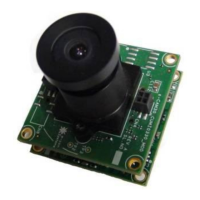

 To Next Page