Passage Mode:
22
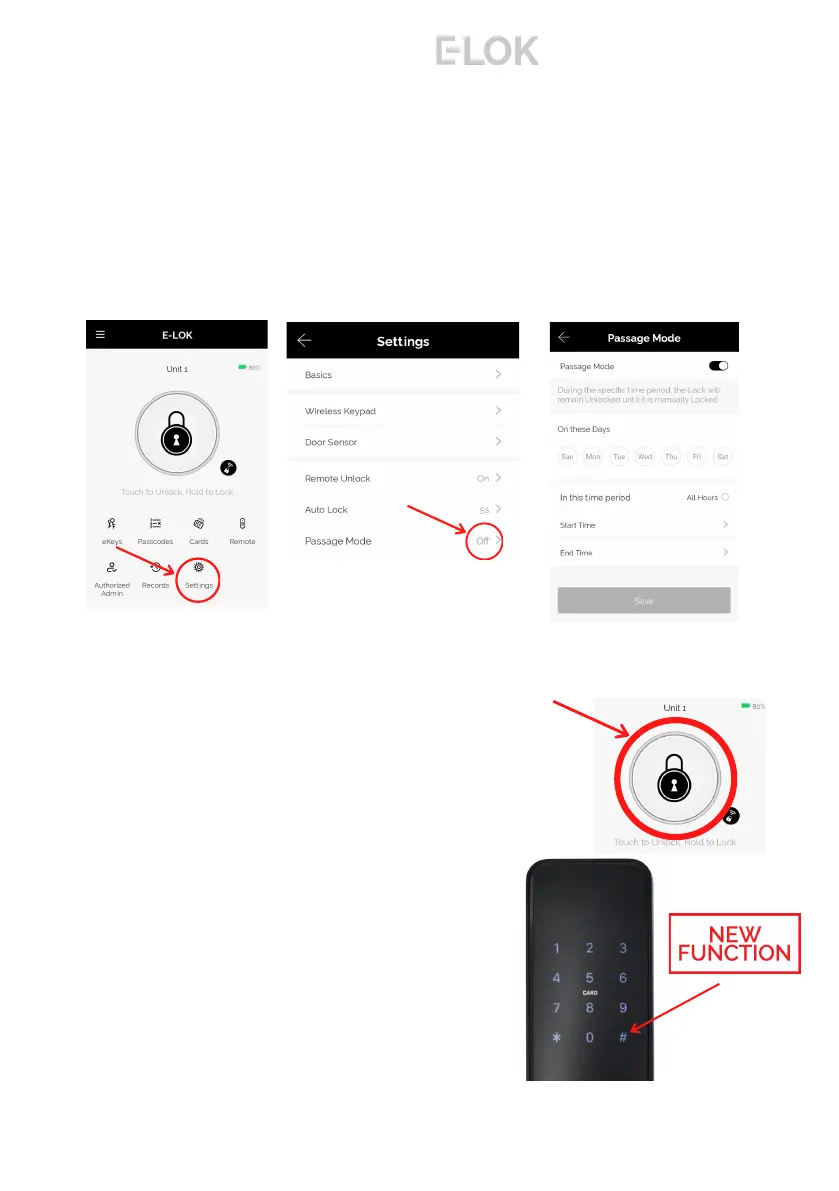
Once exited, long press "#" Key on pinpad. This will
lock the E-LOK Smart Lock until you unlock it again.
This method is perfect as it doesn't require the use
of a phone. Ensure you lift handle and engage bolt.
To unlock the E-LOK Smart Lock again, please use
preferred unlock method, eg Pinpad, RFID FOB or
App.
8 - S e r i e s
Passage Mode:
E-LOK App allows you to manage and control passage mode on your E-LOK 8-
Series Smart Lock. Tap into "Settings", "Passage Mode", then choose the days
and hours you want your E-LOK Smart Lock to be in passage mode. A common
application for this is having a Smart Lock on passage mode Mon-Fri 9am-5pm
for an office building. As a security feature, passage mode only begins after an
unlock method (pincode, RFID Card etc) has been used on the smart lock.
When you leave your house or office with passage mode set on, there are two
methods to lock your E-LOK Smart Lock correctly:
Open up the E-LOK App, long press "Lock"
button on E-LOK app. This will Lock your Smart
Lock until you unlock it with pinpad, fingerprint,
RFID Card Etc.



 To Next Page
 Loading...