E-LOK Gateway
(only if you've purchased the E-LOK Gateway Add-On)
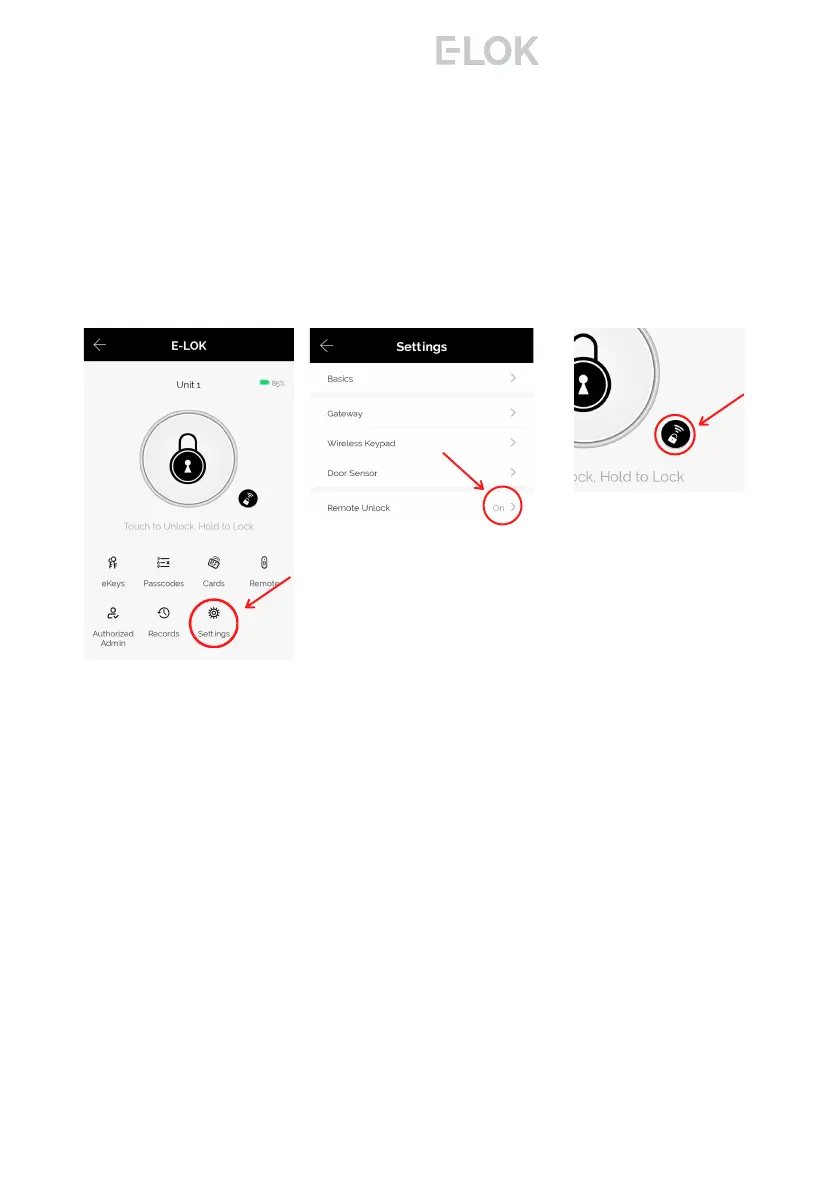
Last step is to ensure the Unlock Remotely feature is enable on your 8-
Series. Open your lock management, tap into "Settings", locate the
"Unlock Remotely" menu and ensure this is enabled.
You will now be able to control your E-LOK 8-Series from the app
remotely via Wi-Fi, whether you're at work or out-of-town. You can add,
change or delete unlock codes. The remote unlock feature will now be
available. You can also receive live notifications for when your E-LOK 8-
Series was unlocked, and which code was used to unlock it.
32
If the E-LOK Gateway refuses to connect or displays error messages;
disconnect it from the power source for at least 15 minutes. Then retry
setting it up,
8 - S e r i e s



 To Next Page