The E-MetroTel XSTIM Infinity Phones User Guide provides comprehensive instructions for using E-MetroTel Infinity IP phones with a UCX Server. This guide covers various models, including the 5004, 5006, 5008, 5010, and 5010W, ensuring that users can effectively utilize their devices for communication. The core function of these phones is to facilitate voice communication through an IP network, offering a range of features designed to enhance productivity and connectivity in a professional environment.
Function Description
The E-MetroTel Infinity IP phones are designed for robust and reliable voice communication within an IP telephony system. They integrate with the UCX Server to provide a rich set of features for making, receiving, and managing calls. The phones support both off-hook and on-hook dialing, as well as hands-free operation using a speaker or headset, offering flexibility in how users interact with their device.
Key communication functions include:
- Making Calls: Users can initiate calls by lifting the handset and dialing, or by pressing a Line key and then dialing. Hands-free calling is also supported via the Speaker or Headset button.
- Intercom (Voice Call): This feature allows direct voice communication with another extension, either by dialing a star code (*80 + EXTENSION), using a programmed VoiceCall line key, or by pressing the Feature soft key followed by feature code 66.
- Paging: Users can broadcast messages to a group of extensions by dialing a PAGE GROUP extension number, using a programmed Paging line key, or by pressing the Feature soft key followed by feature code 60 (for the Default page group) or 61x (for specific page zones 1-6).
- Call History / Call Log: The phones maintain a record of received, placed, and missed calls, accessible via the Call History button or by using the Feature soft key followed by feature code 812. This allows users to review past interactions and easily redial numbers.
- Last Number Redial: A dedicated Redial soft key allows users to quickly call the most recently dialed number.
- Hotline: This feature enables automatic dialing of a pre-configured number simply by lifting the handset or pressing the Line/Speaker/Headset key, ideal for quick access to a specific contact.
- Call Management During a Call: While on an active call, users can perform various actions such as placing a call on hold, transferring calls (attended or blind), and conferencing multiple parties.
- Incoming Call Management: The phones offer features like Directed Call Pickup (picking up a call ringing at a specific extension), Group Pickup (picking up a call within a defined group), and BLF Pickup (picking up a call alerting on a Busy Lamp Field key). Call Waiting allows users to receive additional incoming calls when multiple line keys are available.
- Call Forwarding: Several call forwarding options are available, including Unconditional (all calls), Busy (when the line is busy), and Unavailable (when a call is not answered). Calls can also be forwarded directly to voicemail.
- Do Not Disturb (DND): This feature allows users to prevent incoming calls from ringing their phone, placing the phone in a busy state. It can be activated or deactivated via a DND/MSB soft key or feature codes 85 and #85.
- Multi-Party Calls: The Call Join feature allows users to combine two separate calls into an ad-hoc conference. Additionally, the Conference (Multi-Party) feature enables users to initiate a multi-party conversation at any time without needing a separate conference bridge.
- Hotdesking: This function allows users to temporarily assign their extension to any compatible phone, providing flexibility for shared workspaces. The phone's capabilities during hotdesking are determined by the physical phone in use.
Usage Features
The E-MetroTel Infinity IP phones are designed with user-friendly interfaces, incorporating various buttons and soft keys to access features efficiently.
- Controls and Buttons: The phones feature a standard telephone keypad, LED indicators for call status, configurable Line keys with LCD labels, and context-sensitive Soft keys. Navigation is facilitated by Up/Down/Left/Right buttons and a central OK key for selection. Dedicated buttons for Message (voicemail), Headset, Mute, Speaker, Call History, Transfer, Hold, Release, and Conference are also present on various models.
- Speed Dial: Users can program Speed Dial line keys for immediate dialing of target numbers. System-wide speed dial codes are also available, accessible by dialing *0 + SPEED DIAL CODE. Users can override system speed dial locations with their own numbers.
- Busy Lamp Field (BLF): BLF keys can be configured to act as speed dials for monitored extensions, allowing users to quickly call a contact and see their status. BLF keys can also be used for Direct Call Park, allowing calls to be transferred to a specific parking lot extension and monitored.
- Star Codes: A wide array of star codes are available for activating and deactivating various features, such as System Blacklist (*30, *31, *32), Call Recording toggle (*1), Call Trace (*69), Intercom Allow (*54), Intercom Disallow (*55), Speak your Extension (*65), Speak Time (60), Stamp Log (99), and Wake Up Call (*68).
- Services Key: Pressing the central OK navigation button when the phone is idle provides access to a "Services" menu, which lists many features including Stamp log, Speed dial, Voice call (Intercom), Group pickup, Directed pickup, Call timer, Do not disturb enable/cancel, Call forward/cancel, Forward to voicemail, CID blocking/cancel, Hotdesking/cancel, Static Time/Date/cancel, Agent Login/Logout, Agent Not Ready/Ready, External/Internal autodial, Configure feature, Language settings, Time zone offset, Ring type, Contrast level, Ring volume, Page general/zone, Last number redial, Voicemail/number, Leave message, Call log, Directory services, Time announcement, Local IP address, Button inquiry, and Test sets.
- Phone Display Settings: Users can customize their phone's display through the "Phone Display Settings" menu, which includes options for LCD Font Size (Normal or Large), Backlight Time (timeout before backlight turns off), Screen Time Out (timeout before screen saver activates), Text Logo, Screensaver Type (time and logo by default), Upload Screen Photo, and Screensaver Photo deletion.
- Sleep Mode Settings: The phone's Sleep Mode is a read-only feature that cannot be disabled, designed to protect and prolong the life of the LCD screen. Users can define Office hours (default 7:00 AM to 9:00 PM), and set Office Hour Inactive Timeout (default 60 minutes) and Free Hour Inactive Timeout (default 10 minutes) for screen turn-off during and outside office hours, respectively.
Maintenance Features
While the manual primarily focuses on usage, some aspects touch upon maintenance indirectly through configuration and troubleshooting.
- Firmware and Configuration: The document emphasizes that E-MetroTel will provide support as long as the phones are on the latest firmware versions and configured according to programming instructions. This highlights the importance of keeping the device updated and correctly set up for optimal performance and support.
- Troubleshooting: The "Stamp Log" feature, accessible via the Services key or star code 9*9, allows users to create a timestamp log entry for troubleshooting purposes. This can be useful for diagnosing issues with the phone's operation.
- Button Inquiry and Test Sets: The Services menu includes "Button inquiry" to check what is programmed on a button and "Test sets" to test the functionality of a button on the phone. These features can assist in identifying and resolving issues with physical buttons.
- Administrator Configuration: Many advanced features and system-wide settings, such as Hotline numbers, Call Park timeout duration, default Call Park lot numbers, Call group and Pickup group configurations, Audible Call Waiting notification tone, and On Demand Recording, are managed by the administrator on the UCX Server. This centralized management ensures consistent operation and simplifies maintenance for a fleet of devices.
- User Speed Dial Override: Users have the flexibility to override system speed dial locations with their own numbers. If a user wishes to revert to the system speed dial number, they can simply delete their user speed dial entry, which can be seen as a form of user-level maintenance for personal settings.
In summary, the E-MetroTel Infinity IP phones are sophisticated communication tools offering a wide array of features for efficient call handling, advanced communication, and personalized settings, all designed to integrate seamlessly with the UCX Server for a comprehensive IP telephony experience.

 Need help?
 General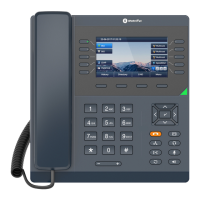

 To Next Page
