The ISBW8 is a fabric water-resistant Bluetooth speaker designed for portability and convenience.
Function Description
The ISBW8 serves as a portable Bluetooth speaker, allowing users to play audio wirelessly from compatible devices such as smartphones, tablets, and laptops. It features a speakerphone function for handling calls.
Important Technical Specifications
- Bluetooth Version: 4.2
- Battery: 3.7V/300mAh Li-ion battery
- Speaker Output: 4Ω3W
- Distortion Factor: ≤1%
- Frequency Range: 100Hz - 20KHz
- Signal-to-Noise Ratio (SNR): ≥95dB
- Operating Frequency Range: 2.40GHz - 2.48GHz
- Charging Time: 1 hour
- Playing Time: 1-2 hours
- Product Size: D85*H40mm
- Weight: 150g
- Wireless Range: 30 feet (varies depending on environment and battery level)
- Water Resistance: IPX4 (water-resistant)
Usage Features
General Features:
- Fabric Grills: Provides a pleasant tactile experience.
- IPX4 Water-Resistant: Allows for use in rainy conditions, making it suitable for outdoor use.
- Lightweight and Portable: Designed with a hook for easy carrying.
- Compatibility: Works with all Bluetooth-enabled smartphones, tablets, and laptops.
Package Contents:
- Bluetooth speaker x1
- Charging cable x1
- User manual x1
- Carabiner x1
Key and Connection (Controls):
The speaker features several controls:
- Play/Pause/Phone Button: Controls audio playback and phone calls.
- Volume-/Previous Button: Decreases volume and skips to the previous track.
- Volume+/Skip Button: Increases volume and skips to the next track.
- ON/OFF/Mode Button: Powers the device on/off and switches modes.
- Bluetooth Indicator: Shows the Bluetooth pairing status.
- Charging Indicator: Shows the charging status.
- DC IN (Charging Port): Micro USB port for charging.
Easy Pairing (First Time Pairing):
- Power On and Pair: Press and hold the Pair button for 6-9 seconds.
- Pairing Indication: A voice will announce "Bluetooth is connecting," and the indicator will flash blue rapidly. Keep the unit within 3 feet during pairing.
- Device Selection: On your Bluetooth device, select "ISBW8" from the Bluetooth Settings to pair.
- Successful Pairing: Once paired, a voice will announce "Bluetooth is connected," and the LED indicator will turn solid blue. Audio will then play from the connected device.
- Audio Control: Use either the speaker controls or the connected Bluetooth device to select and play audio, and adjust volume.
Music Control:
- Play: Press the Play/Pause button.
- Pause: Press the Play/Pause button.
- Increase Volume: Long press the Volume+ button.
- Decrease Volume: Long press the Volume- button.
- Next Song: Press the Skip button.
- Previous Song: Press the Previous button.
Using the Speakerphone:
- Accept a Call: Press the Phone button or use controls on the connected phone.
- End a Call: Press the Phone button or use controls on the connected phone.
- Redial Last Number: Press the Play button twice.
Maintenance Features
Charging the Battery:
- Use the provided Micro USB cable for charging.
- Connect one end of the cable to the speaker's USB port and the other end to a PC, wall charger, or other 5V charging device.
Battery Maintenance:
- To maintain battery power, charge and discharge the battery every 3 months, even if the device is not in use.
FCC Statement:
- The device complies with Part 15 of the FCC Rules.
- It must not cause harmful interference and must accept any interference received.
- Warning: Changes or modifications not expressly approved by the party responsible for compliance could void the user's authority to operate the equipment.
- Note: The equipment has been tested and found to comply with Class B digital device limits, providing reasonable protection against harmful interference in residential installations.
- If interference occurs, users are encouraged to try measures such as reorienting the receiving antenna, increasing separation between equipment and receiver, connecting the equipment to a different circuit, or consulting a dealer/radio/TV technician.
- RF Warning Statement: The device has been evaluated to meet general RF exposure requirements and can be used in portable exposure conditions without restriction.

 Need help?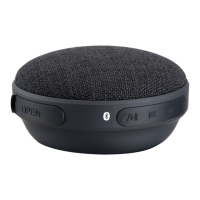

 To Next Page
 General