www.estar.eu
2
PIC 5
EN Bluetooth Sele Stick User Instruction
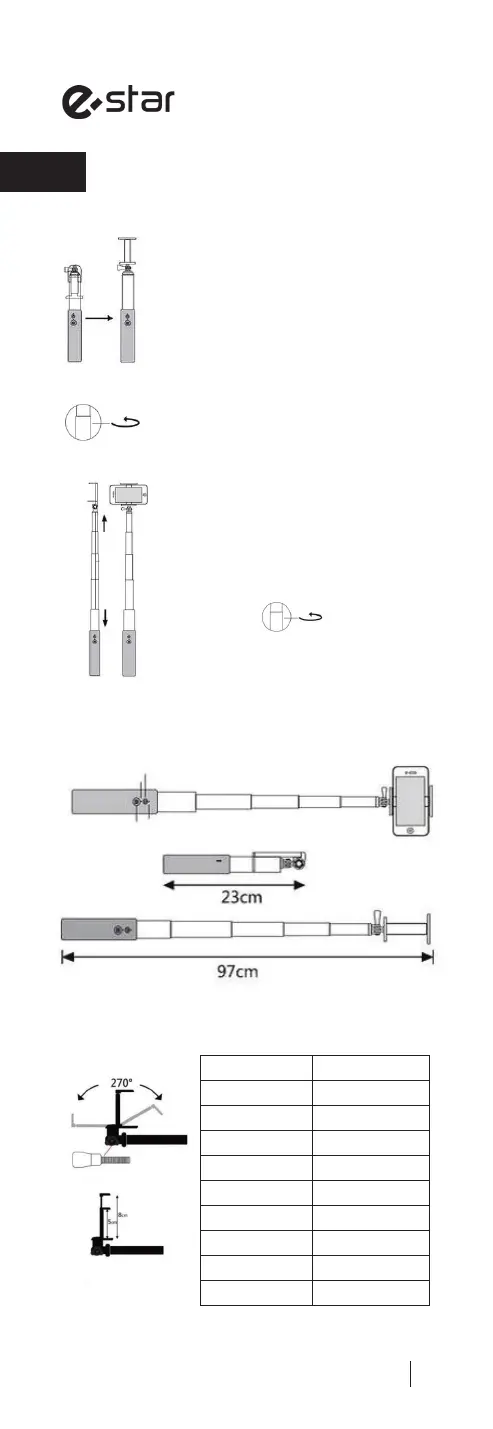
Step 1: Unfold the phone holder of sele
stick (as per PIC 1-2 )
Step 2: Rotate the sele stick counter-
clockwise to unlock (as per PIC 3 )
Step 5: Place your mobile phone into the
phone clip (as per PIC 6 )
Product Specications
Net Weight 153 g
Extended Length 97 cm
Folded Length 23 cm
Material Aluminum Alloy
Battery Capacity 180 mAh
Standby Time 100 Hours
Charging Voltage 5V / 1A
Charging Time 1 Hour
Flex Section 5 Segments
Color Options Black/Gold
Step 3: When the groove matches to be
a straight line (as per PIC 4), you may
adjust the length of the stick freely.
Step 4: Rotate the sele stick clockwise to
lock at your desired length (as per PIC 5 )
PIC 1 PIC 2
PIC 3
Stretch
Groove
Contract
PIC 6PIC 4
Recharge indicator (Red)
Shutter Button Shutter Indicator (Blue)
Power Button
Side view
Removable Thumb Screw
Foldable phone holder 270
o
rotatable


 To Next Page
 Loading...