
 Need help?
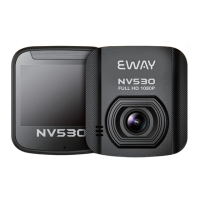
Do you have a question about the e-way NV530 and is the answer not in the manual?
Core video quality feature of the device.
Specification for the device's display.
Feature indicating energy efficiency.
Feature related to reduced interference.
Details on input/output ports and control buttons.
Explanation of indicator lights, speaker, microphone, screen, and lens.
Instructions for turning the device on and off.
Guidance on how to charge the device's battery.
Steps for inserting a MicroSD memory card.
Overview of the device's operational modes.
How to start and stop video recording.
Instructions for taking photos and configuring settings.
How to playback, delete, and protect recorded files.
Configuration of language, date, and other system options.
Details on connecting the device via USB.
Details on main chip, lens module, and screen specifications.
Specifications for resolution, file format, and recording features.
Information on memory card support and available languages.
Core video quality feature of the device.
Specification for the device's display.
Feature indicating energy efficiency.
Feature related to reduced interference.
Instructions for turning the device on and off.
Guidance on how to charge the device's battery.
Steps for inserting a MicroSD memory card.
Overview of the device's operational modes.
How to start and stop video recording.
Settings for resolution, time, loop recording, exposure, motion detection, G-sensor.
Settings for photo resolution, preview, date label, and EV.
File playback, deletion, protection, volume, and thumbnail management.
Procedure for formatting the memory card.
Options for selecting the interface language.
Setting for automatic device power shutdown.
Setting for automatic screen dimming.
Option to restore the device to factory settings.
Setting for flicker reduction based on power frequency.
Configuration for date and time format.
Setting for rotating displayed images.
Information about the current software version.
Connecting the device to a computer via USB.
Troubleshooting steps for USB device recognition.
Specifies the core processing unit of the device.
Details the camera lens specifications.
Information about the display size and type.
Supported video and photo resolutions.
Supported file types for video and photo.
Setting for adjusting image color balance.
Feature for continuous video recording.
Feature to recover files after power loss.
Functionality to detect movement.
Supported memory card type.
Supported languages for the user interface.
Information regarding the product's limited warranty.
Steps to obtain warranty service for the product.
Fields for product name, owner's name, and contact information.
Fields for recording purchase date and warranty duration.
Guidance on product warranty and repair procedures.
Key considerations regarding warranty, damage, and replacements.
Company contact details for support and inquiries.
 General
| GPS | Yes |
|---|---|
| G-sensor | Yes |
| Loop Recording | Yes |
| Parking Monitoring | Yes |
| Night Vision | Yes |
| Display Size | 3.0 inch |
| Video Resolution | 1920x1080 |
| Viewing Angle | 170 degrees |
| Memory Card Support | MicroSD |

 To Next Page