Copyright 2013 Eagle Tree Systems, LLC Page 1
Table of Contents
Introduction 1
Specifications 1
How to Get Help 1
Terms and Symbols used in the Manual 1
Main Features 2
Overview/Quick Start 2
Guardian Physical Connections/ Controls 3
The Receiver Connection Harness 4
Receiver Requirements 4
Mounting the Guardian in your Model 5
Preflight Checks 6
First Flight 6
Tuning Stabilization Gains 6
Status LED 8
Mode/Config Switch Behavior 8
The Guardian PC Software 10
Guardian Configuration Page Software
Reference 11
Troubleshooting / F.A.Q. 12
Guardian 2D/3D Stabilizer
Document Version 2.0
Assembled in Taiwan
Introduction
Thank you for your purchase! Based on Eagle Tree's proven inertial stabilization technology, the Guardian 2D/3D Stabilizer (the Guardian) stabilizes just about any type of
fixed wing model, and works with any radio. Unlike most “gyro stabilizer” products on the market, the Guardian provides true wing leveling stabilization as well as precise
fly-by-wire control. This lets you configure the Guardian to return to level flight in an emergency, by just flipping a radio switch!
This instruction manual will guide you through the installation and operation of your Guardian. The latest version of this manual is available in the Product Manuals
section of the Support tab on http://www.eagletreesystems.com. The online manual is in full color, and includes any updates that were made after this manual was
produced. Please read the entire manual carefully before proceeding. If, after you read the manual, you have further questions or problems, see the “How to Get
Help” section below.
Packing List
Your package should include the following: The Guardian, the receiver connection harness with labeled
connectors, the quick reference card, and a printed version of this manual.
Specifications (approximate)
• Input Voltage Range: 4.5v to 16v
• Current Draw: Approximately 31mA
• Dimensions: 41mm x 22mm x 11mm (1.62 inches x 0.86 inches x 0.42 inches)
• Mass: 11 grams (0.4 ounces) including harness
• Maximum Servo Current through Guardian: 5 Amps
How to Get Help
Eagle Tree is committed to providing great customer service. If you’ve read the manual and something is not clear,
just ask. We’d much prefer to take the time to answer your questions, rather than having you waste your valuable
time struggling with an issue.
To get help, visit the Eagle Tree Guardian support thread at
http://www.rcgroups.com/forums/showthread.php?t=1596644. Chances are someone has posted a solution to your
problem already. If not, posting your problem there will get a very quick response from the Eagle Tree community.
If you prefer to not post on the forum, or you feel there is a problem with your Eagle Tree hardware, please open a
support ticket with us at http://ticket.eagletreesystems.com and we will respond to your support ticket as soon as we
can. Note that when you create a support ticket, you will be emailed a link that will let you check the status of the
ticket. If you do not receive the email, this most likely means that a spam filter is intercepting emails from Eagle
Tree.
Also Eagle Tree greatly values your feedback on how we can improve our products. To leave us feedback for a
new feature request or improvement, either post the feedback on our support thread above, create a support ticket
with your feedback, or send feedback at http://www.eagletreesystems.com/Feature/feature.html
Terms and Symbols used in the Manual
Warning or Caution
Helpful Note
Pitch – Lift or descent of the nose and tail of the model. Normally controlled by the elevator, or
movement of elevons in same direction.
Roll – Rocking movement of the wings, side to side. Normally controlled by ailerons, or
movement of elevons in opposite directions.
Yaw – Turning of the airplane without banking. Normally controlled by the rudder.
Axis – an imaginary line drawn horizontally through your model’s wing (for Pitch), horizontally
through your fuselage (for roll), or vertically through the center of your fuselage (for yaw).
Control Stick – The stick on your radio that controls elevator and aileron functions (pitch and roll).
Attitude – The orientation of the model with respect to the horizon.
2D Mode – A mode where the model is brought to a level attitude (level flight and level wings) by
the Guardian when the control stick is centered.
3D Mode – A mode where the Guardian attempts to hold the model’s present attitude when the
Control Stick is centered, by moving the model’s control surfaces automatically.
Heading – The present direction of travel of the model with respect to North.

 Need help?
 General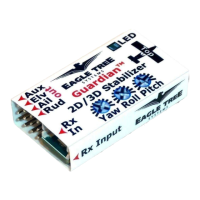

 To Next Page