1. Remove the insulating film on the earbuds
before using this device.
2. Fully dry off the earbuds and the USB port before charging.
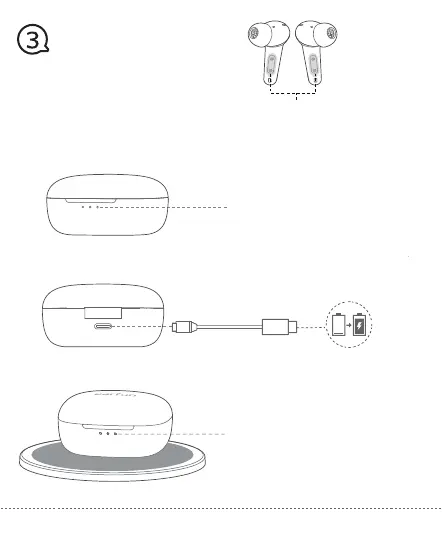
3. Open or close the charging case to activate the case battery level LED indicator.
4. Place earbuds back into the charging case and the earbuds will start charging.
5. Fully charge both the earbuds and the charging case before the first-time usage.
Connect USB-C cable for charging
Wireless charging(not included)
One of White LED Flash – Charging
3 x White LED Light ON – Charging complete
Battery level:
3 x White LED >60%
2 x White LED >20%
1 x White LED <20%
1 x White LED Flash <5% Please charge
02
Insulating film
Charging


 To Next Page