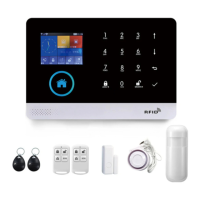
This document describes a Cellular Home Security System, which is a comprehensive alarm system designed to protect your home. The system consists of a Smart Hub (the main control panel), various sensors, and remote control devices, all connected wirelessly. It offers multiple security modes and can be controlled both on-site and remotely via a dedicated mobile application.
Smart Hub (Panel)
The Smart Hub serves as the central brain of the security system, integrating the alarm, display, and keypad functionalities. It's designed to be placed in a convenient location, such as near an entry/exit point, for easy access. The hub requires an unused indoor power outlet and a micro SIM card (supporting 2G/GSM for 2G version or 4G network for 4G version) to utilize cellular services for communication.
Key Features:
- Alarm, Display, and Keypad: The hub features a keypad for entering passcodes and settings, along with indicators to show the system's status.
- Cellular Network Indicator: A blue indicator light shows the cellular network status. Dark means no SIM card or a faulty one; blinking indicates searching for a network; solid means registered on the network; and blinking very fast indicates calling/recording.
- RFID Tag Reader: Located on the hub, this allows users to quickly arm or disarm the system by tapping an RFID tag, eliminating the need to enter a passcode.
- Status Indicator: This light indicates the current ARM, DISARM, ARM STAY, or ALARM status. Solid red means armed; solid yellow means armed stay; solid green means disarmed; blinking red means alarm; blinking yellow means entry delay; blinking green means low battery; and alternating green and red means setting/dialing.
- Tamper Switch: A lever underneath the bracket triggers an alarm notification if the hub is tampered with or removed from its installed location.
- Microphone and Speaker: These enable two-way talking and provide voice prompts and alarm sounds. The internal siren sounds at 85dB on-site.
- Backup Battery: The hub includes a built-in backup battery that provides power for over 6 hours in case of electrical power loss. The status indicator flashes green when the battery is low, and low battery notifications are sent to registered phone numbers. The battery takes 8-12 hours to fully charge.
- SIM Card Slot: A regular SIM card slot is provided for cellular connectivity.
- Power Port (Micro USB): For connecting the power cable.
Usage Features:
- Arming/Disarming: The system can be armed or disarmed using a remote tag, RFID tag, the ARM button on the hub's touchscreen, or the mobile app.
- Voice Prompts: The system provides voice prompts for various operations, guiding users through settings and actions.
- Phone Number Settings: Up to 5 phone numbers can be stored to receive SMS text messages and phone calls in case of triggered alarms. Each number can be set for SMS notification only, call only, or both. The hub calls stored numbers successively (up to 2 rounds) until answered or a keypad command is operated.
- Exit/Entry Delay: These countdowns allow users to enter and leave the home without triggering an immediate alarm. The exit delay (default 40 seconds) provides time to leave after arming, while the entry delay (default 30 seconds) allows time to disarm upon entry. Both can be adjusted from 0 to 255 seconds.
- Voice Message Recording: Users can record a brief voice message (up to 20 seconds) that will be played to the remote when an alarm call is connected.
- Instruction Mode: Allows setting various parameters using instruction codes, such as changing user/system passcodes, alarm sounding duration, and enabling/disabling text notifications.
- Loss/Restoration of AC Power: The hub sends alert notifications for power loss or restoration.
- Tamper Detection: Alerts users if the Smart Hub is tampered with or removed from its back plate.
- Factory Reset: Pressing the tamper switch 5 times resets the hub to factory settings, deleting all paired accessories.
Remote Tag (Wireless Key)
The Remote Tag is a wireless key fob designed for quick control of the security system.
Key Features:
- LED Indicator: Provides visual feedback.
- Arm Button: Used to away-arm the system when no one is home. The alarm sounds if a door/window is opened or motion is detected.
- Disarm Button: Disarms the system, preventing the alarm from sounding.
- Stay Arm Button: Used to home-arm the system when you are at home and want security. The alarm sounds if a door/window is opened.
- SOS Button: Triggers an emergency alarm and sends an alert notification to registered users.
RFID Tag
RFID tags offer a convenient way to arm or disarm the system without needing to enter a passcode.
Key Features:
- Key Fob Design: Attaches to a key ring for easy carrying.
- Tap to Arm/Disarm: Simply tap and hold the RFID tag on the hub's RFID area to arm or disarm the system.
Door/Window Sensor
These sensors are designed to protect entry/exit locations like doors and windows. They are set to Stay Arm Active mode by default.
Key Features:
- LED Indicator: Lights up when a door/window is opened and blinks when the battery is low.
- Setting/Panic Button: Used to send a transmission signal for pairing with the hub or to trigger an alarm.
- Open-Close Magnet: Works in conjunction with the sensor to detect when a door or window opens or closes. The magnet should be aligned with the middle of the sensor and placed within 0.6 inches (1.5cm) when the door or window is closed.
- Tamper Switch: Triggers an alarm notification if the sensor is tampered with or removed from its installed location.
- Battery Receptacle: Contains one CR2032 3V lithium battery.
- Power On/Off Switch: A slide switch to power the sensor on or off.
- Mounting Strips: For attaching the sensor and magnet to a flat surface.
Usage Features:
- Stay Arm Active Mode: When the system is armed or home armed, if a sensor is triggered (magnet separated), a push notification with the sensor name is sent, and the alarm sounds.
- Placement: The magnet should be aligned with the middle of the sensor and placed within 0.6 inches (1.5cm) of the sensor when the door or window is closed.
PIR Motion Detector
The motion detector is designed for interior walls and is set to Out Arm Active Mode by default.
Key Features:
- LED Indicator: Blinks for 30 seconds after power-on, lights up when motion is detected, and blinks for low battery.
- Detection Window: The area where motion is sensed.
- Pairing Button: Sends a transmission signal for pairing with the hub.
- Bracket: For mounting the detector to a wall.
- Battery Receptacle: Contains three AA 1.5V batteries.
- Power On/Off Switch: A slide switch to power the detector on or off.
- Setting Jumpers (Pulse Counter): Allows setting the pulse counter to 1, 3, or 5 pulses for detection.
- 1 Pulse: For fast catch performance.
- 3 Pulses: For excellent false alarm protection.
- 5 Pulses: For maximum false alarm protection in hostile environments.
- Setting Jumpers (Working Mode - TEST & NORMAL):
- TEST Mode: For effective walk testing.
- NORMAL Mode: Saves battery power. In normal use, if triggered twice within 3 minutes, it enters a sleeping state for 3 minutes, during which it won't generate an alarm.
- LED Jumper: Enables or disables the LED indicator.
Usage Features:
- Out Arm Active Mode: Detects movement only when the alarm is armed. A push notification with the sensor name is sent, and the alarm sounds.
- Mounting Height: Must be mounted 79 to 87 inches (2 to 2.2m) above the floor.
- Installation: Mount the bracket with screws, then place the detector in the bracket, ensuring the correct detection range direction. Test the operation in testing mode.
- Special Considerations:
- Do not install outdoors, in a garage, or on glass.
- Cannot detect motion through glass.
- Avoid places where it could get wet (e.g., swing-out windows).
- Do not install within 3 feet (1 meter) of heat sources (electric heaters, heat vents, fireplaces) or sources of turbulent air.
- Do not install behind large appliances or furniture that may obstruct its motion sensors.
Wireless Siren (Optional)
The wireless siren sounds when the alarm goes off.
Usage Features:
- Pairing: Press and hold the SET button until two beeps are heard and the light ring blinks quickly. Then, trigger an alarm on the hub (e.g., by pressing the tamper switch) to send a transmission signal. A long beep indicates successful pairing.
- Unbinding: Press and hold the SET button until three beeps are heard to unbind the siren from the hub.
Security Modes
The system offers three security modes:
- Away Mode: All sensors are monitored. Useful when leaving home, providing notifications for any triggered events.
- Home/Stay Mode: All NORMAL and DELAY (exterior and perimeter) sensors are monitored, but interior sensors are not. Useful when at home but wanting to be alerted if someone tries to break in through a door or window.
- Disarmed Mode: No sensors are monitored except 24 HOUR sensors. Useful for freedom to move in and out easily.
APP
A dedicated mobile application allows remote control and monitoring of the system.
Usage Features:
- Download: Scan QR codes to download and install the app.
- Remote Control: Arm, stay arm, or disarm the system by sending text messages via the app.
- Customization: Name accessories, set phone numbers, change exit/entry delay, and enable/disable features through the app.
Pairing and Deleting Devices
Pairing:
- Wireless Sensor: Enter system password, choose "Pairing," then "Wireless Sensor." Press the sensor's setting button within 20 seconds, input a number (0-99), and choose a defense mode (Normal, Home, 24 Hour, Delay, Doorbell).
- Remote Tag/RFID Tag: Enter system password, choose "Pairing," then "Remote Tag" or "RFID Tag." Press any button on the remote tag or tap the RFID tag on the panel within 20 seconds, then input a number (0-9).
Deleting:
- All Devices: Enter system password, choose "Deleting Device," then "Wireless Sensor," "Remote Tag," or "RFID Tag," and finally "Delete All."
- One Device: Enter system password, choose "Deleting Device," then "Wireless Sensor," "Remote Tag," or "RFID Tag," and finally "Delete." Input the number of the device to delete.
This comprehensive system provides robust security features, flexible control options, and remote monitoring capabilities to keep your home safe.

 Need help?
 Power Supply
 Battery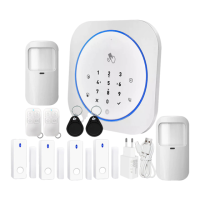

 To Next Page