55
V. 2
The pump should be inspected if the machine does not empty and/or spin;
the machine makes an unusual noise during draining due to objects such as
safety pins, coins etc. blocking the pump.
Proceed as follows:
1. Disconnect the appliance;
2. If necessary, wait until the water has cooled down
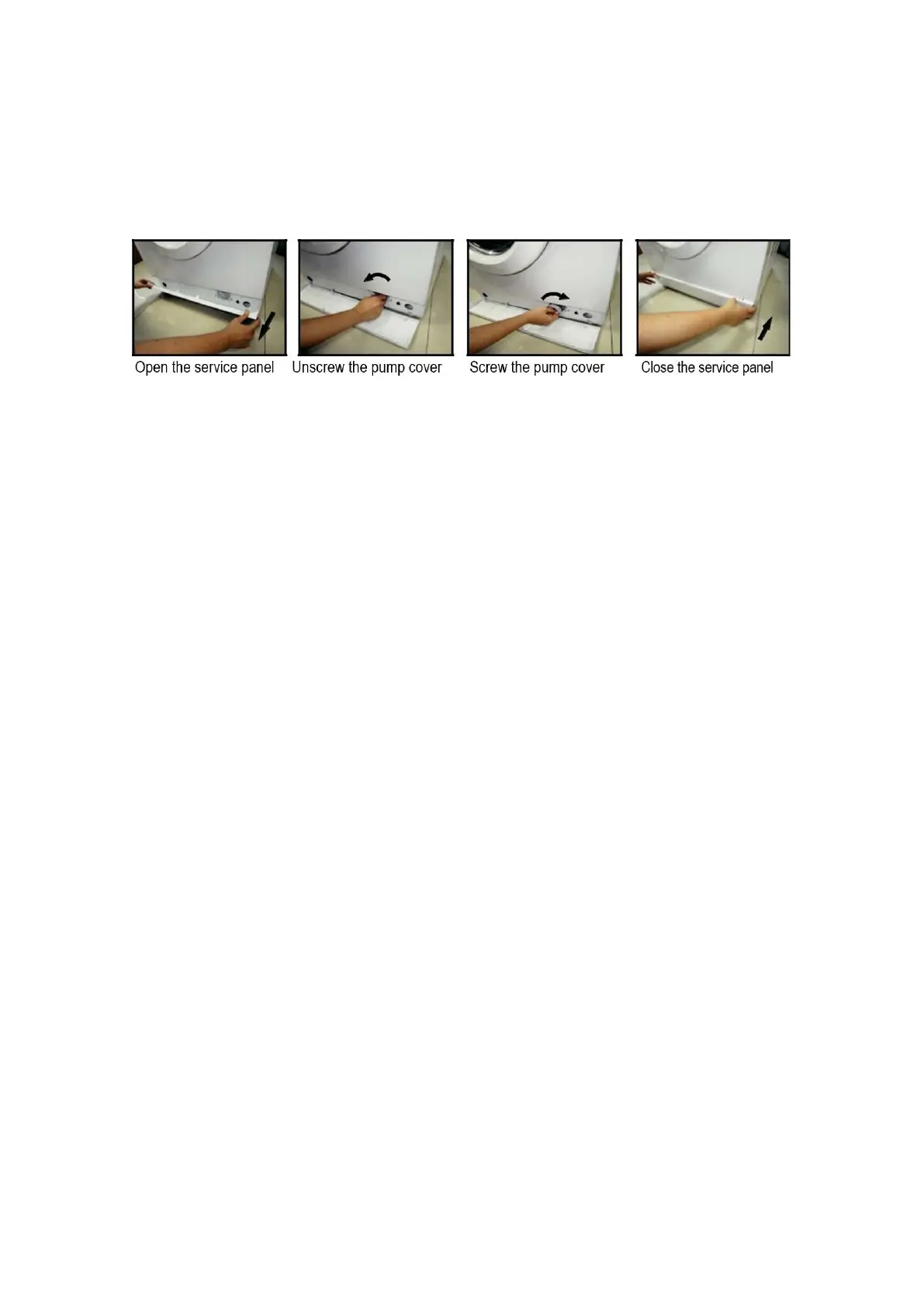
3. Open the service panel. Place a container close to collect any spillage.
4. When no more water comes out, unscrew the pump cover and remove it.
Always keep a rag nearby to dry up spillage of water when removing the
cover.
5. Remove any objects from the pump impeller by rotating it.
6. Screw the pump cover fully in.
7. Close the service panel.
Warning!
When the appliance is in use and depending on the programme selected there
can be hot water in the pump. Never remove the pump cover during a wash cycle,
always wait until the appliance has finished the cycle, and is empty. When
replacing the cover, ensure it is securely retightend to stop leaks and young
children being able to remove it.



 To Next Page