Need help?
Do you have a question about the Eastern Times Technology D-09 and is the answer not in the manual?
Locate mouse/receiver, plug receiver into USB, insert battery, and confirm LED flash.
Adjust DPI settings (800-2400) via button press, with LED feedback for each level.
Switch between 125Hz/250Hz polling rates using button combination and observe LED flashes.
Mouse enters power saving mode after 8 minutes idle or when PC is off/receiver removed.
Control LED backlighting via bottom button; mouse enters sleep mode after 8 minutes inactivity.
Two side buttons are customizable via software for over 20 functions.
Small design for USB port plug-and-stay; portable design allows storage on mouse bottom.
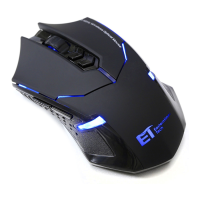
This document describes the D-09 2.4G Wireless Optical Mouse, manufactured by Eastern Times Technology Co.,ltd.
The D-09 is a 2.4G wireless optical mouse designed for general computer use, with features optimized for professional gaming. It offers a wireless connection with an operating range of up to 10 meters. The mouse utilizes USB high-speed transmission technology, achieving a polling rate of 250Hz per second, which is twice as fast as a normal RF mouse, ensuring responsive performance. It includes a Nano receiver for plug-and-play functionality.
Installation:
CPI Adjustable Function: The mouse offers five adjustable CPI levels: 800, 1200, 1600, 2000, and 2400, with 1200 CPI as the factory default. To adjust the CPI, press the switch button located on the top of the mouse. The LED indicator will flash a specific number of times to indicate the current CPI setting:
Polling Rate Adjustable Function: The mouse supports two adjustable polling rates: 125Hz and 250Hz, with 250Hz as the default. To switch between these rates, press and hold both the right mouse button and the scroll wheel button simultaneously.
Customized Function for the Fourth and Fifth Buttons: The mouse features two side buttons, which by default function as "move back" and "move forward." Users can customize these functions using software, which offers over 20 different options. This software can be downloaded from the manufacturer's website (contact your local distributor for details).
Nano Receiver: The Nano receiver is designed to be very small, allowing it to remain plugged into a PC or notebook USB port without interference. For portability, the Nano receiver can be stored in a dedicated slot on the bottom of the mouse.
Reconnection: Both the mouse and Nano receiver have a built-in code, allowing one mouse to be paired with one receiver, or multiple mice with one receiver. Reconnection may be necessary under conditions of high temperature, strong magnetic fields, or strong vibration.
Saving Power Mode and Power Switch Off:
LED Backlighting Power Off Button and Sleep Mode Function: A dedicated power off button for the LED backlighting is located on the bottom of the mouse. Additionally, the mouse will enter sleep mode if it remains out of work for 8 minutes, further conserving power.
FCC Statement: This device complies with Part 15 of the FCC Rules. Operation is subject to two conditions: (1) this device may not cause harmful interference, and (2) this device must accept any interference received, including interference that may cause undesired operation. Users are advised that changes or modifications not expressly approved by the party responsible for compliance could void the user's authority to operate the equipment. The equipment has been tested and found to comply with Class B digital device limits, providing reasonable protection against harmful interference in a residential installation. If the equipment causes harmful interference to radio or television reception, users are encouraged to try to correct the interference by:
 General
| Brand | Eastern Times Technology |
|---|---|
| Model | D-09 |
| Category | Mouse |
| Language | English |

 To Next Page