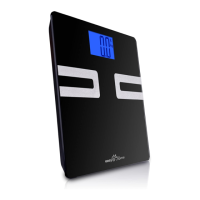
Need help?
Do you have a question about the Easy@Home CF351BT and is the answer not in the manual?
Crucial safety advice for users, including contraindications, environmental hazards, and proper handling.
Instructions for preparing the scale before use, primarily focusing on battery installation.
Provides instructions for downloading and installing the 'easyhomescale' application on your smartphone or tablet.
Guidance on launching the app, pairing it with the scale via Bluetooth, and entering pairing codes.
Instructions for stepping on the scale barefoot for accurate body fat measurements and understanding display codes.
Solutions for common issues like recalibration needs and 'EEEE' display indicating overload.
Explanation of error codes like 'Err2' for body fat measurement and 'LO' for low power.
 General
| Bluetooth Connectivity | Yes |
|---|---|
| Body Fat Percentage Measurement | Yes |
| Water Percentage Measurement | Yes |
| Muscle Mass Measurement | Yes |
| Bone Mass Measurement | Yes |
| Auto Calibration | Yes |
| Auto Power Off | Yes |
| Type | Digital Body Fat Scale |
| Weight Capacity | 400 lbs (180 kg) |
| Maximum weight capacity | 400 lbs (180 kg) |
| Measurement Units | lb, kg, st |
| Measurements | Weight, Body Fat, Water, Muscle Mass, Bone Mass |
| Dimensions | 11.8 x 11.8 x 1 inches |
| Accuracy | 0.2 lb (0.1 kg) |
| Platform Size | 11.8 x 11.8 inches |
| Display | LCD |
| Power Source | 4 x AAA batteries |


 To Next Page