TROUBLE SHOOTING
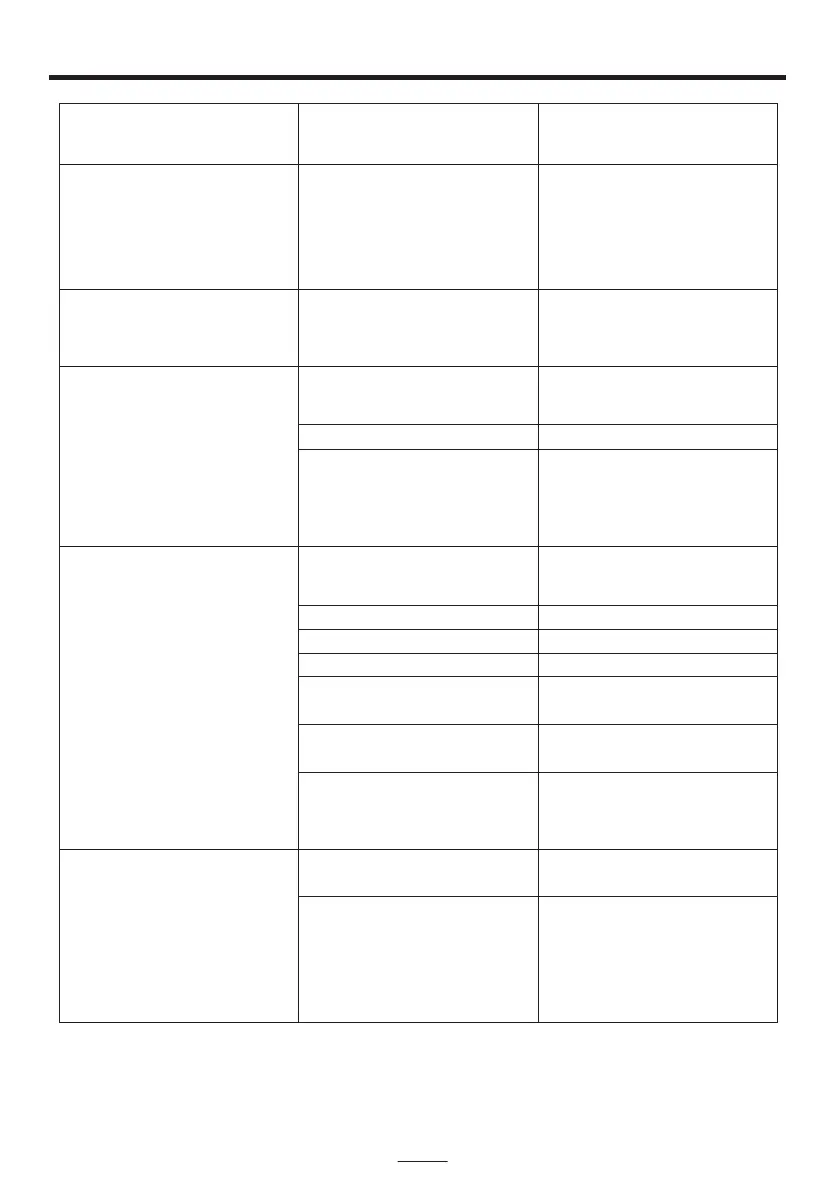
No power when POWER
is on.
AC adaptor is not plugged
into a wall outlet or the
connector is not plugged
into the power supply jack
on the back of the unit.
Plug the AC adaptor into a
wall outlet and plug the
connector into the supply
jack on the unit.
The AC outlet may not have
power.
Check the outlet with a
working lamp or other
electrical appliance.
TV system is set to
minimum.
TV system is powered Off.
RCA cords are not
connected securely.
Turn up the volume on
the TV system.
Power the TV system on.
Ensure white and red RCA
cords are securely inserted
into into the karaoke system
and the TV system.
CD Player does not work
normally.
Disc is inserted upside
down.
Disc is dirty.
Disc is scratched.
Disc is warped.
A non standard disc is
inserted.
Moisture has formed
inside the CD deck.
Karaoke system needs to
be reset.
Insert the disc correctly.
Wipe clean with a soft cloth.
Use a new disc.
Use a new disc.
Only use discs bearing
correct identification logo.
Wait about 20 - 30 mins to
let it dry out.
Disconnect the machine
from the power source for
30 seconds then reconnect.
No sound - If audio is going
through TV or VCR.
Source Selection on TV or
VCR is not correct.
RCA cords are not
connected securely.
Follow directions “Making
the connections”.
Ensure white and red RCA
cords are securely inserted
into both the karaoke
system and the home
stereo system.
PROBLEM POSSIBLE CAUSE SOLUTION
EN - 14
No power when plugged in.
No sound from TV.


 To Next Page