MAKING THE CONNECTIONS
AUDIO CONNECTION
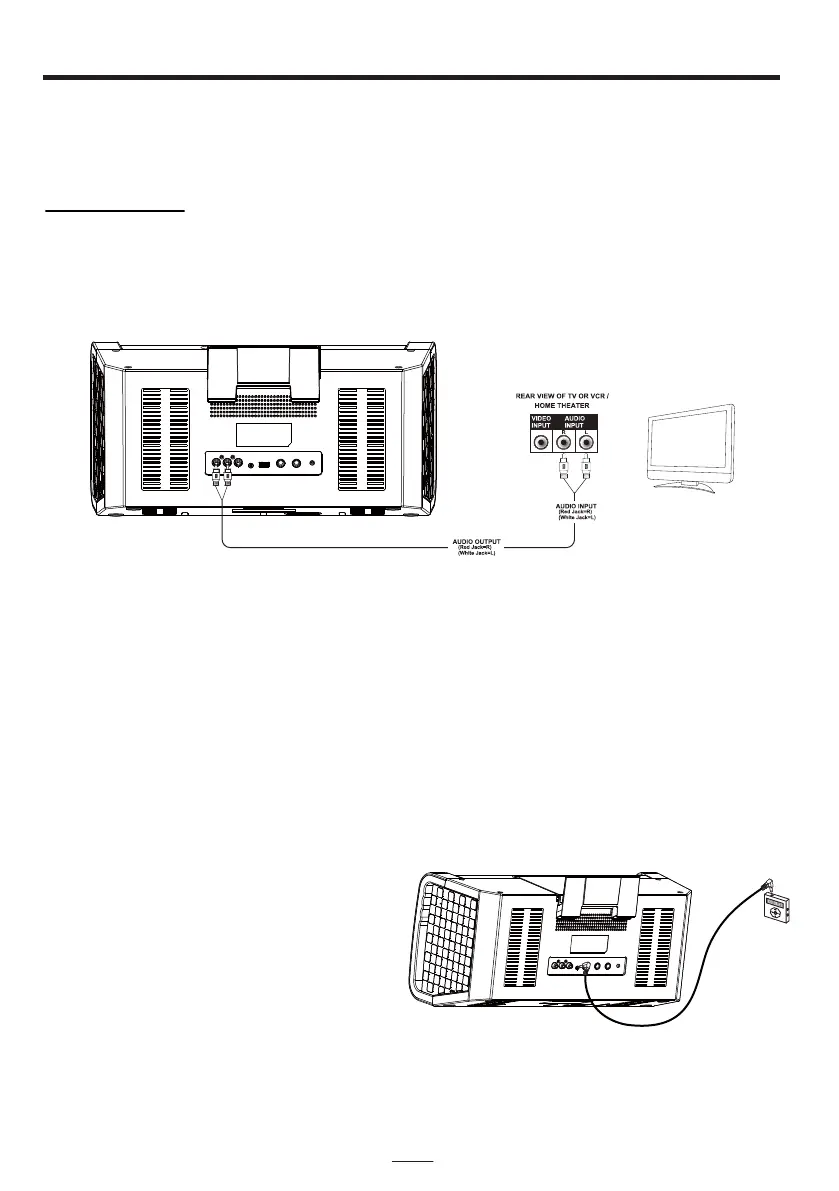
Please follow the steps below to connect audio signal from the unit to your TV, VCR/Home
Theater or home audio system.
RCA connection
1. Locate the multi-colored RCA cables (White and Red)
2. Connect audio cables to the Audio Out of the back of your Karaoke Machine.
3. Connect the other end of the audio cables to the Audio/Auxiliary input on your TV or
VCR/Home Theater or home audio system.
EN - 6
SETTING UP LINE IN CONNECTION
The Line-in mode allows you to connect external music player or external sound source to
your Karaoke Machine speakers
1. Plug a 3.5mm audio cable (not included) into your external music player and connect the
other end (3.5mm jack) into the LINE IN jack on the front of your Karaoke Machine.
2. Make sure your external music is turned on.
3. Start music playback on your external music player.
4. Adjust MASTER VOLUME to control the sound level of music playback from the speakers
on the Karaoke machine.
NOTE:
If the unit is in CDG / USB / Bluetooth
mode, when you connect an external
audio device to the LINE IN jack by an
LINE-IN cable, this unit will automatically
be switched to LINE IN mode. If you
remove the LINE-IN cable from the LINE
IN jack, the unit will resume to the previous
mode.


 To Next Page