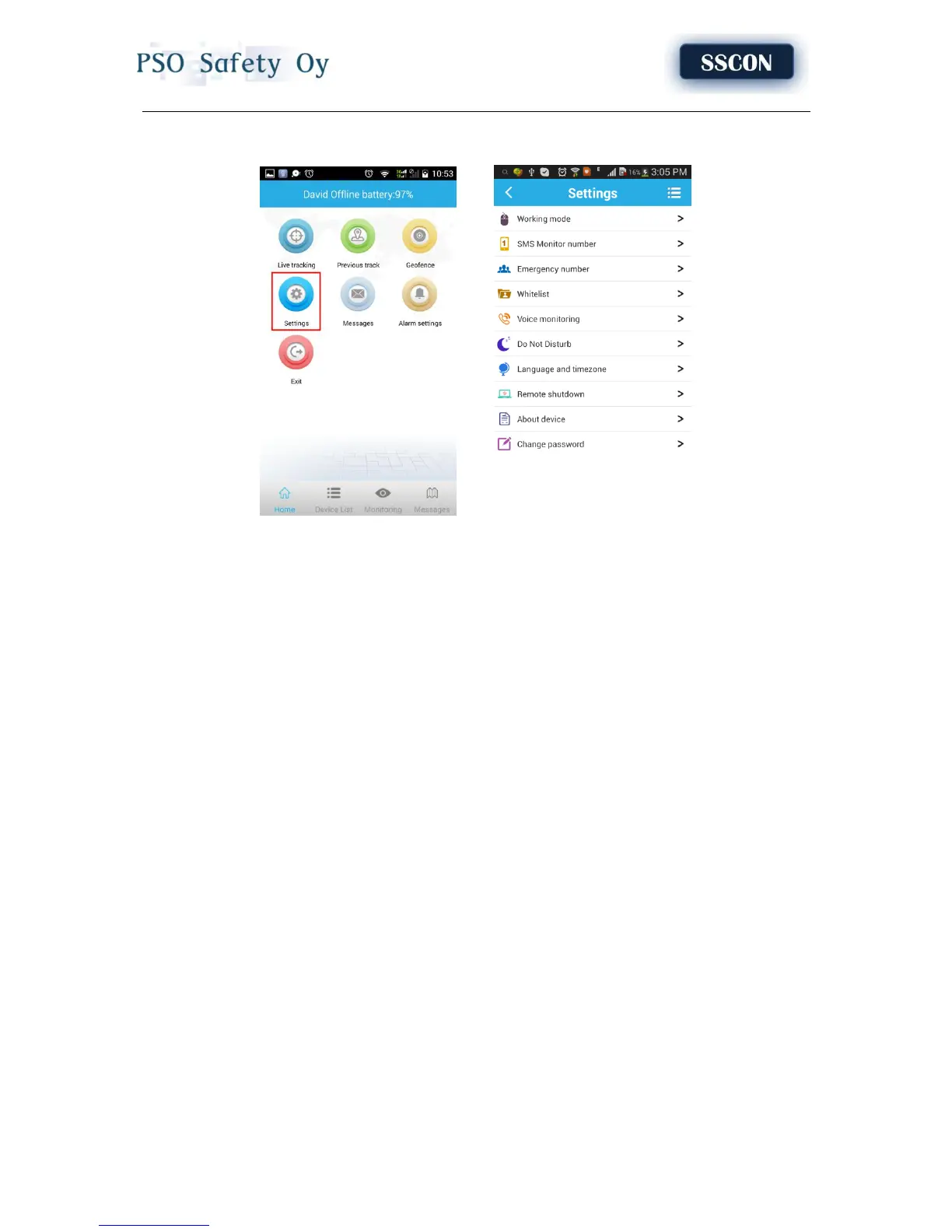
Chapter 4 Settings
4.1 Setup admin number
Click “admin number” and input the admin phone number. The device will send the alarm information
to this number. The alarm information includes lower power alarm, Geo-fence alarm and other alarm.
4.2 Setup emergency number
The emergency number should be the number for emergency calls. Two emergency numbers can be
set at most. The device circularly dials SOS numbers when pressing the SOS key . It will call the second
number if the first number is not connected, then cycle continually.
4.3 Setup working mode
The device can setup GPS data uploading interval in working mode settings, which it is related to the
standby time of battery.
1. Tracking every 60 seconds: Fast positioning mode and standby time is 36 hours.
2. Tracking every 10 minutes: Standard positioning and standby time is 72 hours.
3. Tracking every 1 hour: Power saving mode and standby time is over 120 hours.
4.4 Other settings
1. Device number
User should input the phone number of SIM card in device here.
2. Remote shutdown
User can remote shutdown in device setting option.
3. Device information
It includes display device name, device number and duration of platform.
4.Change password
User can change the password of the device for safety reason.



 To Next Page