EasyManua.ls Logo

Easylife EL5952 - User Manual

Easylife EL5952
2 pages
Print Icon
To Next Page IconTo Next Page
Loading...
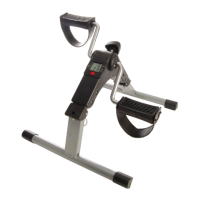
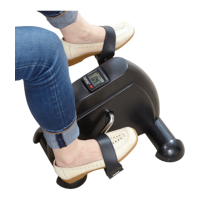
Portable Pedal Exerciser
INSTRUCTION MANUAL
Model No. EL5952
Please read carefully before use and keep for future reference
Imported and distributed by Easylife Group Ltd, London NW1 0JP
Support Line: 0303 031 0777
For more innovative products from Easylife please visit:
www.easylifegroup.com
IN5952 © 2017 Easylife Group Ltd
PANTONE 072 C
PANTONE 123 C
DISPOSAL
• Pleaserespecttheenvironment!
• Disposeofthepackagingaccordingtothelocalrecyclingregulations.
• Disposeofpaperandcardboardpackagingseparatelyfromplasticbagsintothecorresponding
containers.
• Disposeoftheapplianceattheendofitslifespanaccordingtoenvironmentalconsiderations.
WARNING
Thisproductisintendedfordomesticuseonly.
TECHNICAL SPECIFICATION
Maximumload:70kgMeasurements:H23.5xW49.5xL37cm(includingpedals)
Voltagesupply:1xLR44(supplied)
Paperweight60gsm
1
3
2
4
1
3
2
4
1)Removethescreenfromthesocket
3)Insertanew1.5VAG13
battery, positive side down
andclosethetabs
2)Onthebackofthescreenunit,
liftupthebatterytabsandslide
outthebattery
4)Replacethescreenunitinits
socketandsecurewiththescrews
CHANGING THE BATTERY
BatteryrequiredLR44(supplied)
Sit back
and get t
with the
Mini Exercise
Bike
everyday solutions
Est. 1992
Support Line: 0303 031 0777
For more innovative products from Easylife please visit:
www.easylifegroup.com
everyday solutions
Est. 1992
Question and Answer IconNeed help?

Do you have a question about the Easylife EL5952 and is the answer not in the manual?

Summary

Environmental Precautions

Product Disposal Guidelines

Instructions on proper disposal of packaging and the appliance to respect the environment and local regulations.

Safety Warning

Intended Use Restriction

Clarifies that the product is designed and intended solely for domestic use.

Technical Specifications

Key Product Details

Lists maximum load, dimensions (H, W, L), and required voltage supply.

Battery Replacement

Step-by-Step Battery Change

A visual and textual guide to replacing the LR44 battery in the device.

Assembly

Assembling the Pedal Exerciser

Instructions for extending the legs and positioning the exercise bike on a flat surface for immediate use.

How to Use

Operating the Pedal Exerciser

Guidance on proper posture, pedaling, and adjusting resistance using the black knob.

Display Functions

Understanding Display Data

Explains how to turn on the display, scroll through functions (TIME, CNT, RPM, CAL), and what each metric represents.

Functions and Operation

Controlling the On-Board Computer

Details on using the red button to select functions (TIME, REPS/MIN, CALORIES), how the COUNT function works, and the SCAN mode.

Resetting the Computer

Instructions on how to reset the on-board computer by holding the red button for 4-5 seconds.

Summary

Environmental Precautions

Product Disposal Guidelines

Instructions on proper disposal of packaging and the appliance to respect the environment and local regulations.

Safety Warning

Intended Use Restriction

Clarifies that the product is designed and intended solely for domestic use.

Technical Specifications

Key Product Details

Lists maximum load, dimensions (H, W, L), and required voltage supply.

Battery Replacement

Step-by-Step Battery Change

A visual and textual guide to replacing the LR44 battery in the device.

Assembly

Assembling the Pedal Exerciser

Instructions for extending the legs and positioning the exercise bike on a flat surface for immediate use.

How to Use

Operating the Pedal Exerciser

Guidance on proper posture, pedaling, and adjusting resistance using the black knob.

Display Functions

Understanding Display Data

Explains how to turn on the display, scroll through functions (TIME, CNT, RPM, CAL), and what each metric represents.

Functions and Operation

Controlling the On-Board Computer

Details on using the red button to select functions (TIME, REPS/MIN, CALORIES), how the COUNT function works, and the SCAN mode.

Resetting the Computer

Instructions on how to reset the on-board computer by holding the red button for 4-5 seconds.

Easylife EL5952 Specifications

General IconGeneral
BrandEasylife
ModelEL5952
CategoryFitness Equipment
LanguageEnglish

Related product manuals