MH3E-E-A 2
- 7 -
4
4
4
4 Network
Network
Network
Network connection
connection
connection
connection
Picture
Picture
Picture
Picture 3-
3-
3-
3- network
network
network
network connection
connection
connection
connection guide
guide
guide
guide
4.1
4.1
4.1
4.1 Connection
Connection
Connection
Connection instruction
instruction
instruction
instruction
Connect camera to router and connect power adapter before accessing IP Camera , and
check the network light and power light
if
it
is
normal, confirm the cable status
is
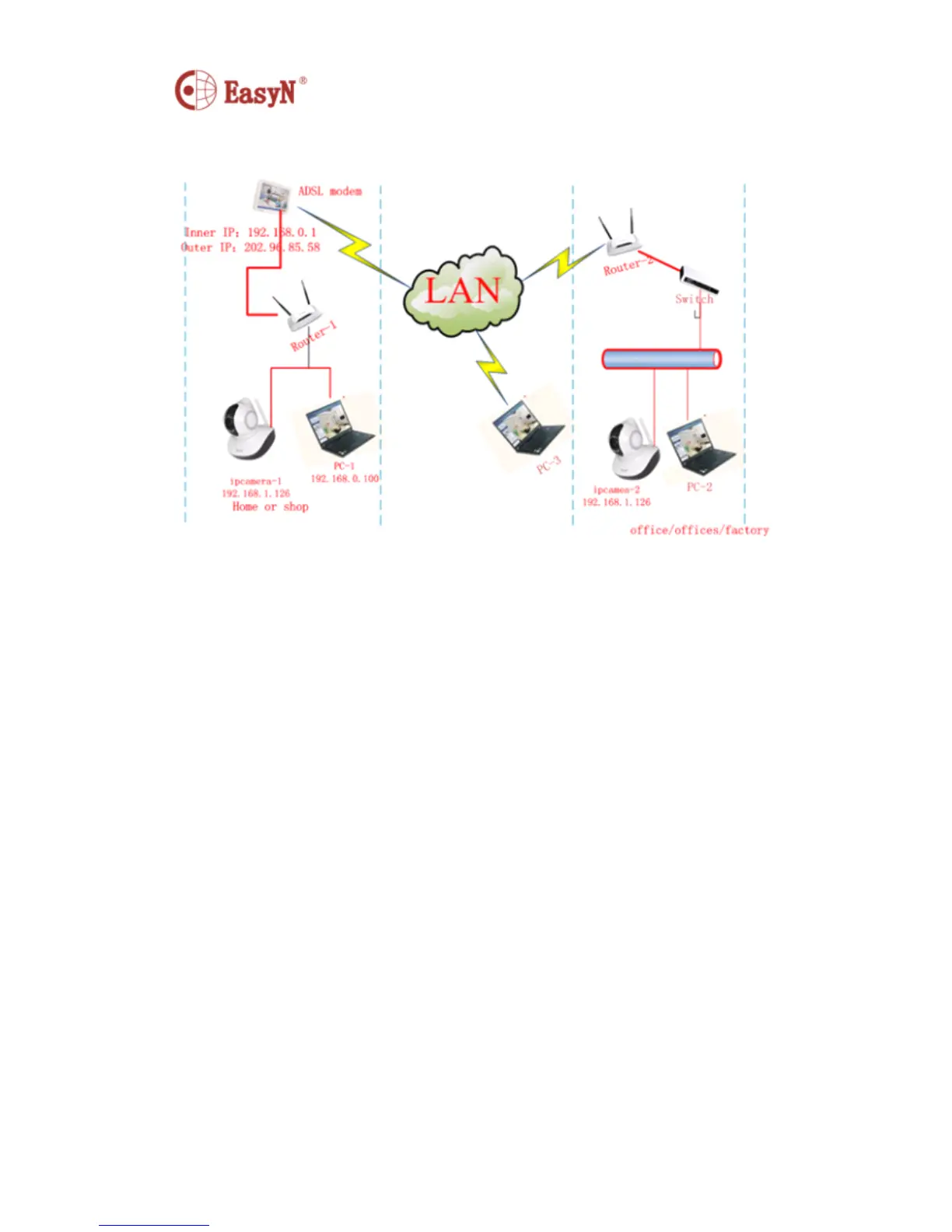
good. To connection mode in picture 3 :
1 ) camera-1 and camera-2 separately connect to two different LANS
2 ) the two LANS must directly connect to internet , and there
is
router
in the LAN , the connection mode can be ADSL or optical fiber, etc.
3 ) computer-3 can access internet
4.2
4.2
4.2
4.2 Access
Access
Access
Access instruction
instruction
instruction
instruction
For accessing camera,
it
should configure some simple settings on the cable in good
status :
1 ) computer
computer
computer
computer and
and
and
and camera
camera
camera
camera should
should
should
should be
be
be
be in
in
in
in the
the
the
the same
same
same
same subnet
subnet
subnet
subnet
To access camera via inner access link(ip link),
it
should confirm the computer to be
in the same subnet with the camera, otherwise
it
needs to configure the IP for IP
Camera , for example: camera-1 in picture5 has IP 192.168.1.126 (
it
is
in subnet
192.168.1 ) , PC-1
’
s IP
is
192.168.0.100 (
it
is
in subnet 192.168.0 ) , then PC-1 can not
access Camera-1 through inner link, so we should change Camera-1
’
s IP into
192.168.0.126 ;
2 ) computer
computer
computer
computer and
and
and
and camera
camera
camera
camera are
are
are
are in
in
in
in different
different
different
different LAN,
LAN,
LAN,
LAN, but
but
but
but both
both
both
both can
can
can
can access
access
access
access internet
internet
internet
internet
Refer to picutre3 camera-1 and computer-2 ,
if
we want to access camera-1 through
computer-2 , then need to configure some settings following 1 ) , to confirm


 To Next Page