Unit description
Display information
Measuring location symbol: The icon indicates the correct
measuring position.
Temperature data indicator: The temperature reading is
displayed after measuring.
Temperature unit indicator: Unit of measuring temperature
shows ˚F or ˚C.
Low battery symbol: The icon prompts you to replace the
battery when the power is low.
Memory symbol: It shows in memory query mode currently.
Load and replace batteries
When the battery symbol “ ” appears, please replace with new
batteries immediately. The steps are as follows:
1. To remove the battery cover, press down on and slide the
battery cover towards the bottom of the thermometer.
2. Install 2 x AAA batteries according to the correct
positive and negative pole as shown on the inside
of the battery compartment.
3. Close the battery cover.
ON/OFF/SCAN
Unit body
Display screen
Intended use
Thank you for purchasing the EasyTouch® Infrared Thermometer,
type AET-R1D1. This Infrared Thermometer is a non-sterile,
reusable, handheld device. It can be used by consumers in
homecare environment and doctors in clinic as reference. It
is intended for measuring the human body temperature of
individuals three months of age and older by detecting infrared
heat from the center of the forehead.
• For safe and proper use of this product, be sure to read
and fully understand Safety Precautions contained in
this user manual.
• Keep this manual with you for a convenient reference.
• Keep this manual in a proper way and avoid any loss.
• If you need other information that is not listed in the
instructions-for-use packet, please contact MHC Medical
Products at (877) 358.4342.
The correct measurement method
to follow:
Measure forehead.
Distance 0.59” to 1.97” (15mm to 50mm)
Correct measurement method
1. Turn the thermometer on by
pressing the “ON/OFF/SCAN”
button. Choose mode by pressing
“ON/OFF/SCAN” on the shuto
mode. A beep sound will be heard
following which the screen will
indication with ---˚F (˚C), indicating
the unit is ready for use.
2. Place the thermometer probe
point near the forehead and press
“ON/OFF/SCAN” and release after
~1 second and the thermometer
will beep and display the accurate
temperature. Whenever consecutive
readings are required, please wait
for at least 5 seconds. The above
procedure can be repeated as many
times as required.
3. To turn o the device press and
hold the “ON/OFF/SCAN” button
for 5 seconds. The thermometer will
turn o automatically after
60 seconds of not being in use.
Warning:
Please take out the battery if you do not use the thermometer
for longer than a month. Please refer to the relevant laws and
regulations for the disposal of waste batteries.
Before take a measurement
1. It is suggested to read through the entire instructions for use
packet to understand how to operate the thermometer.
2. In order to avoid aecting accuracy of the device due to the
external too cold or too hot environment, it must be placed
in general environment of room temperature of 60.8˚F-95˚F
(16˚C-35˚C) for at least 30 minutes before use to avoid
incorrect measurement results.
3. The person measured should be kept at room temperature
for at least 20 minutes to make body temperature balanced.
4. After strenuous exercise, you should rest for at least 30
minutes before taking measurement.
5. Wipe the skin dry and push aside hair strands before
commencing.
6. When repeated measurements are made continuously,
move away the probe between each measurement and
rest for at least 5s before making the next to obtain the
most correct result.
7. The normal reading value is about 95.9˚F~100˚F
(35.5˚C~37.8˚C). The user should frequently take his or her
own temperature to know their average temperature. Pay
attention to physical changes or consult your doctor if there
is any abnormality.
8. Check to make sure the probe is clean before each
measurement to ensure accuracy of temperature reading.
See Page 7 for instructions on how to properly clean
the thermometer.
Correct position to measure
Forehead temperature mode
The correct measurement method
to follow:
Measure the forehead.
Distance 0.59” to 1.97” (15mm to 50mm)
Instructions for Use
1. Turn the thermometer on by pressing the
“ON/OFF/SCAN” button.
2. A beep sound will be then heard and the screen will then
ash ----˚F (˚C). The unit is now ready for use. Using the
correct measuring position, point the thermometer’s probe
to the forehead, press “ON/OFF/SCAN” and release after
~1 second, the thermometer will beep and display the
temperature. If a consecutive reading is required then please
wait for at least 5 seconds. Repeat the above procedure as
often as required.
3. Press and hold the “ON/OFF/SCAN” button for 5 seconds
to turn o the thermometer. Or the unit will switch o
automatically after 60 seconds.
• If a reading below 89.6˚F (32˚C) is recorded a “Lo” sign will
be displayed followed by 2 consecutive beeps.
• If a reading above 100˚F (37.8˚C) is recorded there will be
6 consecutive beeps.
• If a reading above 107.96˚F (42.2˚C) is recorded a “Hi” sign
will be displayed followed by 2 consecutive beeps.
Recalling Readings from Memory
1. Ensure the thermometer is switched o.
2. Press and hold the “ON/OFF/SCAN” button for 4 seconds
to put the device on memory mode. The last reading will
be displayed.
3. Press and release the “ON/OFF/SCAN” button again to
display the next reading in a sequence from the last reading
to the rst reading.
4. The thermometer has the memory to recall the last
32 readings.
5. The thermometer will automatically turn o if it idles for
more than 12 seconds.
Changing Temperature Scales
1. Ensure the thermometer is switched o.
2. Press and hold the “ON/OFF/SCAN” button for 8 seconds to
bring it into temperature mode. The current temperature
unit will be displayed.
3. Release and press the “ON/OFF/SCAN” button again to
toggle and select between ˚C and ˚F.
4. The thermometer will switch o automaticaly if it idles for
more than 4 seconds.
Disposal
Do not dispose of electrical appliances as unsorted
municipal waste, use separate collection facilities.
Contact you local government for information
regarding the collection systems available. If electrical
appliances are disposed of in landlls or dumps,
hazardous substances can leak into the groundwater
and get into the food chain, damaging your health and
well-being.
Explanation of Marks or Symbols
The following symbols may appear on the manual, Infrared
Thermometer and its accessories.
MUST OBSERVE
Means Obligatory with detailed items expressed in
words or gures within or beside the mark. Left one
means General Compulsory.
Follow instructions for use.
IMPLICATION OF SYMBOL
Type-BF applied part.
CE Mark: conforms to essential requirements of the
Medical Device Directive 93/42/EEC.
Caution: Consult accompanying documents.
Do not dispose this product as unsorted municipal
waste. Collection of such waste separately for
special treatment is necessary.
Transport package shall be kept away from rain.
Transport package shall not be exposed to sunlight.
Indicates correct upright position of the transport
package.
Contents of the transport package are fragile
therefore it shall be handled with care.
Indicates temperature limits within which the
transport package shall be stored and handled.
Non-ionizing electromagnetic radiation
Do not roll
Lot number
Production date
The device should not be used after the expiration
date listed on the retail box.
Protected against solid foreign objects of 12.5mm
dianeter and greater. protected against vertically
falling water drops when the device is tilted up
to 15˚.
Manufacturer
Authorized Representative in the European
Community
1 2 3 4 5
Memory symbol
Low battery
symbol
Measuring location symbol
Temperature unit
indicator
Temperature data
indicator
1 2 3
Battery compartment
(enlarged to
show detail)

 Need help?
 General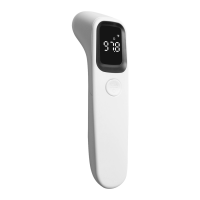

 To Next Page