EasyManua.ls Logo

Eaton ConnectUPS Web/SNMP Card - User Manual

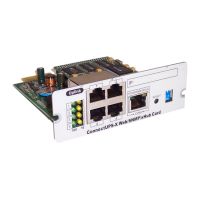
Eaton ConnectUPS Web/SNMP Card
26 pages
Print Icon
To Next Page IconTo Next Page
Loading...
Eaton
®
ConnectUPS
Web/SNMP Card
Quick Start Instructions
Package Contents
l
ConnectUPS Web/SNMP
l
USB Cable
l
Quick Start Instructions
COM
1
2
3
4
ConnectUPS-X Web/SNMP/xHub Card
RESET
100 10
POWER
STATUS
Uplink
COM
2
1
3
4
ON
12
ConnectUPS-BD
SNMP/WEB Adapter
RESET
ON
12
COM
NETWORK
Question and Answer IconNeed help?

Do you have a question about the Eaton ConnectUPS Web/SNMP Card and is the answer not in the manual?

Summary

Section 1 Installation Checklist

Section 2 Install the Card

Section 3 Connect the Card to the Computer

Section 4 Initialize the Card Configuration

Section 5 Obtain a DHCP-assigned IP Address

Section 6 Assign an IP Address Manually

Section 7 Disable Browser Compatibility Mode

Section 8 Register a PredictPulse Subscription

Eaton ConnectUPS Web/SNMP Card Specifications

General IconGeneral
ModelConnectUPS Web/SNMP Card
Device TypeNetwork Management Card
Form FactorPlug-in module
Connectivity TechnologyWired
Data Link ProtocolEthernet
Power SupplyPowered by UPS
Network ProtocolsHTTP, HTTPS, SNMP
CompatibilityEaton UPS systems
FeaturesRemote monitoring
Compliant StandardsIEEE 802.3
Operating Temperature0°C to 40°C
Storage Temperature-20°C to 60°C
Interface TypeRJ-45

Related product manuals