Need help?
Do you have a question about the Ebac 4000 Series and is the answer not in the manual?
Instructions for safely unpacking the unit and handling packaging.
Details on operating temperatures, fuse rating, and general safety warnings.
Critical warning regarding the presence of flammable R290 refrigerant gas.
Detailed safety guidelines for handling R290 refrigerant in the unit.
Provides meanings for various symbols displayed on the dehumidifier.
Guidance on optimal location, initial operation, and comfort settings.
Explanation of Ebac's patented SmartControl™ technology for efficient operation.
Steps to turn on the unit and select the initial SMART mode.
Identifies and describes the main buttons and indicators on the control panel.
How to cycle through and activate modes like Laundry, Target, and Boost.
Detailed instructions for using Laundry, Target humidity, and Boost modes.
Instructions for using the timer, standby function, and changing fan speed.
How to use Night mode and reset the filter change indicator.
Steps for downloading the 'Smart Life' app and registering an account.
Instructions for creating a password and granting necessary app permissions.
Step-by-step guide to connect the dehumidifier to the app via Wi-Fi.
Enabling location services and connecting to the local Wi-Fi network.
Confirmation of successful connection and initial troubleshooting advice.
Solutions for when the dehumidifier is not detected or doesn't connect during pairing.
Instructions for removing, emptying, and replacing the water collection tank.
Steps for cleaning the filter and its replacement schedule.
Diagnosing power problems and the meaning of the red bucket icon.
Understanding normal operational noise and identifying excessive noise.
Addressing reduced water collection and situations where no water is collected.
Troubleshooting the unit continuing to operate with a full water container.
Solutions for icing, leaks, and malfunctioning displays.
Guidance for dealing with a physically damaged dehumidifier unit.
Instructions and benefits of registering the product warranty.
Details what is covered and not covered by the product warranty.
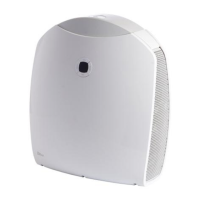
The Ebac 4000 Series dehumidifier is a household appliance designed to remove excess moisture from the air, thereby protecting homes from condensation and damp, and improving air quality. Manufactured in the UK, this dehumidifier incorporates over 50 years of expertise from Ebac, a company that has helped over 1 million customers manage humidity in their homes.
The primary function of the Ebac 4000 Series dehumidifier is to extract moisture from the air. It operates by drawing in humid air, passing it over a cold surface where moisture condenses into water, and then releasing drier air back into the room. The collected water is stored in a removable bucket. The unit is designed to cope with the significant amount of moisture produced daily by an average family, which can be up to 12 litres (20 pints) from activities like showering, washing up, boiling kettles, and even breathing.
The dehumidifier features a patented SmartControl™ technology, referred to as SMART Mode, which continuously monitors and learns about environmental factors in and around the home. This intelligent system determines when the unit needs to operate and when it doesn't, optimizing running time and reducing energy costs.
The Ebac 4000 Series offers several modes of operation to suit different needs:
SMART Mode (SmartControl™): This is the recommended default setting for continuous use. When first switched on, the dehumidifier should run in SMART Mode continuously for 6 hours. After this initial period, it will automatically switch on and off to maintain the correct humidity level in the most economical way. The SMART icon (9) illuminates blue when this mode is active.
Laundry Mode: Ideal for drying clothes, this mode operates the unit at the highest fan speed and optimal capacity for water extraction. After 8 hours of operation in Laundry Mode, the unit automatically reverts to SMART Mode. To activate, press the MODE button (1) until the laundry symbol (7) illuminates.
Target Mode: This mode allows users to set a specific target humidity level. The dehumidifier will operate until the desired humidity is reached. To activate, press the MODE button (1) until the TARGET symbol (10) illuminates and the digital display (8) flashes. The left and right buttons (3) and (4) can be used to adjust the target humidity. The display will show the current humidity after 3 seconds, but the target humidity can be viewed by pressing the MODE button (1) once. To exit Target Mode, press the MODE button (1) twice.
BOOST Mode: This mode runs the unit continuously at the highest fan speed and maximum capacity, useful for increasing air flow and water collection for a set period. To activate, press the MODE button (1) until the BOOST symbol (12) illuminates.
Timer Function: The unit can be set to operate for a specific duration, cycling through options from 1 hour to 8 hours. Selecting "0hrs" allows for continuous operation (without a timer). The timer function dictates how long the unit will operate, and if modes are switched, the timer will still operate unless reduced to 0 hours. To use, press and hold the TIMER button (3) and use the scroll buttons.
Standby Mode: The unit can be switched to standby by pressing the POWER button (2). The STANDBY light (13) will illuminate orange.
Fan Speed Control: The fan speed can be adjusted by pressing the FAN button (4), which cycles through different speeds. The fan symbol (6) will flash slowly or fast to indicate the speed.
Night Mode: This mode reduces the fan speed for quieter operation and can only be activated via the mobile app.
The Ebac 4000 Series dehumidifier can be controlled remotely via Wi-Fi using the "Smart Life" app, available on Itunes and Android play stores.
Regular maintenance ensures optimal performance and longevity of the dehumidifier.
Emptying the Water Container: The dehumidifier automatically stops collecting water when the container is full, indicated by a red bucket icon (15) on the control panel. The container can then be removed, emptied, and replaced. Ensure the container is inserted correctly with the outlet on the left-hand side.
Cleaning the Filter: The Ebac 4000 Series includes a filter to remove dust from the air. This filter should be cleaned monthly and replaced every 4 months. Failure to do so can reduce performance.
Troubleshooting: The manual provides a comprehensive troubleshooting guide for common issues such as no power, a constant red light (indicating a full or missing water container), noisy operation, low water collection, no water collection, overflowing, display problems, and unit damage. For issues like icing up, the unit has a defrost function. For leaks, ensure the drainage bung is correctly inserted and the unit is on a level surface. For damaged parts, Ebac may supply replacements, or advise contacting customer service for further assistance.
 General
| Model Series | 4000 Series |
|---|---|
| Category | Dehumidifier |
| Manufacturer | Ebac |
| Dehumidification Capacity | 40 liters/day |
| Water Removal Capacity (per day) | 40 liters |
| Dimensions | 580 x 390 x 320 mm |
| Dimensions (H x W x D) | 580 x 390 x 320 mm |
| Operating Temperature Range | 5°C to 32°C |
| Type | Compressor dehumidifier |


 To Next Page