
 Need help?
Do you have a question about the Ebmpapst K3G450-PB24-01 and is the answer not in the manual?
Explains hazard level symbols (DANGER, WARNING, CAUTION, NOTE) used in the manual.
Specifies the required qualifications for personnel handling the device.
Outlines fundamental safety practices to be observed during operation.
Highlights electrical hazards, specifically concerning voltage and protective earth connection.
Addresses hazards from missing guards and emphasizes correct installation.
Discusses potential interference and shielding measures for EMC compliance.
Warns about hazards related to rotating parts and securing the device.
Addresses potential noise emissions and required safety measures.
Warns about burn hazards from hot components.
Provides guidelines for safe handling and transportation of the fan.
Specifies conditions for proper storage to maintain device integrity.
Defines the device's intended applications and operational parameters.
Lists prohibited and hazardous operating conditions and applications.
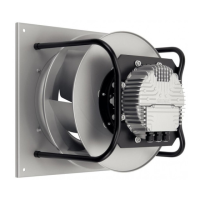
Presents a detailed visual representation of the device with dimensions and part labels.
Lists key technical specifications and operating parameters of the device.
Provides energy efficiency data as per EU regulations.
Details the physical attributes, materials, and construction of the device.
Specifies technical requirements and constraints for mounting the device.
Details environmental limits for transport and storage.
Outlines EMC immunity and emission standards applicable to the device.
Provides instructions and warnings for physically installing the device.
Details the procedures and safety precautions for wiring the device.
Lists prerequisites and checks before establishing electrical connections.
Specifies fuse assignments and cable cross-sections for power supply.
Explains reactive currents due to EMC filter and their typical values.
Advises on suitable RCCB types and potential tripping issues.
Discusses factors affecting leakage current.
Explains the device's protection against locked rotor conditions.
Details how to prepare and connect cables within the terminal box.
Guides on stripping cables and ensuring proper strain relief.
Step-by-step instructions for wiring to terminals.
Provides guidance on routing cables to prevent moisture ingress.
Lists default configurations and parameters set by the manufacturer.
Illustrates the electrical connections between the device and external circuits.
Automatic restart follows detection error.
Motor restarts automatically after blockage is removed.
Motor restarts automatically when line voltage returns to permitted values.
Motor restarts automatically after 10-40s when phases are correctly supplied.
Addresses imbalance and suggests cleaning or replacement.
Covers causes like line voltage faults, faulty connections, or winding issues.
Relates to overheating and provides reset procedures.
Addresses overheating due to ambient temperature and reset procedures.
Deals with issues like excessive back pressure and cooling.
Recommends regular vibration checks for mechanical integrity.
Provides instructions and warnings for cleaning the device.
Details periodic safety checks, including high-voltage testing.
Offers recommendations for environmentally responsible product disposal.
Emphasizes adherence to local regulations for product disposal.
Outlines procedures and warnings for safe product disassembly.
Guides on separating and recycling various device components.
This document outlines the operating instructions for a built-in device designed for conveying air, emphasizing safety, proper usage, and maintenance. It is crucial to read these instructions thoroughly before any work on the device to prevent malfunctions or harm. The manual is an integral part of the device and must accompany it if sold or transferred. Duplication and distribution are permitted for informing about potential dangers and their prevention.
The instructions employ specific hazard levels:
Only qualified, trained, and authorized technical staff should transport, unpack, install, operate, maintain, and use the device. Electrical installation, test runs, and related work must only be performed by authorized specialists.
After installation in the final product, a new assessment of the device's safety hazards is required. Always adhere to local industrial safety regulations. Maintain a clean and tidy workplace, as untidiness increases accident risk. Do not modify, add to, or convert the device without ebm-papst's approval. Regularly inspect the device's electrical equipment and immediately replace loose connections and defective cables. Be aware of the risk of electric shock from electrically charged devices; stand on a rubber mat when working on them.
Live terminals and connections pose an electric shock risk even when the device is switched off. Wait five minutes after disconnecting voltage at all poles before opening the device. In case of a fault, the rotor and impeller may be energized, so avoid touching them once installed. If control voltage or a stored speed set value is applied, the motor can restart automatically (e.g., after a power failure), posing an injury risk. Stay out of the device's danger zone, switch off line voltage, ensure it cannot be switched back on, and wait for the device to stop. Remove all tools and objects from the device after working.
Operating the device without a fixed protective device and guard grill can lead to serious injury, as hands or loose items could be caught. The device is a built-in component, and the owner is responsible for adequate safeguarding. Stop the device immediately if a protective device is missing or ineffective.
Electromagnetic radiation interference is possible, especially with open- and closed-loop control devices. If impermissible radiation levels occur after installation, the user must implement appropriate shielding. Ensure the entire setup is EMC-compliant.
Rotating parts, such as the rotor or impeller, pose a risk of injury from contact. Secure the device against accidental contact and wait until all parts have come to a standstill before working on the system/machine.
Depending on installation and operating conditions, the sound pressure level may exceed 70 dB(A), leading to noise-induced hearing loss. Implement technical safety measures and protect personnel with hearing protection, adhering to local regulations.
The electronics housing can become hot, posing a burn risk. Ensure sufficient protection against accidental contact.
Transporting the fan requires care to prevent injuries from tipping or slipping. Always transport the fan in its original packaging. Hard impacts or setting it down at an angle can cause bearing damage or deformation of the frame or impeller. Ensure fans cannot tip over during transport and handling, securing them with lashing strips, especially when stacking multiple fans. Account for possible wind forces.
Store the device, whether partially or fully assembled, in a dry, weather-protected, and vibration-free environment, in its original packaging. Protect it from environmental effects and dirt until final installation. Storage for no longer than one year is recommended to ensure trouble-free operation and maximum service life. Even devices intended for outdoor use should be stored as described prior to commissioning. Maintain the storage temperature as specified in the transport and storage conditions. Ensure all cable glands are fitted with dummy plugs.
The device is exclusively designed as a built-in component for conveying air according to its technical data. Any other use is considered misuse. Customer equipment must withstand the mechanical and thermal stresses generated by this product throughout its service life.
Intended use includes:
Improper use, which is prohibited and hazardous, includes:
The rotating parts are designed for a maximum of one million load cycles for cyclic speed loads. Consult ebm-papst for support on specific questions. Use the device according to its degree of protection.
The product surfaces conform to industrial standards, though surface quality may vary during production without affecting strength, dimensional stability, or accuracy. Paint pigments react to UV light over time, but this does not affect technical properties. Protect the product from UV radiation to prevent patch formation and fading. Color changes are not covered by warranty.
Mounting data can be found in the product drawing or mechanical connection section. Use strength class 8.8 screws and secure them against unintentional loosening (e.g., with self-locking screws).
Maximum permitted ambient temperature for motor (transport/storage) is +80 °C. Minimum permitted ambient temperature for motor (transport/storage) is -40 °C.
EMC immunity to interference conforms to EN 61000-6-2 (industrial environment). EMC interference emission conforms to EN 61000-6-3 (household environment), except EN 61000-3-2 for professionally used equipment with total rated power greater than 1 kW. If multiple devices are switched in parallel on the supply side, and the line current is 16-75 A, the arrangement conforms to IEC 61000-3-12 if the short-circuit power Ssc at the connection point to the public power system is greater than or equal to 120 times the rated output. The installation engineer or operator is responsible for ensuring this.
When removing the device from packaging, handle it carefully by grasping the frame to avoid cutting and crushing. Wear safety shoes and cut-resistant safety gloves. The device weighs over 25 kg, so use suitable hoisting equipment to avoid physical injury. Do not subject the fan to force or excessive vibration from the installation. If connected to air ducts, isolate the connection from vibration using compensators. Ensure stress-free attachment to the substructure. Do not handle the fan by the inlet nozzle during transport and installation to prevent impeller damage. Check for transport damage; do not install damaged devices. Install the undamaged device according to your application.
Always use appropriate hoisting equipment and lifting devices for transporting the fan. Use four round slings passed around the struts of the support bracket, positioned as shown in the hoisting diagram. Ensure the support bracket struts are vertical. Transport the fan only in the installation position shown in the product drawing. Do not exceed an acceleration of 2 g during transportation.
Always connect protective earth first and check it. Faulty insulation poses a risk of fatal electric shock. Use only cables meeting specified regulations for voltage, current, insulation material, and capacity. Route cables to avoid contact with rotating parts. Electrical charge (>50 µC) can exist between phase conductor and protective earth after switching off multiple devices in parallel. Ensure accidental contact protection and short the supply and PE connections before working on electrical hookup.
The fan is a built-in component without a disconnecting switch. Connect it only to circuits that can be switched off with an all-pole disconnection switch. Secure the system/machine to prevent accidental restart when working on the fan.
Route control lines separately from the supply line, maintaining at least 10 cm clearance. Water ingress at the customer end of the cable can damage the device; ensure the cable end is connected in a dry environment. Connect the device only to circuits that can be switched off with an all-pole disconnection switch.
Verify nameplate information matches connection data. Ensure power supply matches device voltage. Use only cables designed for the current level indicated on the nameplate, considering EN 61800-5-1 sizing criteria. The protective earth must have a cross-section equal to or greater than the phase conductor. Use 105 °C cables, with a minimum cross-section of AWG 26/0.13 mm².
Compliance with EN 61800-5-1 resistance specifications for the protective earth connection circuit must be verified in the end application. An additional protective earth conductor may be necessary, connected to the housing via the extra protective earth terminal.
The manual provides a table for assigning supply cable cross-sections and required fuses (line protection only).
Due to the integrated EMC filter, reactive currents (< 500 mA) can be measured in the supply line even when the motor is at a standstill and line voltage is switched on. The effective power in this operational readiness state is typically < 6 W.
If an RCD is required, only AC/DC-sensitive (type B or B+) devices are permissible. RCDs cannot provide personal safety during operation with variable frequency drives. Pulsed charging currents from integrated EMC filter capacitors can trip RCDs. A trip threshold of 300 mA and delayed tripping (super-resistant, characteristic K) is recommended.
For asymmetrical power systems or phase failures, leakage current can increase significantly.
Due to locked-rotor protection, the starting current (LRA) is equal to or less than the nominal current (FLA).
Strip cables only as necessary, ensuring the cable gland is sealed and connections are strain-free. Refer to the product drawing for tightening torques. Tightness and strain relief depend on the cable used and must be checked by the user.
Wait five minutes after disconnecting voltage at all poles before opening the device. Remove the cap from the cable gland only where cables are fed in. Equip cable glands with provided seals. Route wires into the terminal box. First connect the protective earth (PE), then other wires to corresponding terminals using a screwdriver. Ensure no wire ends fan out. Seal the terminal box.
Prevent water from reaching the cable gland along the cable. Moisture can penetrate the terminal box if constantly present at cable glands. Route cables in a U-shaped loop to prevent water accumulation. If not possible, create a drip edge with a cable tie in front of the cable gland.
The manual details factory settings for parameters such as mode, fan/device address, PWM limits, set value saving, set value requirement, and direction of action.
Ensure isolation from supply (all phases) and that a restart is impossible. Check cables for proper fit. Screw the terminal box cover back on, referring to the product drawing for tightening torque. Route cables in the terminal box so the cover closes without resistance. Use all screw plugs, inserting them by hand to avoid thread damage. Ensure the terminal box is completely closed and sealed, and all screws and cable glands are properly tightened.
The device may only be switched on if properly installed and in accordance with its intended use, including required safety mechanisms and professional electrical hookup. This applies to devices equipped with plugs and terminals or similar connectors.
The motor housing can become hot, posing a fire risk. Ensure no combustible or flammable materials are near the fan. Before switching on, check for visible external damage and functional protective devices. Check air flow paths for foreign matter and remove any found. Apply nominal supply voltage. Start the device by changing the input signal.
Low-vibration operation must be ensured over the entire speed control range. Severe vibration can result from inexpert handling, transport damage, imbalance, or structural resonance. Identify and address speed ranges with excessively high vibration levels or resonant frequencies during commissioning. Either run through resonant ranges quickly or find another remedy. Excessive vibration can lead to premature failure. The maximum permissible vibration severity (3.5 mm/s) must be checked every 6 months at the motor mount in axial and transverse directions. Measure vibration in all three axes over the entire speed range.
To switch off during operation, use the control input. Do not switch the motor on and off via power supply. For maintenance, switch off via the control input, disconnect from power supply, and disconnect the ground connection last.
The device includes protective functions that automatically switch off the motor in case of faults:
Do not attempt repairs; send the device to ebm-papst for repair or replacement. Live terminals and connections pose an electric shock risk even when switched off. Wait five minutes after disconnecting voltage at all poles before opening the device. If control voltage or a stored speed set value is applied, the motor can restart automatically (e.g., after a power failure), posing an injury risk. Stay out of the device's danger zone, switch off line voltage, ensure it cannot be switched back on, and wait for the device to stop. Remove all tools and objects from the device after working.
If the device is not operated for a long time in a dry environment, start and operate it at full speed for one hour every four months. In a damp environment (e.g., outdoors), start and operate it at full speed for at least three hours once a month to move bearings and evaporate condensate.
The manual provides a table of common malfunctions, possible causes, and remedies:
For further malfunctions, contact ebm-papst.
Check the fan for mechanical vibration based on ISO 14694. Recommendation: Every 6 months. Maximum vibration severity is 3.5 mm/s, measured at the motor fastening diameter on the motor support plate in the direction of the motor axis of rotation and perpendicular to this.
To ensure a long service life, regularly check fans for proper operation and soiling. Adjust checking frequency based on soiling degree. Risk of injury from rotating fan. Only clean when not in motion. Do not disconnect the fan from the power supply; switch it off via the control input to prevent start-up. Dirt deposits on the motor housing can cause overheating. Soiling of the impeller can cause vibration, shortening service life and destroying the fan. In such cases, switch off the fan immediately and clean it. The preferred method is dry cleaning, e.g., using compressed air. Do not use aggressive cleaning agents. Damage to the device during cleaning: Do not use high-pressure cleaners, acid, alkali, or solvent-based cleaning agents. Do not use pointed or sharp-edged objects. Completely remove all cleaning agents. If severe corrosion is visible on load-bearing or rotating parts, switch off the device immediately and replace it. Repair of load-bearing or rotating parts is not permitted. Operate the fan for 2 hours at maximum speed to evaporate any ingressed water. If cleaning does not eliminate vibrations, the fan may need rebalancing; contact ebm-papst. The fan is equipped with maintenance-free ball bearings, designed for a service life of 40,000 hours. If bearing replacement is necessary after this period, contact ebm-papst. Adjust maintenance intervals to the actual level of dust exposure.
High-voltage test: The integrated EMC filter has Y capacitors, and the tripping current is exceeded when AC testing voltage is applied. Test the device with DC voltage for the legally required high-voltage test. The voltage used corresponds to the peak value of the AC voltage required by the standard.
The manual provides a table for safety inspection:
ebm-papst prioritizes environmental protection and resource preservation. Their environmental management system is ISO 14001 certified and rigorously implemented. Ecological design, technical safety, and health protection are fixed criteria from the development stage.
Always observe applicable country-specific legal regulations for product disposal or waste. If necessary, corresponding disposal standards must be heeded.
Disassembly must be performed by qualified personnel with appropriate technical knowledge. The product is to be disassembled into suitable components for disposal, employing standard procedures for motors. Heavy parts of the product may drop off. Some components are heavy and can drop during disassembly, causing serious injury and material damage. Secure components before unfastening to stop them falling.
Products are mostly made of steel, copper, aluminum, and plastic. These materials are generally considered to be recyclable. Separate components for recycling into the following categories:
Only ferrite magnets and rare earth magnets are used in external rotor motors from ebm-papst Mulfingen GmbH & Co. KG. Ferrite magnets can be disposed of in the same way as normal iron and steel. Electrical insulating materials on the product, in cables, and wires are made of materials that are to be treated in the same manner. The materials concerned are as follows:
 General
| Manufacturer | ebm-papst |
|---|---|
| Type | Centrifugal fan |
| Model Number | K3G450-PB24-01 |
| Airflow | 5000 m³/h |
| Speed | 1450 rpm |
| Noise Level | 78 dB(A) |
| Dimensions | 450 mm |
| Frequency | 50/60 Hz |
| Phase | 3~ |
| Weight | 17.1 kg |
| Bearing type | Ball bearing |
| Protection class | IP54 |
| Current | 1.5 A |
| Power | 1.4 kW |

 To Next Page