AVA PRO - Assembly instructions for the CPX300W alarm control panel 9 / 23
After pressing the button, the control panel will enter into the unpairing state, which will be signalled by
the yellow LED above the button (see item 16).
(EXIT) - a button used to exit the wireless devices pairing mode.
- Connector for installation of the GSM module.
- Connector for installation of the Smart Home module.
- Connector for installation of the RF433 module.
- Connector for installation of the Ethernet or Wi-Fi module.
(CELL) - Green LED indicating the presence/status of the GSM module.
(SMARTH) - Green LED indicating the presence of the Smart Home module.
(RF433) - Green LED indicating the presence of the RF433 module.
(ETH / Wi-Fi) - Green LED indicating the presence/status of the Ethernet or Wi-Fi module.
- Blue LED associated with the mode of adding wireless devices.
- Yellow LED indicating pairing mode of wireless devices.
- Yellow LED indicating unpairing mode of wireless devices.
- RF1 and RF2 - U.FL antenna connectors of the built-in 868 MHz radio module.
- LED indicating the operating status of the built-in 868 MHz module.
- Place for a latch securing the antenna wire (included to the module together with the set).
(P1, P2, P3, P4) - Yellow LEDs indicating the signal level for the GSM module.
Steady light represents about 25%, flashing light about 12.5%. Thus, when 2 diodes (P1 and P2)
have a steady light and one (P3) is flashing, it means that the signal level fluctuates within the limit
of 66.5%.
(CONF) - IDC10 connector for programming.
- LED diodes indicating the control panel status.
- Mounting holes for modules (each module has one hole).
- Mounting holes for the panel (hole spacing 132x61 mm).
The indicated holes are used for mounting the control panel in any type of housing. Optionally, a
dedicated OBDNA plastic housing can be ordered (the housing contains a suitable 230 VAC/18 VAC
transformer).
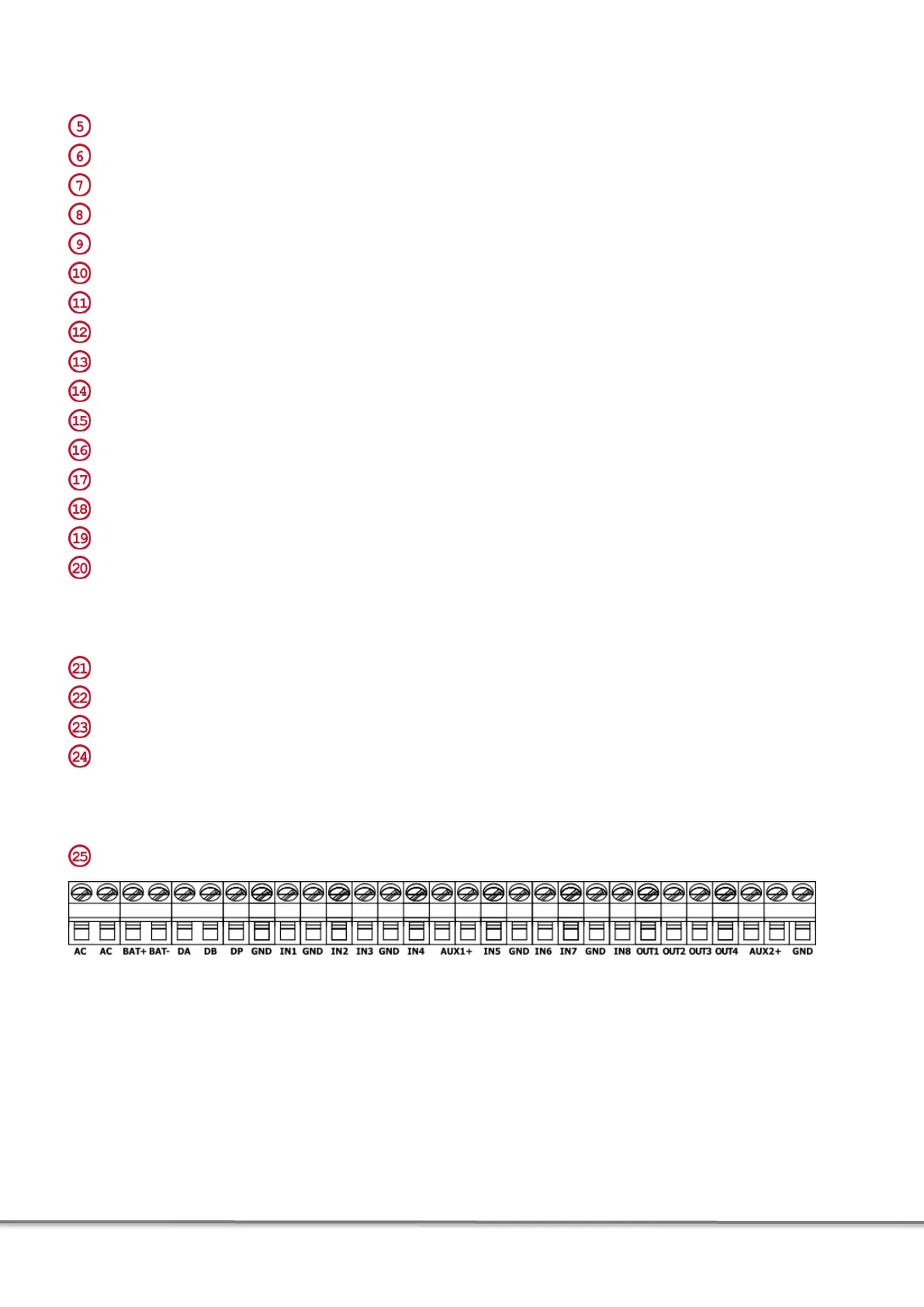
- Screw connectors:
Fig. 2. Screw fastenings on the motherboard of the alarm control panel.
AC - power connector (18 V AC),
BAT+, BAT- - connectors for 13,8 V DC battery supply,
DA, DB, DP, GND (between DP and IN1) - clamps provided for future applications,
IN1-IN8 - configurable input lines,
GND - mass,
AUX1+, AUX2 + - 13,8 V DC power outputs with 350 mA capacity,
OUT1 - programmable high-current output with a capacity of 1100 mA,
OUT2, OUT3, OUT4 - programmable OC type low-current outputs with a capacity of 100 mA.


 To Next Page