7
四,
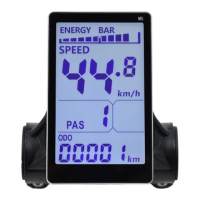
Switching liquid crystal display
If the current display is working
,
long press
,
Will turn off the screen, instead turn
on the screen
五,Toggle multi-function display area content
Short Can switch the value of the multifunction display area
六,
Set Parameters
Long press + Will enter the parameter setting interface. Parameters that
can be set include,Wheel diameter(in: inches), number of magnetic steel, liquid crystal
brightness, low pressure points, etc.(see settings: P01-P20);
Under Settings Interface,Can be short press ,or Set the value to perform a
minimum-precision unit value operation,you can also long press ,or
Continuous Fast Modify Parameters:
1.Short press Switch to Next Parameter;Exit settings and save parameters. If not
operated, the modified parameters will automatically exit and be saved after 8 seconds.
Note: due to the upgrade of the company's products, the content of the product
will be different from the specifications, but it will not affect your normal use.
Company: ebycco.com
ebyccous@gmail.com


 To Previous Page
 Loading...