A - Right Camera (Blue)
B - Left Camera (White)
C - Back Camera (Brown)
D - Front Camera (Green)
1 - AUX Audio Input
2 - Rec. Video Output (Green)
3 - Live Video Output (Yellow)
4 - Audio Output (White)
5 - Left Trigger (White)
6 - Right Trigger (Blue)
7 - Front Trigger (Green)
8 - Back Trigger (Brown)
9 - Split Trigger (Yellow)
10 - Ground (Black)
11 - Power (Red)
RCA:
12 - DVD Video Output (Yellow)
13 - DVD Audio Output (White)
14 - Black
22 Pin Male 22 Pin Female
4 Pin
Female
3A FUSE
A B C D 1 2 3 4 5 6 7 8 9 10 11 12 13 14
WIRING DEFINED
Monitor:
Model EC7000-QM
WARNING!
To prevent accidental shock, DO NOT OPEN THE MONITOR CASE. Opening the monitor case will expose the inside of the monitor to conditions
that could adversely affect performance. Any evidence of tampering with sealed components will void the warranty.
Important! Do not expose the monitor to water, it is not waterproof. Any water that leaks into the monitor could cause extensive damage.
Installation:EC7000-QM
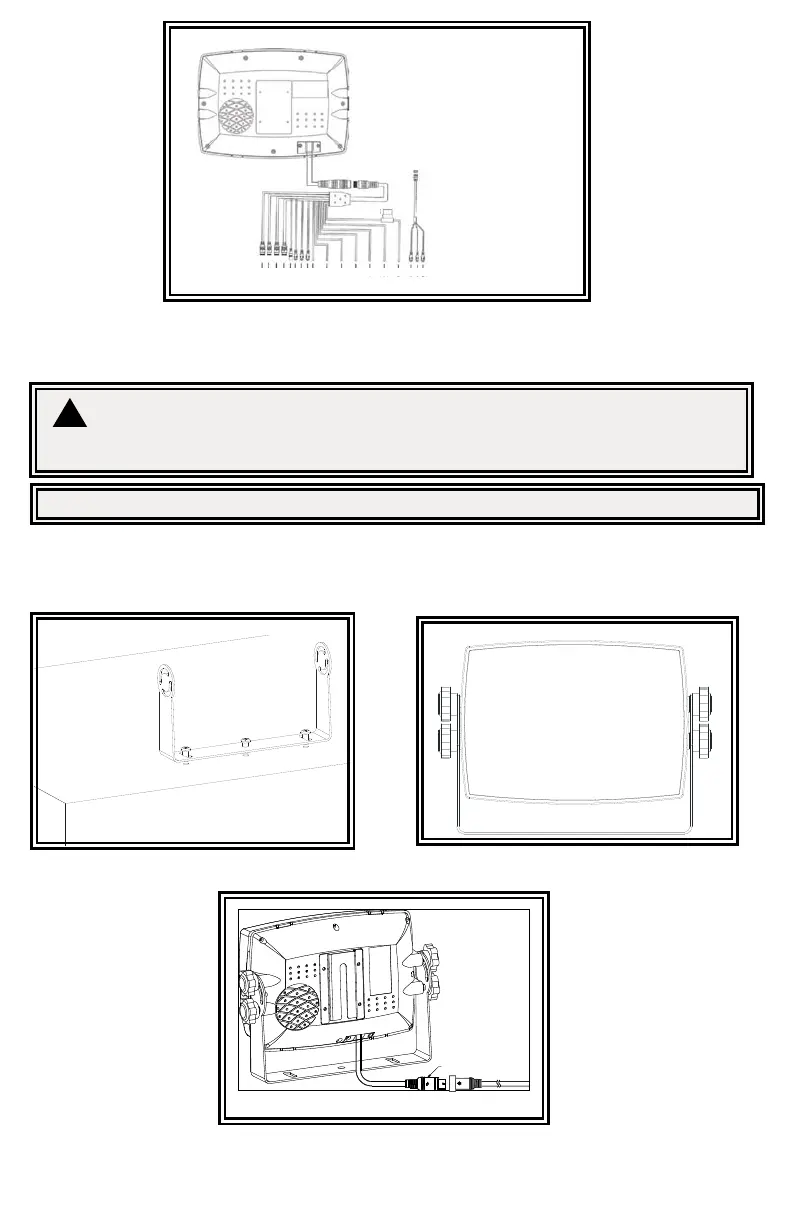
Installation instruction of using U-support bracket
1. Select suitable position on vehicle and x the U-support bracket with screws (Figure 3)
2. Fix the monitor to the U-support bracket with angle adjustment screws and adjust the view angle of the monitor (Figure 4)
3. Put on the sun-visor and connect the monitor with the AV and power supply conversion cable (Figure 5)
Figure 4Figure 3
Figure 5


 To Next Page
 Loading...