Do not install and/or operate this safety product unless you have read and understand the
safety information contained in this manual.
1. Proper installation combined with operator training in the use, care, and maintenance of emergency warning devices
are essential to ensure the safety of you and those you are trying to protect.
2. Exercise caution when working with live electrical connections.
3. This product must be properly grounded. Inadequate grounding and/or shorting of electrical connections can cause high
current arcing, which can cause personal injury and/or severe vehicle damage, including re.
4. Proper placement and installation are vital to the performance of this warning device. Install this product so that output
performance of the system is maximized and the controls are placed within convenient reach of the operator so that
s/he can operate the system without losing eye contact with the roadway.
5. It is the responsibility of the vehicle operator to ensure during use that all features of this product work correctly. In use,
the vehicle operator should ensure the projection of the warning signal is not blocked by vehicle components (i.e., open
trunks or compartment doors), people, vehicles, or other obstructions.
6. The use of this or any other warning device does not ensure all drivers can or will observe or react to a warning signal.
Never take the right-of-way for granted. It is your responsibility to be sure you can proceed safely before entering an
intersection, driving against trafc, responding at a high rate of speed, walking on or around trafc lanes.
7. This equipment is intended for use by authorized personnel only. The user is responsible for understanding and obeying
all laws regarding warning signal devices. Therefore, the user should check all applicable city, state, and federal laws
and regulations. The manufacturer assumes no liability for any loss resulting from the use of this warning device.
WARNING!
Failure to install or use this product according to manufacturers recommendations may result in property
damage, serious bodily/personal injury, and/or death to you and those you are seeking to protect!
Installation Instructions
Camera/Monitor System
Introduction:
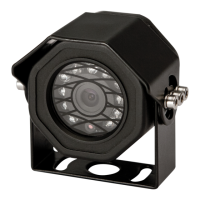
ECCO’s Gemineye™ Camera Systems are designed to provide rear of
the vehicle information that may not be available to a driver relying
solely on a vehicle’s standard rear view mirror system. A driver using a
properly installed and maintained rear view camera system in
conjunction with the standard mirror system, can be alerted to potential
safety hazards and thus take the appropriate action to prevent an
accident. This manual provides information about installation, function,
safety, maintenance, replacement parts, and warranty.

 Need help?
 General

 To Next Page