1 - 16 Right & Left Views
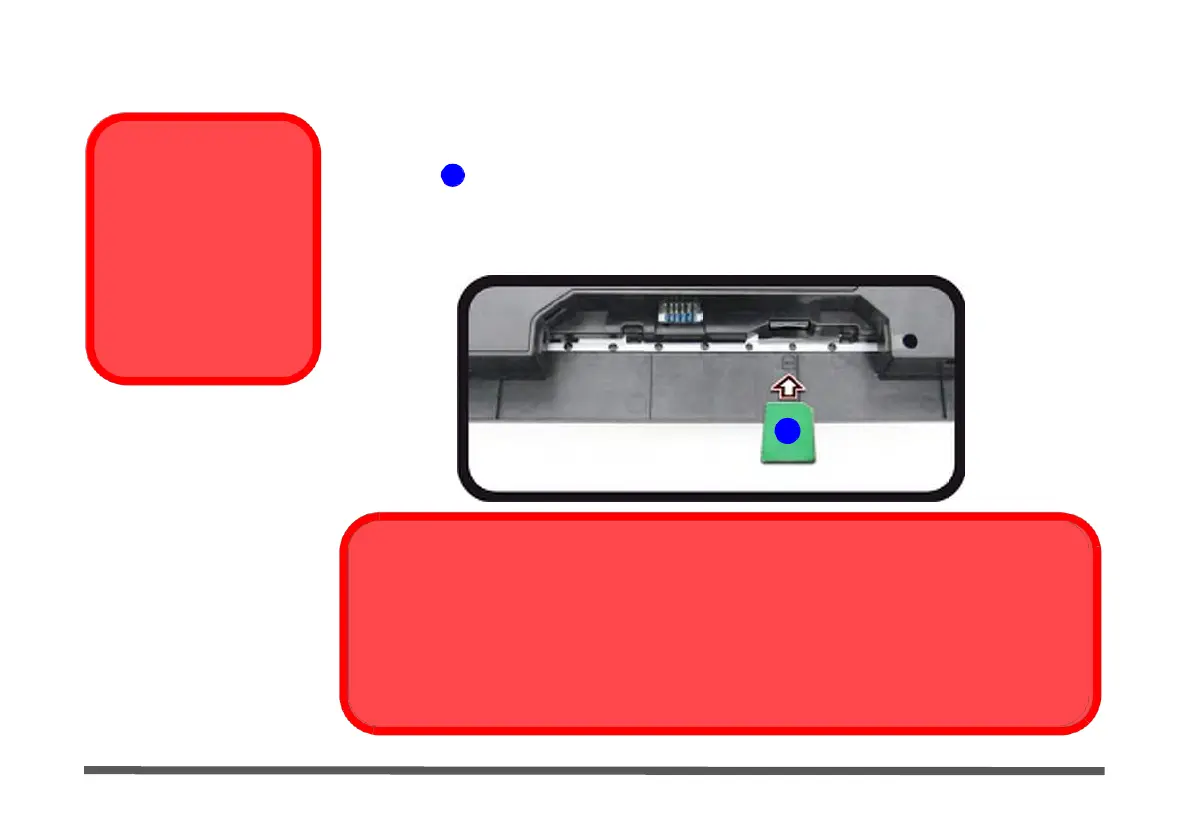
3G/4G Module USIM Card Installation
Remove the battery (see “Removing the Battery” on page 1 - 18) and insert the
USIM Card
USIM card 1 as illustrated below (pay careful attention to the orientation of the card
Orientation
Note that the USIM
card’s readable side
(with the gold-colored
contacts) should face
downwards as illustrat-
ed.
Figure 1 -
8
USIM Card Insertion
as the gold contact side of the card should face downwards) until it clicks fully into
position. To eject the card simply press it until it ejects, but do not attempt to eject
the card while connected to a 3G/4G network (see below).
1
USIM Card
Ejection
Simply press on the USIM card to eject it, however do not do this while a connection is in progress. If
you do eject the card while a 3G/4G connection is ongoing, you will need to shut down the system, re-
insert the USIM card, restart the system and then reestablish the 3G/4G connection.
If you wish to change USIM cards then you will need to shut the system down, reinsert the USIM card,
restart the system and then reestablish the 3G/4G connection.


 To Next Page
 Loading...