English
9
REMOTE CONTROLLER
Inserting the batteries
The battery door is located on the back of the remote control. Slide it down
to open it. Insert two 1.5 V AAA batteries into the battery compartment.
Observe their correct polarity as marked at the bottom of the controller.
Do not mix old and new batteries or batteries of dierent type. Replace the
battery compartment cover and slide it until the latch clicks.
ATTENTION! The manufacturer is not liable for damage caused by leaking
batteries!
Using the remote control
The remote control is used to control all the functions of your TV.
For proper operation, point the remote control at the remote control sensor
located next to the indicator light (LED) on the front panel of the TV.
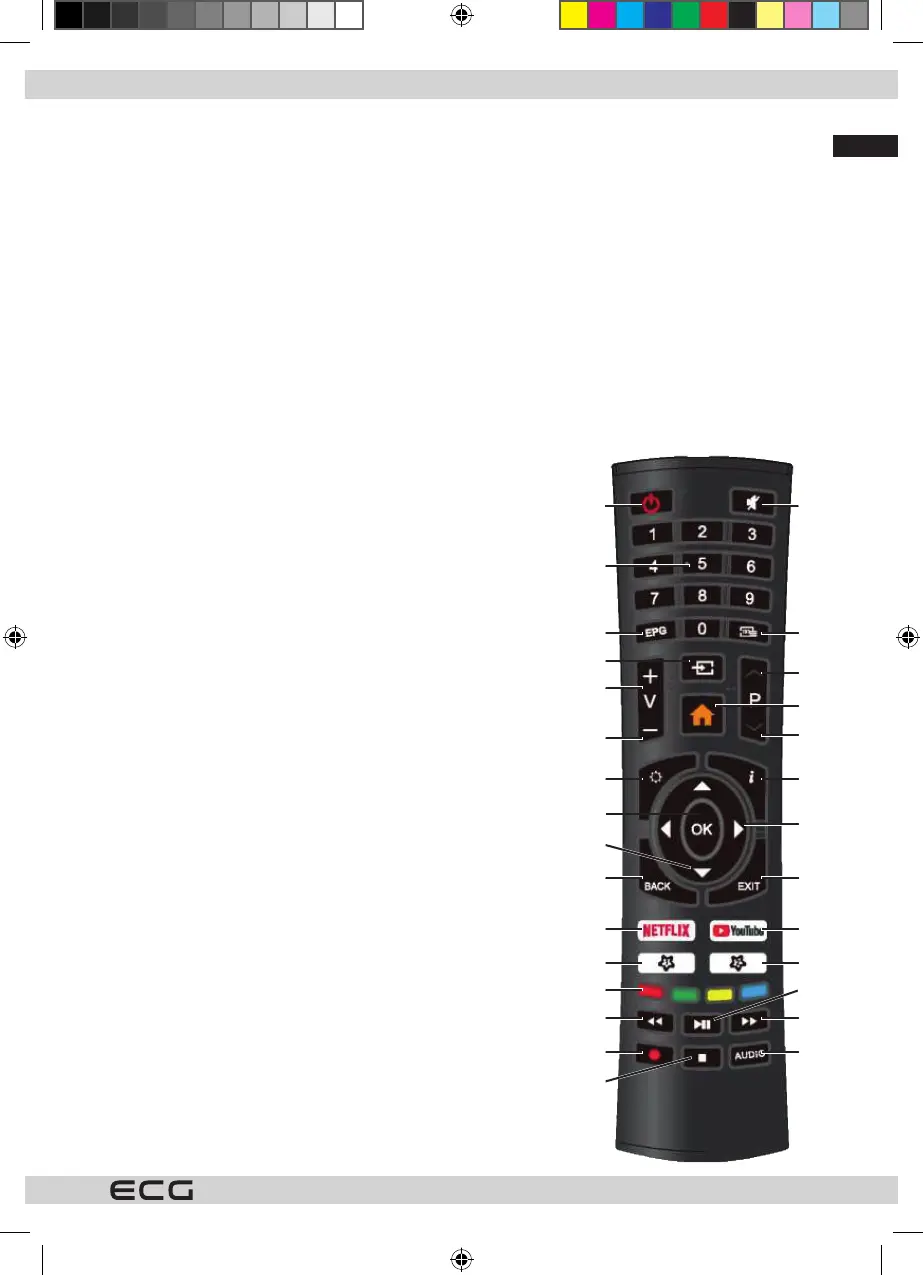
Description of remote control buttons
1 1 (power button) turns the TV on or o from or into stanby mode.
2 Mute the sound (indicated by a pictogram on the screen).
3 0–9 buttons for numeric selection (e.g. channels).
4 Electronic program guide. (EPG)
5 Teletext. (TXT)
6 Switching signal inputs.
7 Display of the home page menu.
8 Increases volume
9 Lowers volume
10 Gradual switching (stepping) TV programs upwards
11 Gradual switching (stepping) TV programs downwards.
12 Enter the system menu with TV settings
13 Displays information about the program, le, signal or input being
watched
14 Conrming selection; display of the toolbar with overview and
editing of programs
15 Cursor button to select menu items
16 Cursor button to select menu items and change their settings
17 Return to the previous menu / up a level
18 Exit a menu, end an active service or function
19 Direct access to Netix
20 Direct access to YouTube server
21 Direct access to the NetRange application store
22 Direct access to the storage medium connected to the USB input
23 Colored buttons (red, green, yellow and blue) for various functions
as described in the respective applications.
24 Fast reverse playback in USB player mode
25 Fast forward playback in USB player mode
26 Play and pause in USB player mode
27 Button without function
28 Stops playback / display in USB player mode
29 Selection of the soundtrack for multichannel broadcasts
A
C
D
H
L
Q
S
U
W
X
wk
E
M
R
T
S
Y
wl
B
F
G
I
J
K
N
O
P
wj
wj
Smart_TV_24_32_40_43_50_cz_sk_de_en.indb 9Smart_TV_24_32_40_43_50_cz_sk_de_en.indb 9 19.08.2020 17:19:1619.08.2020 17:19:16


 To Next Page