English
English
19
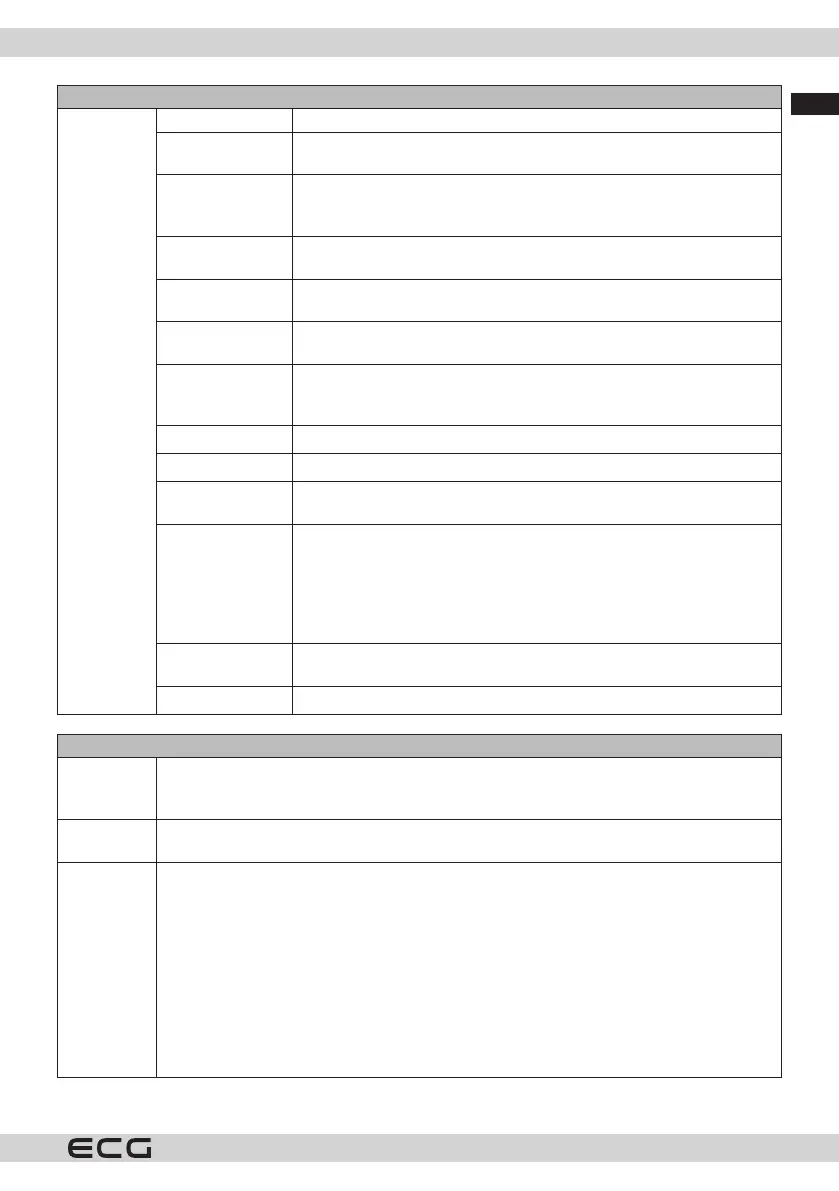
Picture menu
Advanced
Settings
Dynamic contrast The dynamic contrast ratio can be set to the desired value.
Colour
temperature
Sets the desired color temperature value. Cold, Normal, Warm and
Custom options are available.
White point This setting will be available when the Color Temperature option is
set to Custom. Increase the "warmth" or "coolness" of the image by
pressing the left or right button.
Blue extension
White Enhancement function, which makes the white colour cooler for
a brighter image. Set to On to enable.
Micro Dimming
Low, Medium, High and O options are available. When Micro Dimming
is active, the contrast for each dened zone is increased locally.
Noise reduction
Low, Medium, High and O options are available. If the signal is weak
and the image is noisy, use the Noise Reduction setting.
Movie Mode
Films are recorded at varying frame rates from normal television
programmes. Turn this feature on when watching movies to better view
fast-moving scenes.
Skin tone
Skin tone can be set between -5 and 5.
Colour shift
Sets the desired colour tone.
Colour settings
Opens the Color Tuner settings. To set the Hue, Color, and Brightness
values manually, set the Color Tuner to Enabled.
Gamut Mapping
This option can be used to adjust the range of colours displayed on the
TV screen. If set to On, the colors are set according to the source signal.
When set to O, the maximum colour capacity of the TV is used in the
standard way (recommended option).
Note: This option may not be available depending on the TV model and
features.
Full HDMI
This feature is visible while viewing from an HDMI source. You can use
this function to enhance the blacks in the image.
Reset
Sets the picture to factory defaults (except in Game mode).
Audio menu
Dolby Audio Smart, Movie, Music, Messaging and O will be available. To turn it o, set it to O.
Note: Some items in the Sound menu will be greyed out and unavailable if it is set to an
option other than O.
Surround
Sound
Spatial mode can be turned On or O.
Sound
Output
Sets the audio output preset. TV, S/PDIF, HDMI ARC, Headphone Only and Lineout options
will be available. There is no audio output except through the selected option and the
headphone jack.
If you connect an external amplier to the TV using the headphone jack, you can select
Lineout. If you have headphones connected to the TV, select Headphones only. Before using
headphones, please make sure that this menu item is set to Headphones Only. If it is set to
Lineout, the output from the headphone jack will be set to maximum and may damage your
hearing.
When HDMI ARC is selected, the CEC function is activated.
Note: Depending on the option you select, some items in the Sound menu will appear
greyed out and will not be available.



 To Next Page