English
English
38
HbbTv apps use buttons on the remote control to interact with the user. When the HbbTV application is
launched, the application controls some of the buttons. Example: numeric channel selection will not work on
a teletext application where the numbers indicate the teletext pages.
HbbTV requires AV streaming capability for the platform. There are many apps that provide VOD (video on
demand) and catch-up TV services. The user can use the start, pause, stop, forward and rewind buttons on the
remote control to work with AV content.
Note: You can enable or disable this feature from the Privacy menu in Settings > System.
TECHNICAL DATA
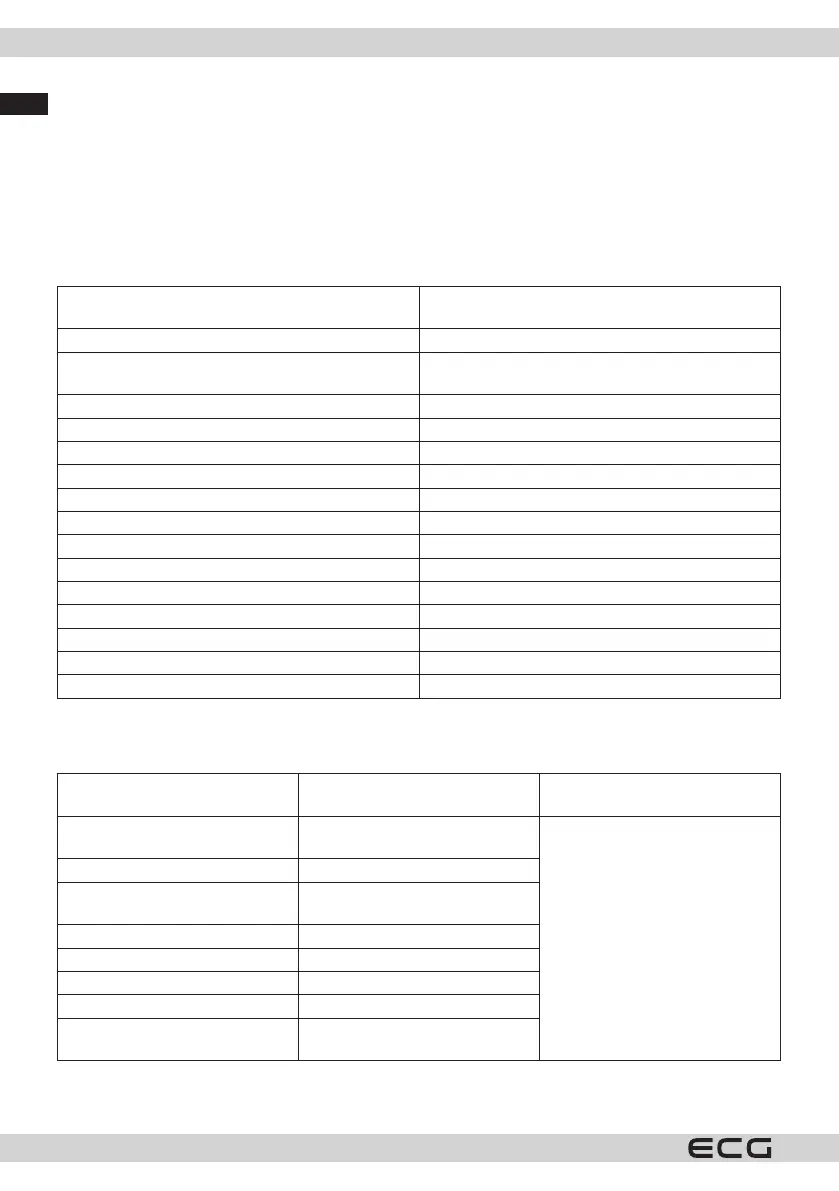
Television broadcasting PAL BG/I/DK/
SECAM BG/DK
Receiving channels VHF (BAND I/III) - UHF (BAND U) - HYPERBAND
Digital reception Fully integrated digital terrestrial-cable TV (DVB-T-
C-S) support (DVB-T2, DVB-S2 compatible)
Number of preset channels 11,000
Channel indicator Display on the screen
RF antenna input 75 ohms (unbalanced)
Operating voltage 220-240V AC, 50Hz.
Sound German + Nicam Stereo
Sound power (WRMS.) (10% THD) 2 x 8
Consumption (W) 75 W
Power consumption in Network Standby (W) < 2
TV dimensions DxLxH (with base) (mm) 250 × 973 × 623
TV dimensions DxLxH (without base) (mm) 56/82 x 973 x 567
Wall mounting dimensions (mm) VESA M4 100x100
Screen 43”
Operating temperature and humidity 0°C to 40°C, max. humidity 85%
Supported le formats for USB mode
Video le formats
Extensions Video codec
Max. resolution, frame rate and
bit rate
.mpg, .mpeg, .dat, .vob .ts, .trp,
.m2ts
MPEG1/2, H.264, VC1
H.264: 1080Px2@30fps - 50Mbps,
1080P@60fps - 50Mbps Other:
1080P@60fps - 50Mbps
.avi MPEG1/2, MPEG4, H.264, MJPEG
.mp4, .m4a, .m4v, .mov, .qt, .3gp,
.3g2, .3gpp
MPEG1/2, H.263, MPEG4, H.264
.mkv MPEG 1/2, MPEG4, H.264
v Sorenson Sp, MPEG4, H.264
.asf, .wmv MPEG4, WMV3, VC1
.webm VP9, VP8
.mp4, .mov, .3gpp, .3gp, .ts, .trp,
.tp, .mkv
HEVC/H.265



 To Next Page