EN
43
OVEN FUNCTIONS
Operating instructions
This microwave oven uses modern electronic controlling to congure cooking parameters to better meet your needs. Each press of a
button is indicated by a beep.
1. Setting the time
As soon as you plug the microwave oven into the outlet, the oven display will ash “0:00” and a beep will sound.
1) Press Clock button once to set the clock and then set the clock by turning the Time/Weight wheel.
2) Press Clock button once more to set minutes and then adjust minutes by turning the Time/Weight wheel.
3) Press the Clock button to conrm and the time set will be displayed.
Note:
The oven will not function properly without the time begin set.
Pressing the Stop/Cancel button while setting the time will automatically return you to the previous settings.
2. Cooking in the microwave oven
1) Press the Power button. The number of presses sets the microwave power from 100 % to 0 %, see table below.
2) Using the Time/Weight wheel, set the desired cooking time. The time range can be set between 1-60 minutes.
3) Conrm by pressing the Start/Quick Start button and the oven will begin cooking. After the cooking time has elapsed, you will hear
a beep and the display will show „END“.
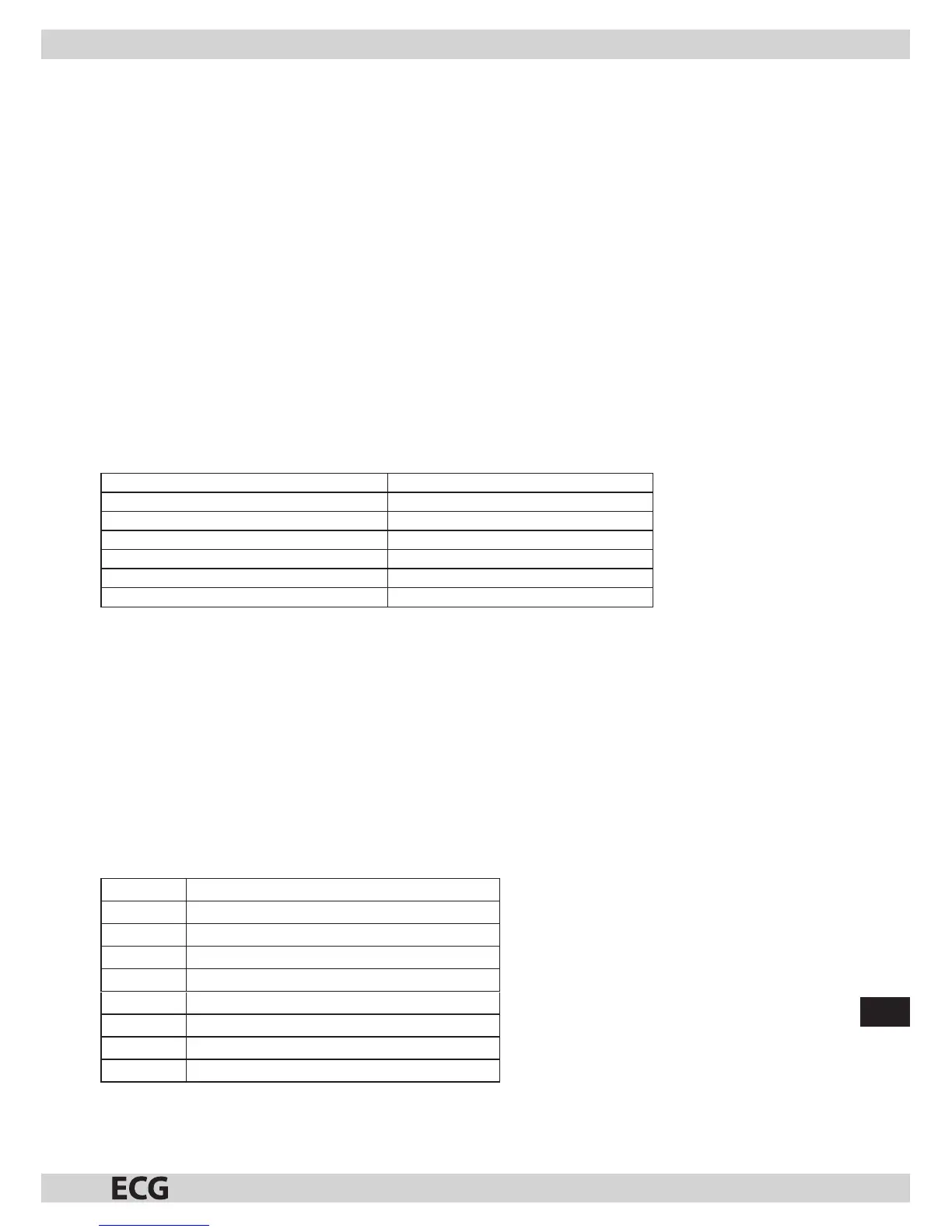
Cooking power table
Number of power button presses Cooking power
1 100%
2 80%
3 60%
4 40%
5 20%
6 0%
3. Automatic defrosting
Example: Defrosting 600g of shrimps.
1) Press Auto Defrost button, set the weight to 600 g by turning the Time/Weight wheel.
2) Start the defrosting process by pressing the Start/Quick Start button.
Defrosting time and power are set automatically by programmed weight.
The weight range of frosted foods is 100-1800 g.
4. Auto Menu
1) Choose type of food you want to reheat by pressing the Auto Cook button.
2) Using the Time/Weight wheel, set weight of the food.
3) Conrm by pressing the Start/Quick Start button and the oven will begin cooking.
Note: It is recommended to turn the food over in the middle of reheating so that the reheating is even.
Auto Menu Table
Code Type of food
1 Milk/Coee (200 ml/unit)
2 Rice (g)
3 Spaghetti (g)
4 Potatoes (230 g/unit)
5 Auto Reheat (g)
6 Fish (g)
7 Popcorn (99 g)
8 Pizza (g)
Note: Auto Reheat function depends on several factors, if the food is not suciently reheated, adjust the reheating time.


 To Next Page