EN
17
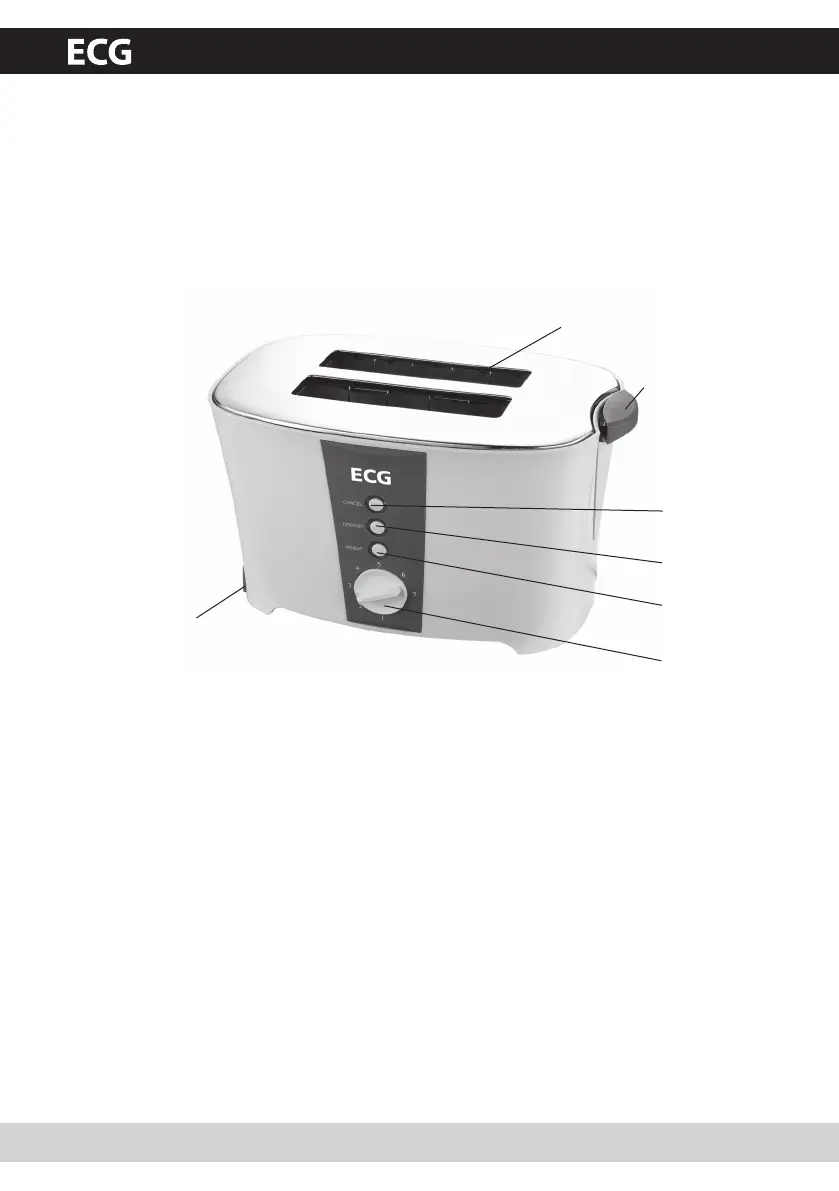
DESCRIPTION
1. On switch
2. Browning setting control
3. Cancel button
4. Defrost button
5. Reheat button
6. Toasting slots
7. Crumb tray
2
5
4
3
1
6
7
USING THE APPLIANCE
Toasting bread
1. Switch the browning setting slide to the middle position (4) after putting the plug into the outlet.
You can choose up to 7 various browning settings: 1=lightly toasted to 7=darkly toasted.
2. Insert a slice of bread and press the toasting lever all the way down so the slice of bread is inserted
into the toaster. The toasting lever will return to its initial position. The slice of bread inserted into
the toaster is automatically centred.
3. To adjust the browning setting during toasting, move the browning setting slide to another setting.
The toaster automatically switches off after the time set has lapsed. The slices of bread pop up from
the toaster.
4. For toasting frozen bread taken directly from the freezer, insert the bread into the toasting slot
and select the desired browning setting. Push down the toaster lever and then press the Defrost
button. The Defrost indicator light will go on.
5. For reheating bread that was already toasted once before, insert the bread into the toasting slot
and select the desired browning setting. Push down the toaster lever and then press the Reheat
button. The Reheat indicator light will go on.
6. Press the Cancel button if the bread is too dark or if the toasting process fails.


 To Next Page