EN
31
EMPTYING THE CONTAINER
Always turn o the vacuum cleaner before carrying out maintenance!
To ensure the maximum performance of the vacuum cleaner it is very important to regularly clean
the lter.
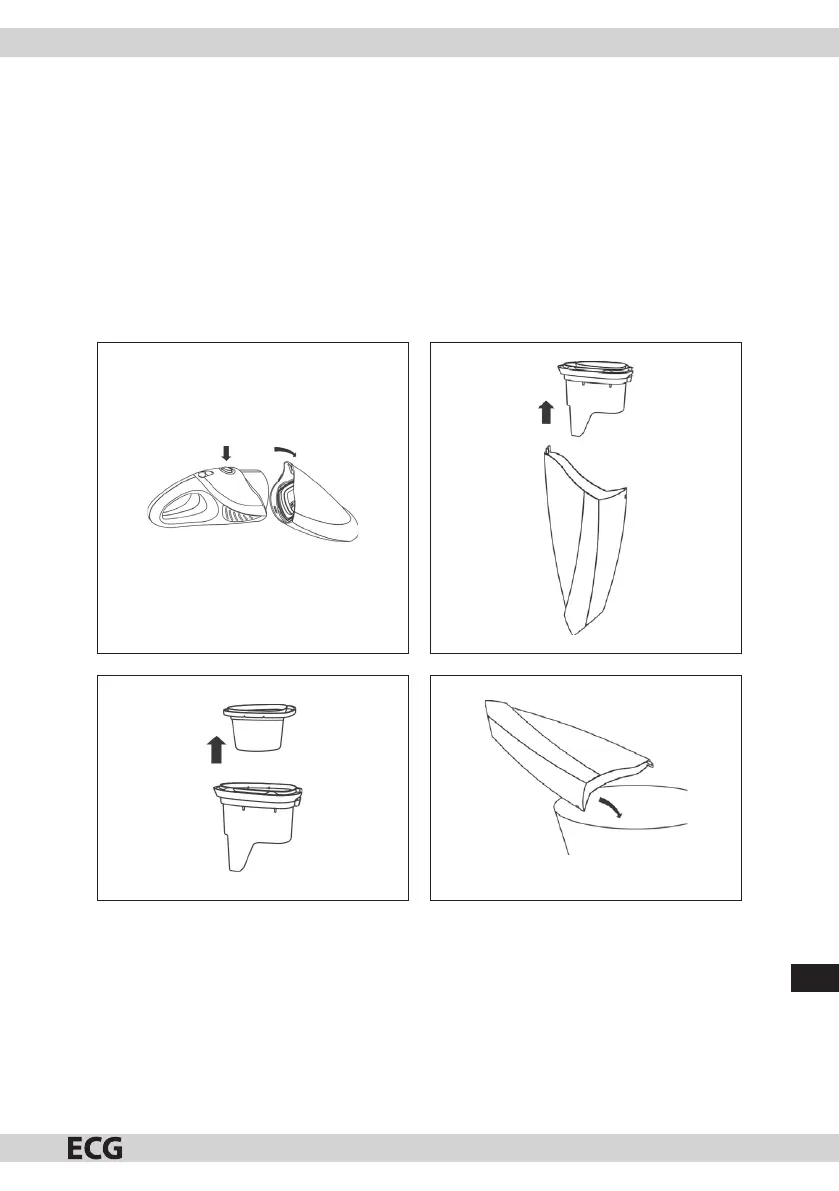
1. Press the release button and remove the dust container (pic. 3).
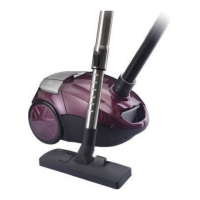
2. Take the lter out of the dust container and empty the container (pics. 4 and 5).
3. Clean out the dust and dirt from the lter, a more thorough cleaning of the lter is carried out by washing
it with cold or lukewarm water. To clean the dust container use a damp cloth.
4. Allow the container and lter to dry properly before inserting it back into the dust container. Keep the
lter su ciently far away from heat sources, e.g. heating, otherwise it may be damaged.
5. Insert the lter back into the container and check that it is correctly and rmly inserted (pic 6).
6. Put the container back by pushing until you hear a click.
Pic. 3
Pic. 5
Pic. 4
Pic. 6
CLEANING
Before cleaning the base always disconnect the power plug from the power socket.
To clean the vacuum cleaner base use a soft and lightly dampened cloth with a few drops of a cleaning agent.
Never use solvents or any other abrasive cleaning agents.
Never submerge the recharge base or the vacuum cleaner under water or in another liquid and do not
leave it under running water.


 To Next Page