Need help?
Do you have a question about the Echelon IzoT U60 DIN and is the answer not in the manual?
Describes Echelon's OpenLDV Network Driver and Software Development Kit (SDK).
Identifies cabling and junction boxes for twisted pair IzoT and LON networks.
Describes using the IzoT SDK, Router, and device connection.
Provides contact info for technical support and training.
Introduces the IzoT U60 DIN Interface and its hardware.
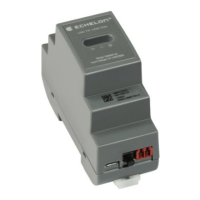
Details the physical size and enclosure specifications.
Explains the function of the status LEDs on the U60 DIN.
Describes network and USB connectors on U60 DIN models.
Guides on connecting U60 DIN to IzoT Router for more channels.
Instructions for U60 DIN with Windows and OpenLDV 5.
Details the installation of the OpenLDV 5 driver.
How LONWORKS Interfaces application manages USB interface identification.
Outlines steps to test and reset the U60 DIN Network Interface.
Introduces the Linux U60 driver and its network capabilities.
Details compiling, building, and installing the Linux U60 driver.
Explains creating and using the U60 Linux network device.
Describes the U60's operation in Layer 5 and Layer 2 modes.
How to select protocol mode via OpenLDV or Linux driver.
Details LLP code packet structure, features, and data handling.
Describes structure of data messages in Layer 5 mode.
Describes structure of data messages in Layer 2 mode.
Explains format for extended data messages.
Explains Type Code values 0-2.
Explains Type Code values 3-4.
Describes Ack bit usage for transfers and traffic reduction.
Lists code packets that imply acknowledgment or require response.
Lists U60 commands (niCOMM, niNETMGMT, etc.) and direction.
Lists additional U60 commands (niFLUSH, niMODE_L5, etc.) and direction.
Details Product Query command, response values, and TXID.
Introduces troubleshooting for OpenLDV and U60 interface.
Steps to resolve U60 detection issues by the computer.
Solutions when U60 interface is listed but unresponsive to tests.
Steps if U60 interface is not found in LONWORKS application.
Addresses issues when Windows cannot install the driver.
 General
| Category | Recording Equipment |
|---|---|
| Enclosure Rating | IP20 |
| Connectivity | Ethernet |
| Input Voltage | 24V AC/DC |
| Certifications | CE, UL, FCC |
| Operating Temperature | -40°C to +70°C (-40°F to +158°F) |

 To Next Page