5
MONITORS I MON-7033-AHD-FB
User Manual
E: echomaster@aampglobal-eu.com
W: EchomasterEurope.co.uk
T: +44(0)1420 487110
MONITORS I MON-7033-AHD-FB
Menu Options
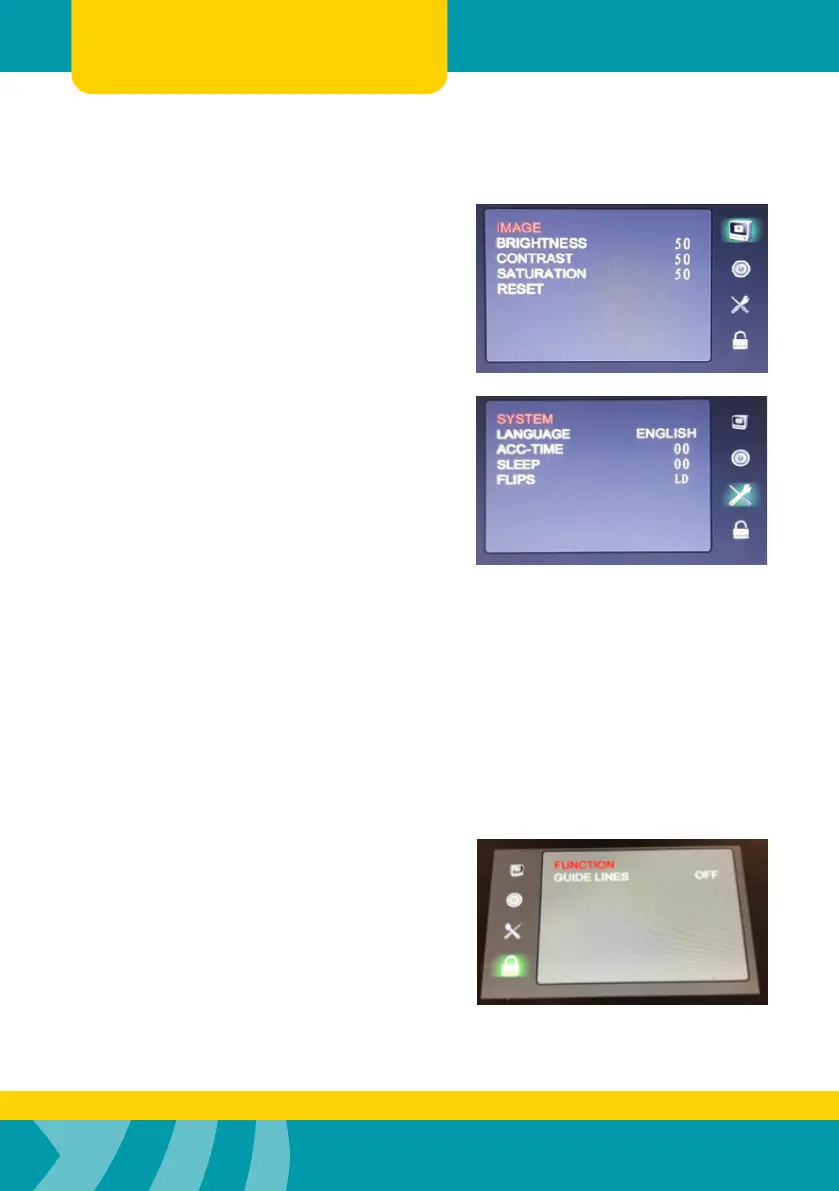
IMAGE
u BRIGHTNESS Values 0~100
u CONTRAST Values 0~100
u SATURATION Values 0~100
u RESET Use the p button
to reset the values
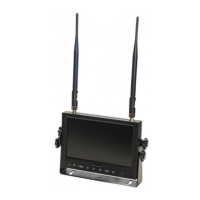
SYSTEM
u LANGUAGE - ENGLISH, SPANISH,
FRENCH, ITALIAN, GERMAN are available.
u ACC-TIME - This is used to adjust the
amount of time a trigger view remains active
once the trigger signal is removed.
Range: 0~15 seconds.
u SLEEP
This feature will turn the monitor ‘OFF’ after
a set time. You can select times between 10
& 100 minutes.
u FLIPS
This feature allows you to ip the image
displayed for each channel independently.
Options that are available are, horizontally,
vertically, mirrored and non-mirrored.
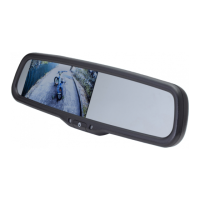
FUNCTION
u GUIDE LINES
This feature allows you to switch ‘ON’ or ‘OFF’
the parking guidelines. If switched ‘ON’
these will overlay guide lines on the displayed
image for each channel it has been selected for.


 To Next Page