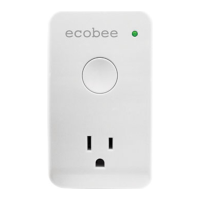
3-Year Limited Warranty
ecobee warrants that for a period of three (3) years from the date of purchase by the consumer
(“Customer”), the ecobee Smart Plug (the“Product”) shall be free of defects in materials and workmanship
under normal use and service. During the warranty period, ecobee shall, at its option, repair or replace any
defective products, at no charge. Any replacement and/or repaired device are warranted for the remainder
of the original warranty or ninety (90) days, whichever is longer.
If the product is defective, contact the supplier from whom the product was purchased to obtain an
equivalent replacement product, provided the supplier determines that the returned Product is defective
and the Customer is otherwise eligible to receive a replacement product;
This warranty does not cover removal or reinstallation costs and shall not apply if the damages were found
to be caused by something other than defects in materials or workmanship, including without limitation,
if the product:
• was operated/stored in abnormal use or maintenance conditions;
•
alteration in writing;
• was subject to abuse, neglect, electrical fault, improper handling, accident or acts of nature;
• was installed improperly.
ecobee’s sole responsibility shall be to repair or replace the Product within the terms stated above. ECOBEE
SHALL NOT BE LIABLE FOR ANY LOSS OR DAMAGE OF ANY KIND, INCLUDING ANY SPECIAL, INCIDENTAL OR
CONSEQUENTIAL DAMAGES RESULTING, DIRECTLY OR INDIRECTLY, FROM ANY BREACH OF ANY WARRANTY,
EXPRESS OR IMPLIED, OR ANY OTHER FAILURE OF THIS PRODUCT. Some US states and Canadian provinces
do not allow the exclusion or limitation of incidental or consequential damages, so the above limitation
or exclusion may not apply to you. ecobee’s responsibility for malfunctions and defects in materials and
workmanship is limited to repair and replacement as set forth in this warranty statement. All express and
implied warranties for the product, including but not limited to any implied warranties and conditions of
warranty. No warranties, whether express or implied, will apply after the limited warranty period has
expired. Some US states and Canadian provinces do not allow limitations on how long an implied warranty
lasts, so this limitation may not apply. ecobee neither assumes responsibility for nor authorizes any other
person purporting to act on its behalf to modify or to change this warranty, nor to assume for it any other
other rights which vary from jurisdiction to jurisdiction. If you have any questions regarding this warranty,
please write ecobee Customer Service, 477 Richmond Street West, #210, Toronto, Ontario M5V 3E7,
Canada or contact customer service at 1-877-9-ecobee (32-6233)
Electrical
Operating Voltage: 110–240 VAC
Max. Load Current: 15A @ 120VAC / 10A @ 240VAC
Environmental
For Indoor Use only
Temperature: 32°F-122°F (0-50°C)
Humidity: 5-85%RH (non-condensing)
Dimensions: 2.5" H x 4.2" L x 2.2" W
(64mm W x 109mm L x 57mm H)
1. From the Home screen, press More.
2. Press Settings, Home Automation and select the device you wish
to remove. Press Remove to reset the Smart plug and remove it
from your network.
3.
outlet and pressing the switch for 10 seconds.
EB-SPLG-01
Wireless
Frequency: 2.4GHz
Maximum Transmit Power: 100mW
Maximum Range: 100ft (30m)
Contains module FCC ID DI2CT EM2506
Accessing Plugs From Smart Thermostat
Congratulations! You are now ready to use and program your plugs.
To access your plugs:
1. From the Home screen, press More.
2. Press the Plugs button. The screen shows if the plug is currently on or
3.
how long you would like it to stay in this new state.
Managing Your Smart Plug Energy Usage
You can monitor and reduce your energy usage by using the Smart Thermostat’s
energy management functions.
To access energy management functions:
1. From the Home screen, press More.
2. Press the Plugs button.
3. Select More beside the plug you want to manage.
4. Select an option:
Program
to follow your thermostat schedule. If you choose to follow the
thermostat schedule, you only need to determine if you want the
thermostat schedule, the plugs will follow suit.
Reports — You can view the hourly, daily and weekly electricity
consumption of each plug.
Settings — You can rename the plug, change the default temporary
your Utility issues a demand response event (note that you must be
registered as part of a Utility program to receive demand response
events).
Accessing Plugs From Personal Web Portal
You can control your Smart Plugs from your ecobee personal Web Portal. When
you log into your web portal you will see a new Smart Plugs tab at the top of the
page. It has 4 widgets: Plug Reports, Status, Preferences and Program.
With these widgets, you have total control of your Smart Plug from anywhere with
an Internet connection. If you have any questions, click the ? mark in the top right-
hand corner of the widget.
Plugs During Vacation Event
When you schedule a vacation event on your ecobee Smart Thermostat, you can
program, so that lights come on at the usual time, or program them to stay on or
return their regular program.
Settings).
Removing a Smart Plug From Your Network
ecobee® is a registered trade-mark of ecobee, inc. ZigBee® is a registered trade-mark of
the ZigBee Alliance and is used with permission. © 2011 ecobee, inc. All rights reserved.
Identifying or Renaming a Smart Plug
By default, the name of a Smart Plug includes the last 4-digits of its MAC address.
The Smart Plug’s MAC address is printed on the back of the plug. You may want to
give your Smart Plug a more descriptive name (such as “Living Room”) in order to
make it easier to identify.
You can rename a Smart Plug from its Settings menu on the Smart Thermostat or
from the Preferences widget in your ecobee personal Web Portal.
Note: There is a special name, “$router”, that optimizes the Smart Plug to work with
an Internet router. If the Smart Thermostat cannot communicate with the ecobee web
then turn it back on. This feature can be used to automatically reboot a router in order


 To Previous Page
 Loading...