EST Install and User Guide
07 2022
4 of 29
ECOER INC.
Manufacturer reserves the right to change specifications or designs without notice.
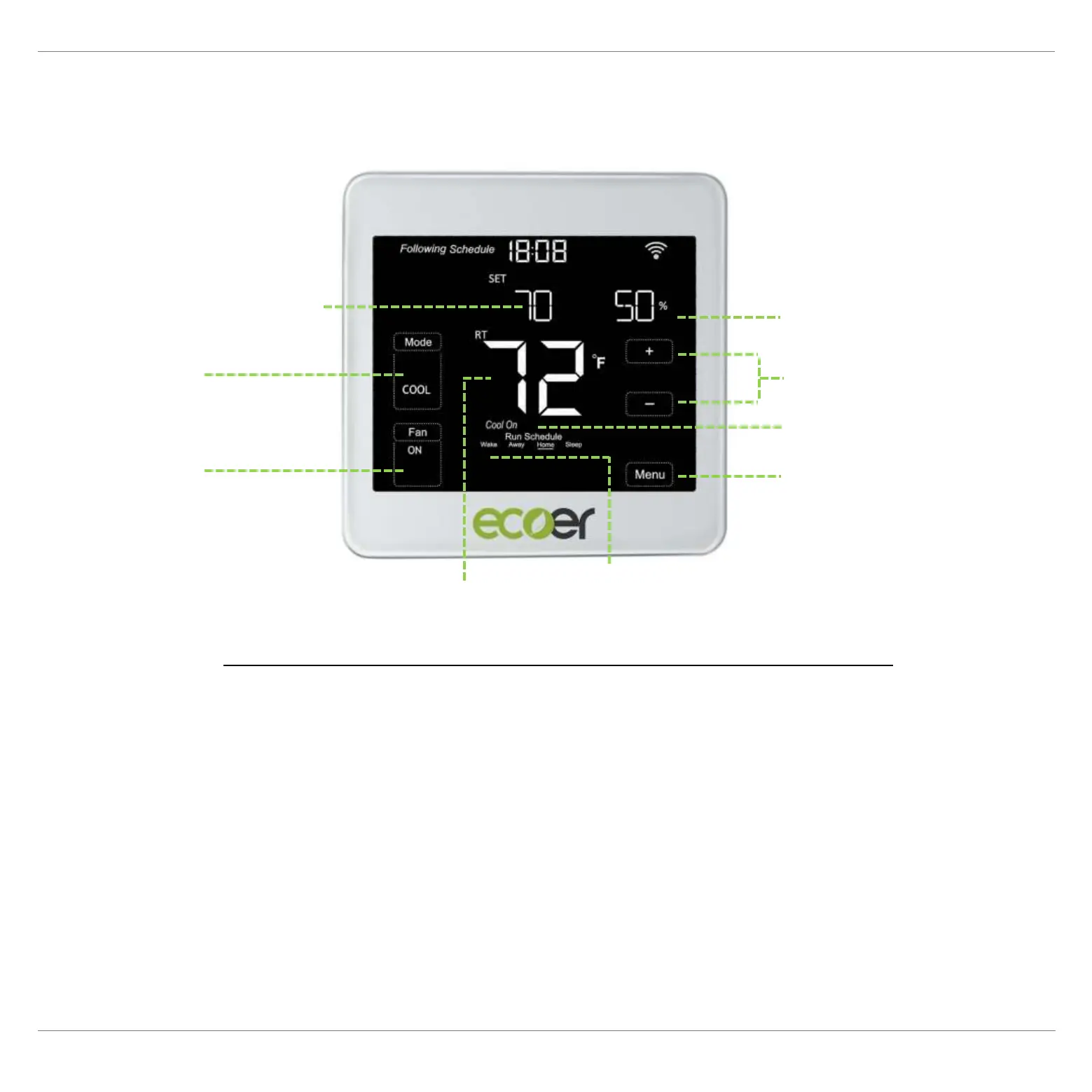
Mode: Select system mode OFF, COOL, AUTO, HEAT and EM HEAT.
Fan: AUTO Runs based on working condition of the compressor.
ON: Keeps running all the time.
CIRC: Circulate the air of indoor periodically when AC/HP stops.
Adjust temperature: Touch + or – icon to set your desired temperature.
Menu (Back Button): Time setting, working mode, Wi-Fi, Schedule and other settings.
Thermostat Layout
Desired temperature
Indoor humidity
Adjust temperature
Indoor temperature *
Working status
Fan
(ON/AUTO/CIRC)
Mode
Menu
(Back button)
Schedule
Wake/Away/Home/Sleep
* The screen will wake up by touching the indoor temperature area


 To Next Page