EST Install and User Guide
07 2022
8 of 29
ECOER INC.
Manufacturer reserves the right to change specifications or designs without notice.
3.2 Working Mode
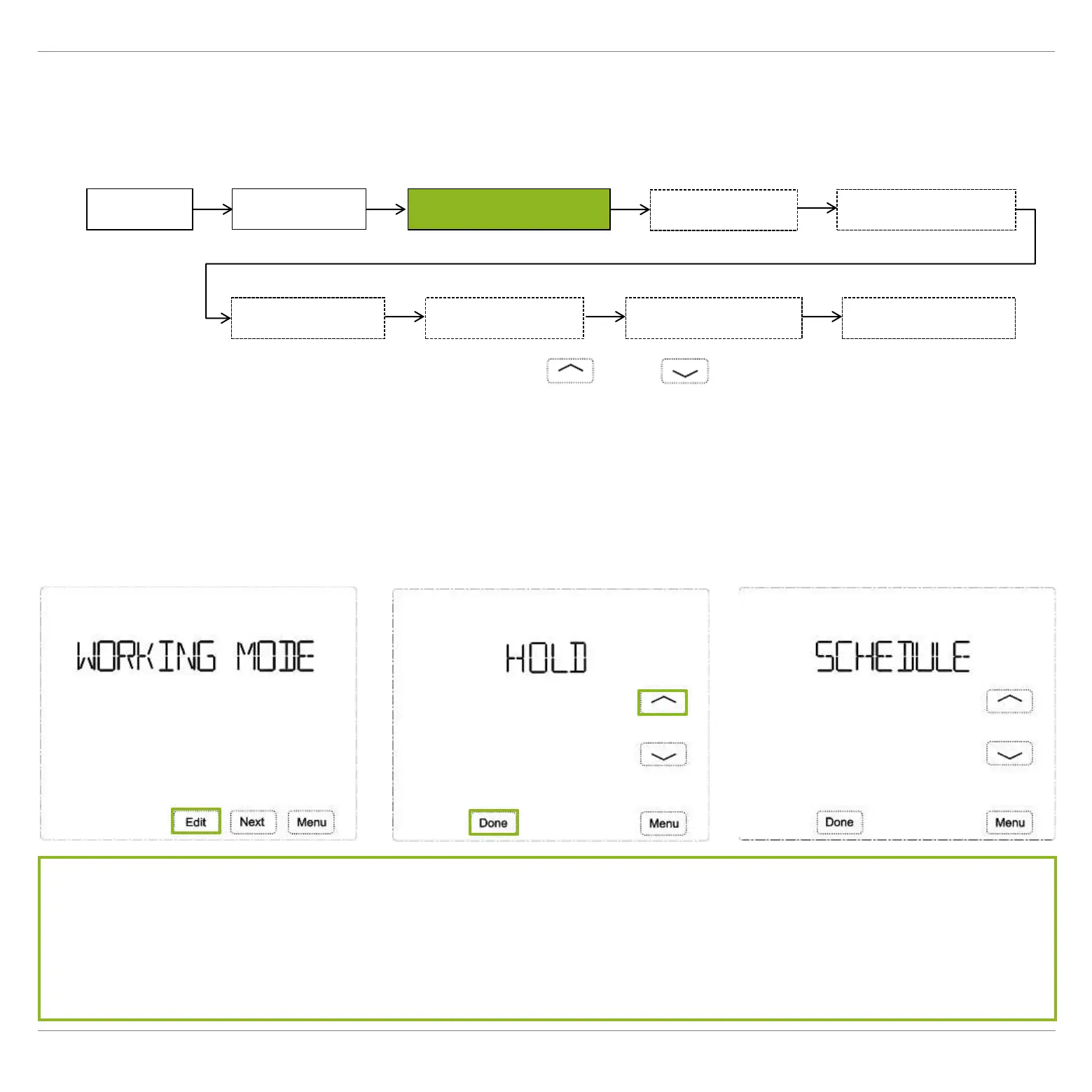
I. Press Menu at homepage, the screen will display DATE TIME, then press Next to WORKING
MODE.
II. Press Edit, the screen displays HOLD, press or to switch between HOLD and
SCHEDULE.
III. Press Done to save.
NOTE: Press Menu during setting will exit you directly and nothing will be saved.
Menu
DATE TIME
WORKING MODE
SCHEDULE SET
USER SETUP FACTORY SET CLEAN SCREEN RESET
SETUP WIFI
HOLD: Keeps the desired temperature set all the time.
SCHEDULE: Follows 7-day plan (4 time periods per day) *
* To activate the scheduling, it’s required to choose AUTO at thermostat homepage or on Ecoer
Home App control interface.


 To Next Page