3
You can integrate the smart plug into any Matter ecosystems for easy control.
Smart home app
Pairing with the Matter System
1.
Open a Matter-supported smart home app, such as Apple Home and Alexa.
2.
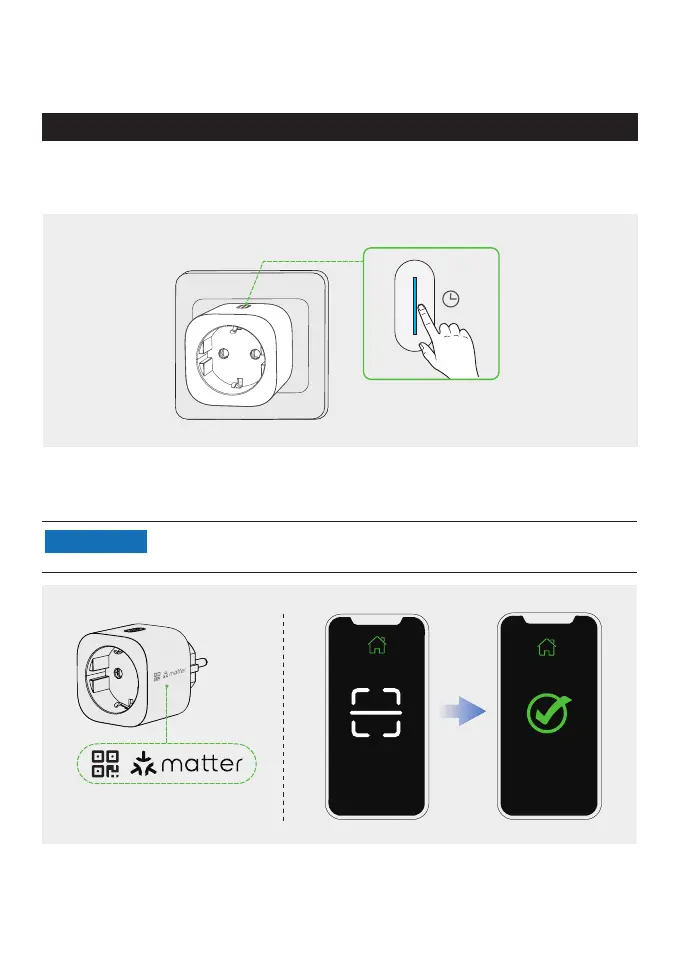
Press and hold the button until the indicator blinks blue. The smart plug switches to the
pairing mode.
3.
Use the smart home app to scan the Matter code, a dedicated label, on the smart plug.
Follow the instructions in the app to complete pairing.
•
For pairing, it is better to select the same Wi-Fi when using the EcoFlow
app and smart home app.
NOTICE
You can turn on or off the smart plug in the app, or control it with your voice
(depending on the feature of the smart home app).
Smart home app
Pair with the first Matter system
3s


 To Next Page