4
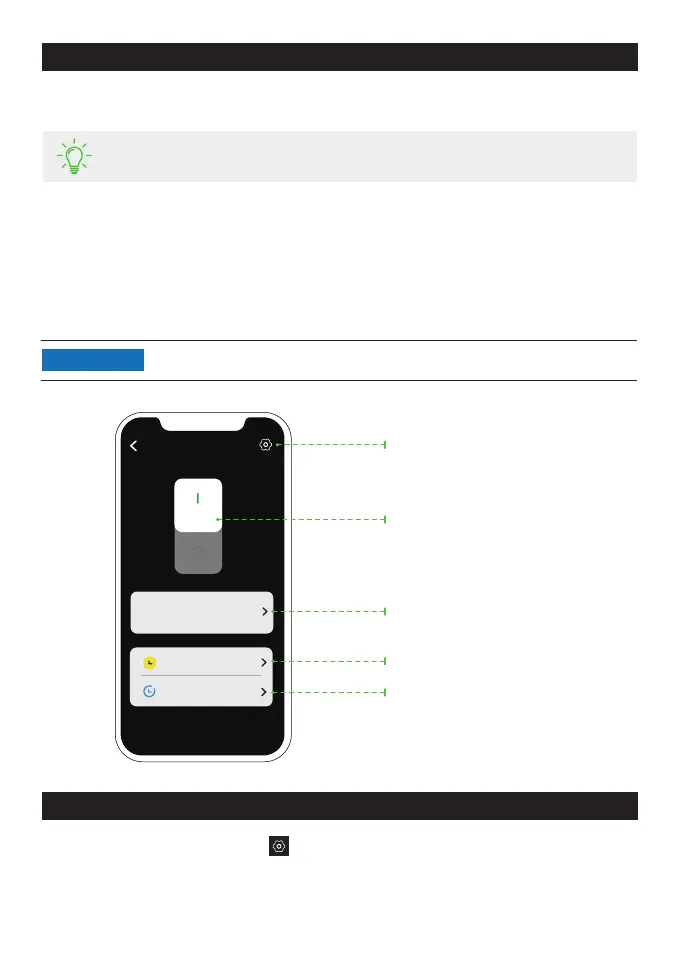
View duration of use and current
power in real time, and today's
power consumption.
Tap to view historical data by day,
week, month, or year.
Set timing for turning on or off the
smart plug.
Tap to enter the "Setting" page of your
smart plug.
Switch on or off
Set the delay time for turning on or
off the smart plug.
Page of your Smart Plug in the EcoFlow App
Press and hold the button for 10s to reset the smart plug.
Factory Reset
•
The figures are for reference only, please refer to the actual app interface.
NOTICE
Smart Plug
-- min
-- kw
2.3 kWh
Duration
of use
Now Today
Timing
Delay
On the page of your Smart Plug, tap > "Firmware" to check the firmware version or update
the firmware.
Firmware update
•
Refer to the user manual of your smart home app for details.
Pair with the second Matter system
1.
Find the setup code in the paired smart home app.
2.
Open the second Matter system and enter the setup code.


 To Next Page