The device described in the manual is an OSCILLATING PEDESTAL FAN WITH REMOTE CONTROL, specifically Model# FS40-3ER (Item#: CT4001R).
Function Description
This fan is designed to provide air circulation with the added convenience of remote control operation. It features an oscillating function to distribute air across a wider area and offers different wind types for varied comfort. The fan can be set to run for specific durations using a timer function.
Important Technical Specifications
- Model Number: FS40-3ER
- Item Number: CT4001R
- Power Supply: Operates under rated voltage. Users must ensure the power supply voltage matches the fan's nameplate.
- Remote Control: Uses "AAA" manganese or alkaline batteries (not included). Rechargeable batteries are not recommended. The remote control has an effective range of approximately 16 feet (5 meters) and an angle of 30 degrees from the control panel.
- Speed Settings: Offers LOW, MEDIUM, and HIGH speed settings.
- Timer Settings: Can be set for 1, 2, or 4 hours.
- Wind Modes: Includes NORMAL WIND and NATURAL WIND.
- NORMAL WIND: Delivers air constantly at low, medium, or high speed.
- NATURAL WIND: Simulates natural wind with variations from strong to weak or vice-versa.
- Adjustments:
- Tilt Adjustment: The grilles can be pushed to adjust the airflow upward or downward.
- Height Adjustment: The internal pole can be adjusted to the desired height by loosening and tightening a height adjustment ring.
- Oscillation Control: An oscillation knob on top of the motor housing controls the fan's oscillation. Pushing it down enables oscillation, and pulling it up stops it.
Usage Features
The fan can be operated via both a control panel on the unit and a remote control.
Control Panel Features:
- SPEED ON/OFF KEY: Cycles through ON (LOW), MEDIUM, HIGH, OFF, and back to ON (LOW) with repeated presses.
- TIMER KEY: Sets the timer for 1, 2, or 4 hours. If not pressed, the fan runs continuously. Timer LEDs illuminate only when in timer mode.
Remote Control Features:
- POWER KEY: Turns the fan ON or OFF.
- TIMER KEY: Functions identically to the control panel's timer key.
- SPEED KEY: Changes fan speed in the sequence of LOW, MEDIUM, HIGH, and back to LOW.
- MODE KEY: Changes the wind type between NORMAL and NATURAL.
Assembly Instructions:
- Round Base and Column Unit Assembly:
- Unpack the base and pole assembly.
- Loosen the fastening bolt from the bottom of the pole assembly.
- Insert the pole assembly into the round base and tighten the fastening bolt.
- Loosen and remove the height adjustment ring from the extension pole, then adjust the internal pole to the desired height. The internal pole is located inside the extension pole and can be pulled out if not immediately visible.
- Loosen the thumb screw on the bottom of the head unit, attach the head unit to the column, and tighten the thumb screw in alignment with the groove on the internal pole.
- Guard & Fan Blade Assembly:
- Remove the plastic nut by turning it counterclockwise.
- Place the rear guard onto the head unit, ensuring the handle is upward.
- Screw on the plastic nut clockwise to secure the fan guard.
- Discard the small plastic sleeve on the motor shaft.
- Install the fan blade onto the motor shaft, ensuring the blade slot fits the retaining pin.
- Attach the spinner to the motor shaft by turning it counterclockwise to secure the fan blade.
- Mount the front guard and join both guards together using the clips.
Safety Rules:
- Do not use with solid-state speed control devices.
- Do not use in a window; rain can create an electrical hazard.
- Avoid operating near water or immersing the unit, plug, or cord in liquids.
- Do not leave the fan running unattended.
- Ensure the voltage matches the nameplate.
- The remote control is specific to this fan.
- Connect power only after full assembly.
- Never insert fingers, pencils, or other objects through the grille.
- Unplug before cleaning, moving, or removing grilles.
- Ensure the fan is on a stable surface to prevent tipping.
Maintenance Features
The fan requires minimal maintenance and should be serviced by qualified personnel if repairs are needed.
General Maintenance:
- Before cleaning or assembling, ensure the fan is unplugged.
- Keep vents at the rear of the motor housing free from dust and fluff to ensure adequate air circulation. Do not use a vacuum cleaner on plugged-in vents. Do not disassemble the fan to remove fluff.
- Wipe exterior parts with a soft cloth dampened with a mild detergent.
- Avoid abrasive detergents, solvents (gasoline, thinner, bending), or any liquids that could scratch the surface.
- Do not allow water or any other liquid to enter the motor housing or interior parts.
Cleaning Instructions:
- Unplug the power cord from the outlet.
- Clean plastic parts with mild soap and a damp cloth or sponge. Rinse thoroughly to remove soap film.
- Prevent water or other liquids from entering the motor.
- Dry all parts completely before reassembling and reconnecting to the power source.
Warranty and Support:
- Includes a limited warranty of one (1) year against defects in workmanship and materials, excluding wear or breakage from abuse or improper use.
- For warranty claims or service, contact support@ecohouzng.com or visit http://www.ecohouzng.com/.
- Proof of purchase (sales receipt) is required for all warranty claims.

 Need help?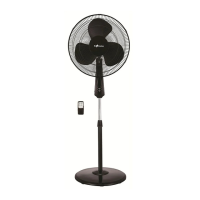

 To Next Page
 General