SYNAIRG
TM
PURIFICATION
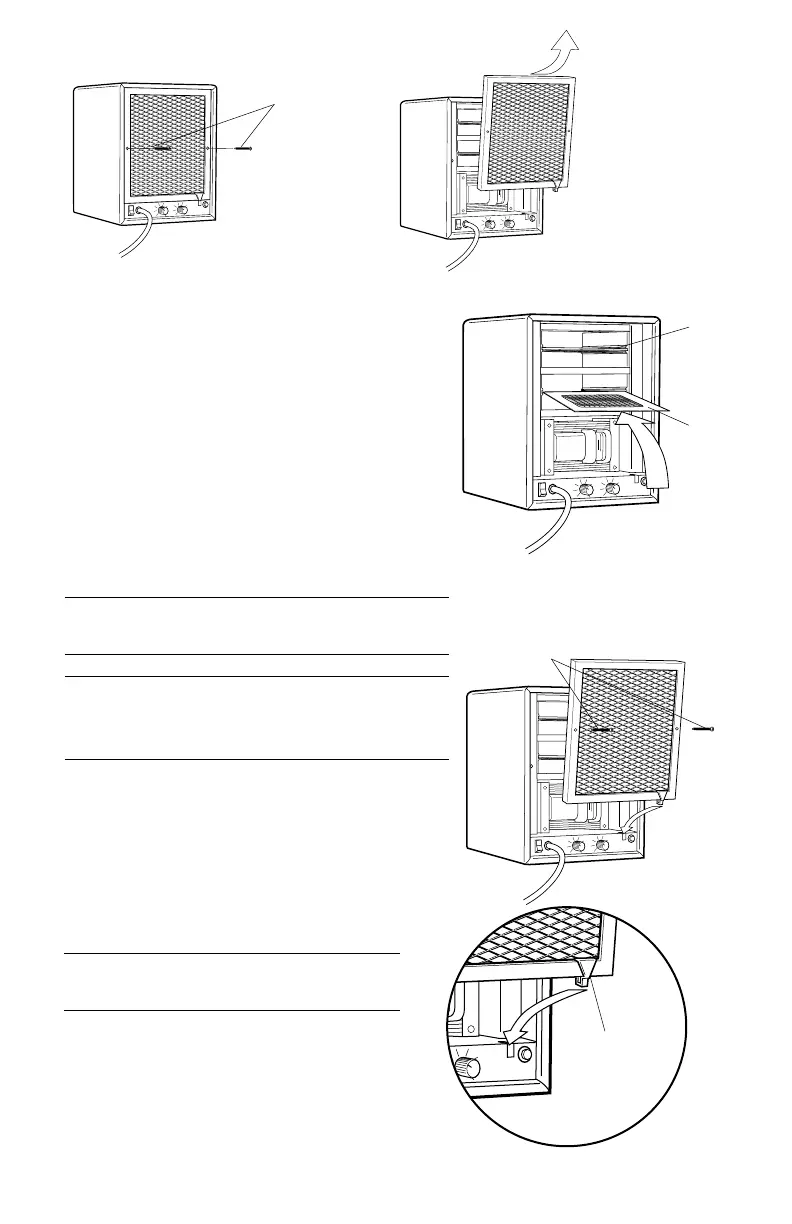
PLATE INSTALLATION
The Flair utilizes two SynAirG
TM
purification
plates.
1. Remove (2) phillips-head screws.
(220/240 volt only)
2. Remove the rear lint screen.
3. Fully insert the SynAirG
TM
purification plates
(A & B) between the guides until they stop.
4. Re-install lint screen as shown below.
NOTE: The Flair’s SynAirG
TM
purification plates
should only be used in the Flair system.
CAUTION: Do not operate unit without one or
both SynAirG
TM
purification plate(s) properly
installed. Doing so may void your warranty.
5
LINT SCREEN INSTALLATION
1. Always install bottom of lint screen first.
2. The white lint screen tab should depress
the safety switch arm towards the
bottom of the unit.
Unit will not operate if safety switch is not
depressed.
3. Fit top of lint screen into cabinet.
4. Secure with (2) phillips-head screws.
(220/240 volt only)
a
b
1
2
3
Lint
Screen
Tab
2 Screws
(220 & 240 volt only)
2 Screws
(220 & 240 volt only)





 To Next Page