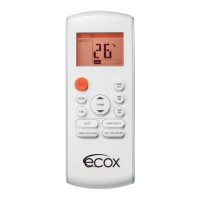
This document is an owner's manual for an ECOX remote controller for split air conditioners, specifically model EADM. It provides information on the remote controller's specifications, features, operation, and maintenance.
Function Description
The ECOX EADM remote controller is designed to operate split air conditioners, allowing users to control various functions such as operating mode, temperature, fan speed, and timer settings. It provides a convenient way to manage the air conditioner's performance from a distance.
Important Technical Specifications
- Model: The manual covers models R51M/C(E), R51M/BG(E), R51M2/C(E), R51A/C(E), R51M3/C(E), R51M3/BG(E), R51M8/C(E), R51M9/C(E), and R51M/BGE-IN.
- Rated Voltage: 3.0V (uses two LR03 AAA batteries).
- Transmission Distance: 8 meters.
- Environment: Operates within a temperature range of -5°C to 60°C (23°F to 140°F).
- Operating Mode: Supports AUTO, COOL, DRY, HEAT, and FAN modes.
- Timer Function: Allows setting the timer for up to 24 hours.
- Display: Features a full-function LCD (Liquid Crystal Display) for clear indication of settings.
Usage Features
The remote controller offers a comprehensive set of buttons and indicators for intuitive operation:
Remote Controller Buttons:
- TEMP Button (▲/▼): Used to increase (▲) or decrease (▼) the indoor temperature setting.
- MODE Selection Button: Cycles through operation modes: AUTO, COOL, DRY, HEAT, and FAN.
- SWING Button: Activates/deactivates the auto swing feature of the horizontal louver.
- RESET Button: Returns all current settings to their initial configuration.
- AIR DIRECTION Button: Changes the swing angle of the louver. Repeated presses cycle through different angles.
- LED DISPLAY Button: Clears the digital display in the air conditioner. Not available for units without LED display window.
- FAN SPEED Button: Adjusts fan speed through AUTO, LOW, MED, or HIGH settings.
- ON/OFF Button: Starts or stops the air conditioner operation.
- TIMER ON Button: Sets the auto-on time in 30-minute increments (up to 10 hours) and then 1-hour increments (up to 24 hours).
- SLEEP Button: Activates the Energy-Saving operation mode. Can be used in COOL, HEAT, and AUTO modes.
- TIMER OFF Button: Sets the auto-off time in 30-minute increments (up to 10 hours) and then 1-hour increments (up to 24 hours).
- LOCK Button: Locks all current settings, preventing accidental changes. Press again to unlock.
- TURBO Button: Activates/cancels the Turbo function for rapid cooling or heating.
- CLEAN AIR Button (on some models): Activates the ionizer or Plasma Dust Collector for air purification.
Display Panel Indicators:
- DIGITAL DISPLAY: Shows the set temperature and, if in TIMER mode, displays ON and OFF settings for the TIMER.
- TRANSMISSION INDICATOR: Flashes once when the remote controller transmits signals to the indoor unit.
- ON/OFF INDICATOR: Symbol appears when the unit is turned on, disappears when turned off.
- OPERATION MODE INDICATOR: Shows the current operating mode (AUTO, COOL, DRY, HEAT, FAN).
- LOCK INDICATOR: Displayed when the LOCK button is pushed.
- TIMER DISPLAY INDICATOR: Shows the settings of the TIMER ON and TIMER OFF.
- FAN SPEED INDICATOR: Displays the selected fan speed (Auto, Low, Med, High).
Operating Modes:
- Automatic Operation (AUTO): The air conditioner automatically chooses the mode (COOL, FAN, or HEAT) based on the room temperature and the set temperature.
- Cool / Heat Operation (COOL/HEAT): Allows manual selection of COOL or HEAT mode. The user sets the desired temperature and fan speed.
- Dry Operation (DRY): Reduces humidity in the room. The air conditioner operates at low fan speed.
- Timer Operation: Allows setting the air conditioner to turn on (TIMER ON) or off (TIMER OFF) automatically at a desired time. The timer can be set for up to 24 hours.
Maintenance Features
Install/Replace Batteries:
- The remote controller uses two alkaline dry batteries (LR03X2).
- To install, slide the back cover of the battery compartment and insert the batteries according to the positive (+) and negative (-) indications.
- To replace old batteries, use the same method as mentioned above.
Important Notes on Batteries:
- When replacing batteries, do not use old batteries or different types of batteries together. This may cause malfunction.
- If the remote controller is not used for several weeks, remove the batteries to prevent battery leakage from damaging the remote controller.
- The average battery life under normal use is about 6 months.
- Replace batteries when there is no answering beep from the indoor unit or if the transmission indicator light fails to light.
- Dispose of batteries as unsorted municipal waste. Collection of such waste separately for special treatment is necessary.
Warnings:
- Ensure there are no obstacles between the remote controller and the receiver of the indoor unit.
- Keep the remote controller away from any liquids.
- Protect the remote controller from high temperatures and exposure to radiation.
- Keep the indoor receiver out of direct sunlight or the air conditioner may malfunction.
- Keep the remote controller away from EMI (Electro-Magnetic Interference) supplied by other household appliances.

 Need help?
 General

 To Next Page