iii
TT
TT
T
ABLE OF CONTENTSABLE OF CONTENTS
ABLE OF CONTENTSABLE OF CONTENTS
ABLE OF CONTENTS
Preface i
Chapter 1 1
Introducing the Motherboard 1
Introduction............................................................................................1
Features...................................................................................................2
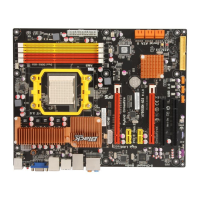
Motherboard Components...................................................................4
Chapter 2
77
77
7
Installing the Motherboard 7
Safety Precautions...............................................................................7
Choosing a Computer Case..................................................................7
Installing the Motherboard in a Case.................................................7
Checking Jumper Settings....................................................................8
Setting Jumpers...............................................................................8
Checking Jumper Settings...............................................................9
Jumper Settings...............................................................................9
Installing Hardware..........................................................................10
Installing the Processor.................................................................10
Installing Memory Modules...........................................................11
Expansion Slots.............................................................................15
Connecting Optional Devices........................................................17
Installing a Hard Disk Drive/CD-ROM/SATA Hard Drive............20
Installing a Floppy Diskette Drive................................................21
Connecting I/O Devices......................................................................22
Connecting Case Components..........................................................23
Front Panel Header.......................................................................25
Chapter 3
27 27
27 27
27
Using BIOS 27
About the Setup Utility....................................................................27
The Standard Configuration..........................................................27
Entering the Setup Utility...............................................................27
Resetting the Default CMOS Values...............................................28
Using BIOS............................................................................................29
Standard CMOS Setup..................................................................30
Advanced Setup.............................................................................32
Advanced Chipset Setup................................................................34


 To Next Page