COPYRIGHT©EDECOA, ALL RIGHT RESERVED,PSW-EU-V2.7------English
4 / 15
6) Battery cable
7) Remote controller and connecting cable (Need purchasing)
8)
Spare fuse (Some models)
SELECT THE INSTALLATION LOCATION
You need to choose the appropriate location to install the inverter to ensure that the inverter can work properly and efficiently.
Basic requirement:
Inverter protection class IP65, indoor and outdoor environment can be used.
The mounting method and position must be suitable for the weight and dimensions of the inverter, please refer to
the technical data.
When the inverter is running, the temperature of the chassis and the heat sink can be high. Do not install the
inverter in locations where it can be inadvertently touched.
Do not install the inverter in areas where flammable or explosive materials are stored.
3.2 Installation environment requirements
Ambient temperature should be kept below 50 ℃, to ensure the best inverter operating conditions, and extend its
service life.
Inverter should be installed in a well-ventilated environment to ensure good heat dissipation.
Avoid to place the inverter in direct sunlight, rain and snow. This can extend the life of the inverter. It is advisable to
select the installation site with occlusion but ensure proper air-circulation.
3.3 Install carrier requirements
The inverter mounting carrier must be fire-resistant.
Do not install the inverter on flammable building materials.
Please ensure that the mounting surface is strong enough to meet the load requirements of the inverter.
In a residential area, do not install the inverter on a plasterboard wall or similar sound-poor wall to avoid interference
with the noise in the work area.
3.4
Installation requirements:
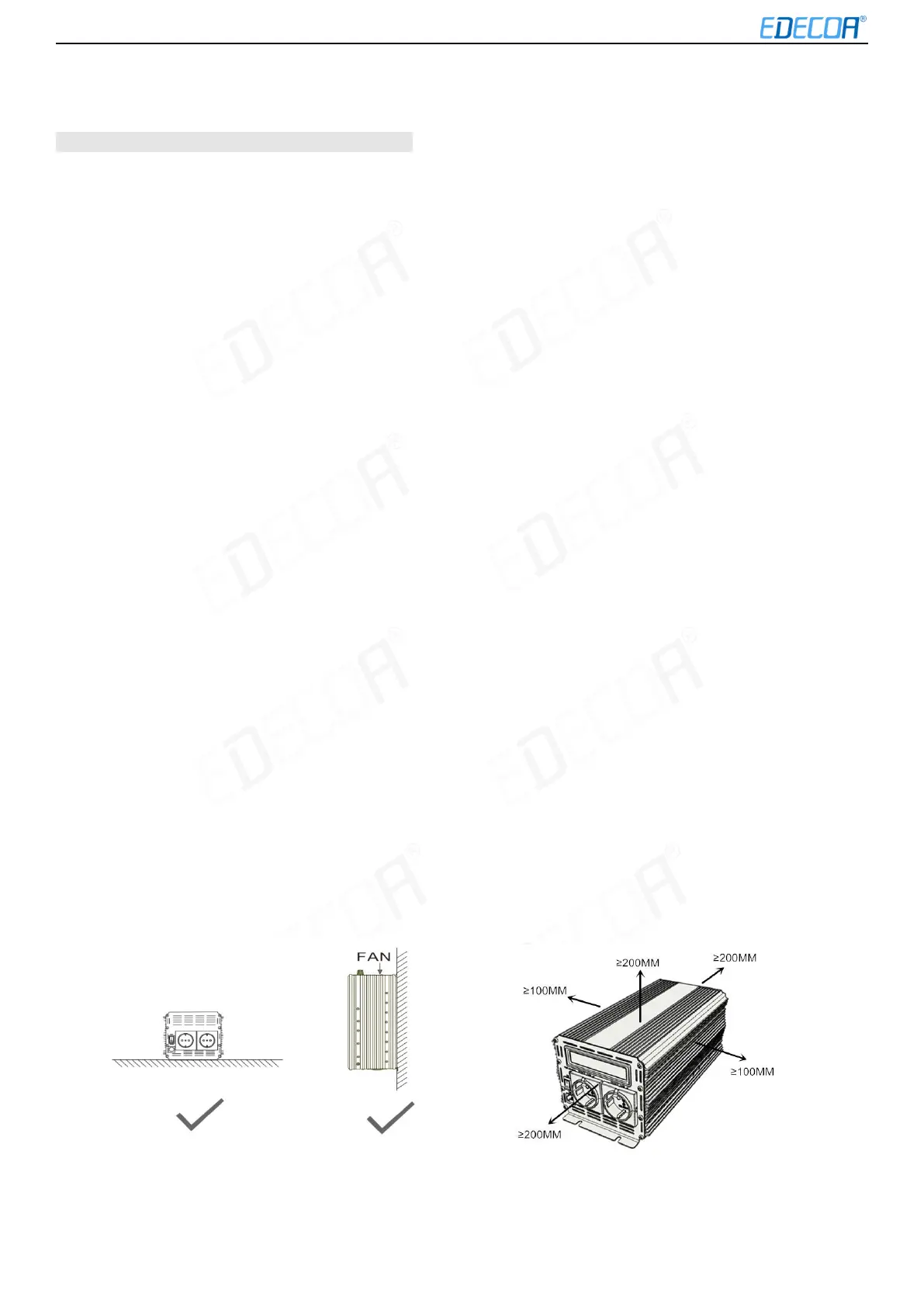
Install it vertically or tilt it back up to 15 ° to allow the fan to cool the machine.
Figure 3-1Proper installation Figure 3-2Installation Space (Unit: mm)



 To Next Page