8
5. STARTING UP
- NEVER POWER THE WATER HEATER WITHOUT WATER: Models with an electric heating
element will be certainly damaged.
- Fill the tank completely. Before powering up, open the hot water taps, drain the pipes in order to
empty the air.
- Check the tightness of the tubes and of the flange seal under the plastic cover. In case of leaking
tighten moderately. Check the operating of the hydraulic components and of the safety valve.
- Turn the power on. After 15 to 30 minutes, depending of the capacity of the device, the water
should drip from the drain. This is normal and due to the expansion of water. Check connection
leaks and seal. During heating and according to the water quality, hot water tanks can make a
bubbling noise. This noise is normal and does not indicate any defect of the unit.
- If you see a continuous release of steam or hot water from the drain or when opening a faucet,
turn off immediately the power to the water heater and call a professional
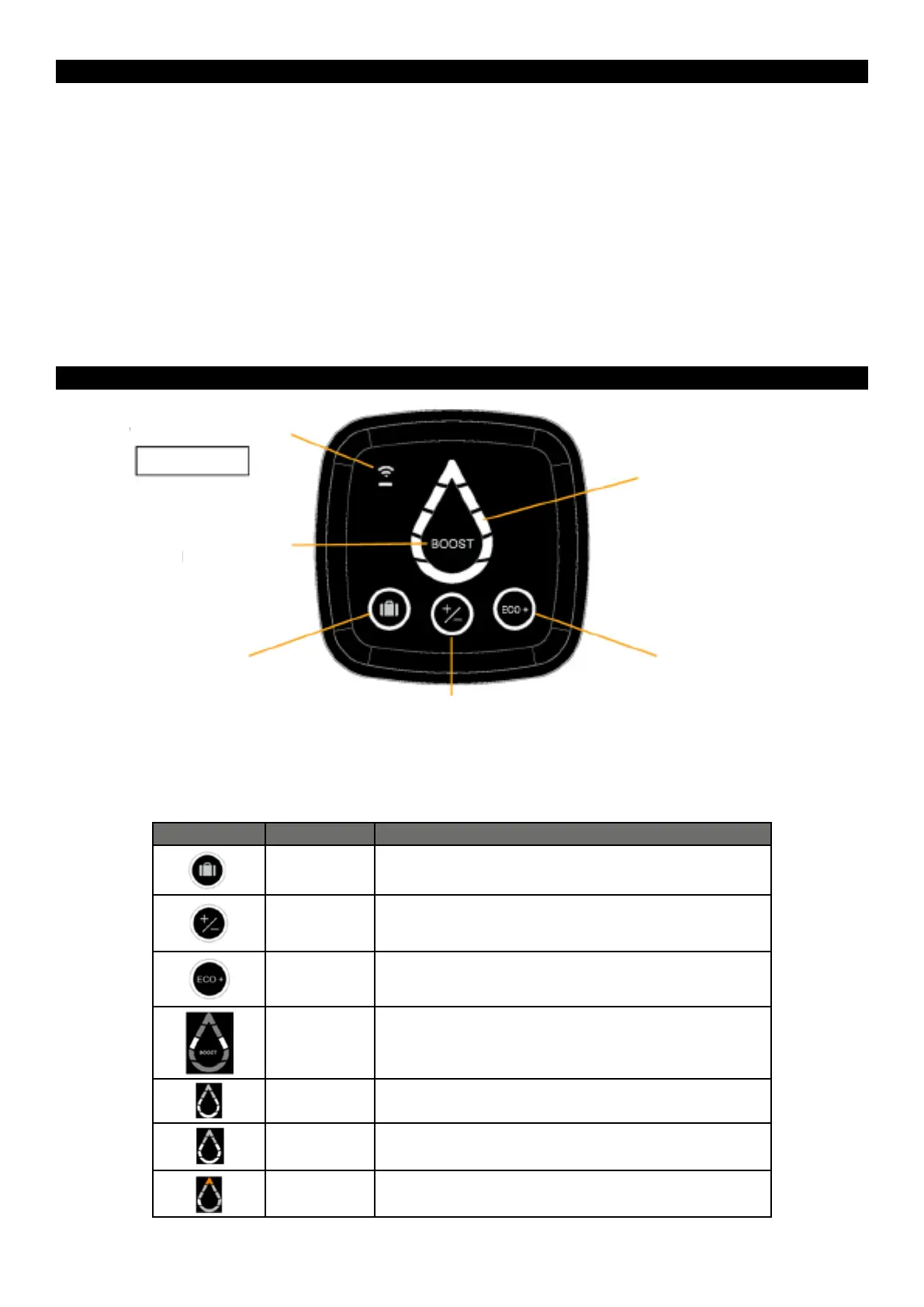
6. CONTROL INTERFACE HMI
- PLEASE NOTE: If the device is inactive for 60 seconds, the LED indicators of the Water Drop will
be turned off and the circle around the selected mode will start to blink on the HMI. The indication on
the Water Drop will be reactivated if a button is used or if the appliance is heating.
Indicators Indicator status Meaning
On
The BOOST function is deactivated.
On Manual mode selected:
To set the temperature of hot water, touch the buttons until the desired
On ECO+ mode activated; the water heater starts reading consumption
to adapt to the needs of the user and ensure energy savings, whilst
guaranteeing comfort levels.
Segments of
the water drop
lightening one
after another
The BOOST function is activated by a quick press. Activating the
BOOST mode sets the heating temperature to the Max level for 1
hour. After the heating is done, the appliance will return to the mode
that was selected before activation of the BOOST mode.
On The appliance is not heating water. The lit segments show the quantity
of available hot water.
Blinking The appliance is heating water to reach the required level. The fixed lit
segments show the quantity of available hot water.
Top segment is lit
in orange
The appliance is malfunctioning. Check the list of error codes below or
contact the after-sales services
WIFI Touch button
WIFI models only
BOOST Mode
Absence mode
Manual Mode
ECO+ mode
Available hot water and
heating indicators (Water


 To Next Page