FL X FR X CE X SL X
SR X
SW X
Engaged
Center Delay
-- ms
Surr Delay
15 ms
DOLBY D COMP
11
English
12
English
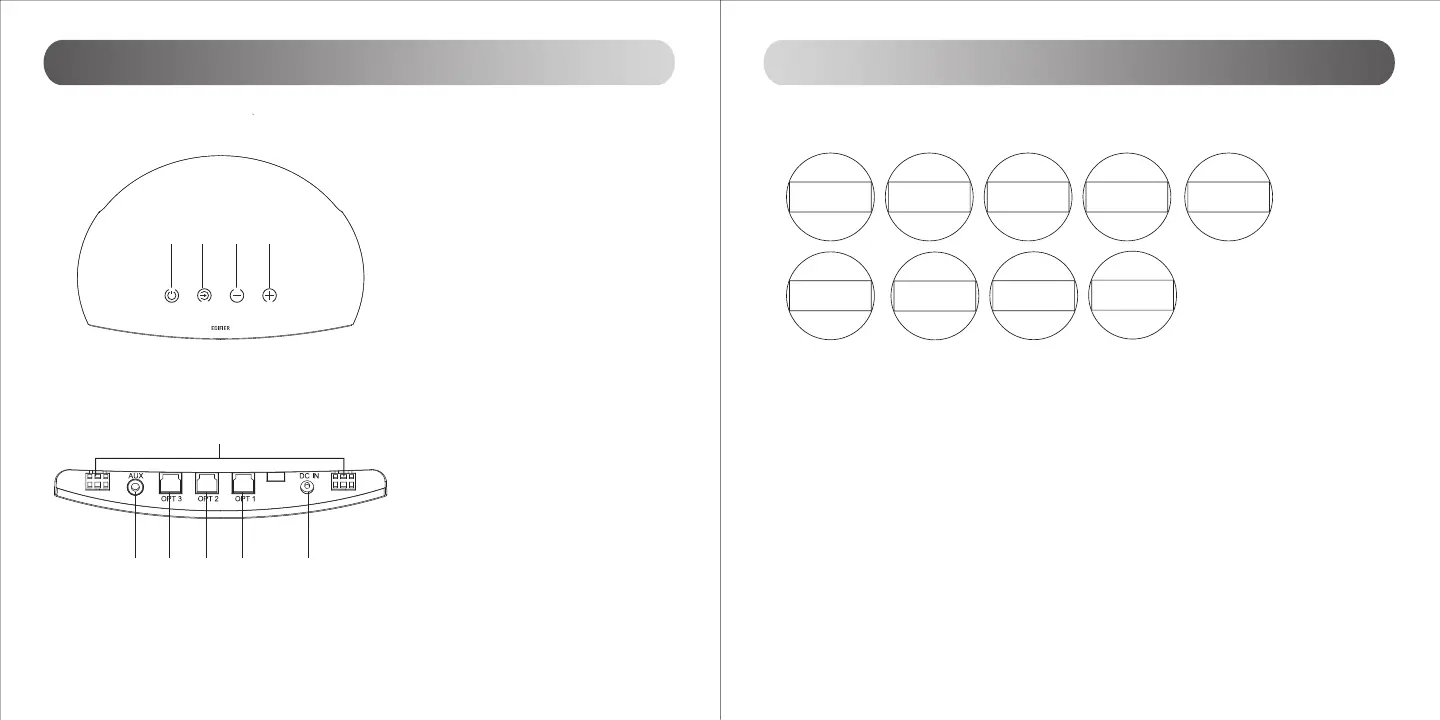
⑤ DC power socket
⑥ OPT 1 input connector
⑦ OPT 2 input connector
⑧ OPT 3 input connector
⑨ AUX input connector
⑩ Front left and right speaker outputs
① ON / Standby
To Switch On: Press once
To Standby: Press and hold for approx. 2
seconds
② Audio source selector
OPT1 / OPT2 / OPT3 / AUX
③ Master volume down
④ Master volume up
① ② ③
④
⑤
⑥⑧⑨ ⑦
⑩
Center speaker Control panel
Center speaker Rear panel
Illustrations Operational guide
FL > FR > CE > SL > SR > SW > DOLBY D COMP > Center Delay > Surr Delay
Channel volume adjustment
Press “FUNC” key repetitively to access setting menus of “FL [VOL] >FR [VOL] >CE [VOL] >SL [VOL] >SR
[VOL] >SW [VOL]”
Compression On/O
This menu is available only when DOLBY D COMP decoder is engaged, press the
◄
/
►
key to enable and disable
compression function.
Center Delay
This menu is available only when Dolby Pro Logic II is enabled, and it is only used to check the current delay
status for center channel, since the setting is fixed according to Dolby Pro Logic II based on different play mode,
the
◄
/
►
key is of no use for this menu.
Surround Delay
This menu comes available only when Dolby Pro Logic II is enabled. Use the
◄
/
►
ey to adjust the delay setting,
5 milliseconds every step. The setting has upper and lower limits based on different Dolby Pro Logic II play
mode.


 To Next Page